Need help?
Do you have a question about the ColorKey PartyBar FX and is the answer not in the manual?
Lists all items included in the package, ensuring users know what to expect.
Crucial safety guidelines for operating the equipment to prevent damage and injury.
Emphasizes caution with power cables, voltage, and professional servicing.
Guidelines for environmentally responsible disposal of electrical equipment.
Instructions on connecting the extension pole to the tripod stand for height adjustment.
Explains how to use MENU, UP, DOWN, and ENTER buttons to navigate the device's display.
Details on making DMX cables and the importance of line termination to avoid erratic behavior.
Explains the conversion and correct cable usage for 5-pin XLR connectors with 3-pin DMX lines.
Guide to setting DMX start addresses and linking multiple fixtures.
Details on necessary cable types and connectors for DMX communication.
Visual guide to setting DMX address and channel modes via the menu.
Overview of Auto, Sound Active, Sound Sensitivity, and Slave modes available in the menu.
How to operate the fixture in DMX control mode for detailed customization.
Details on channel assignments and functions within the 3-channel DMX mode.
Details on channel assignments and functions within the 12-channel DMX mode.
Instructions for selecting and controlling Auto modes and speed settings.
How to access and configure Sound Active modes and adjust sound sensitivity.
Guide to configuring master and slave units for synchronized operation.
Detailed explanation of each button's function on the IR remote control.
Provides solutions for common problems like no DMX control or fixture not responding to sound.
Details on power supply, light sources, consumption, control methods, and physical dimensions.
Information on the product warranty and how to obtain support or updates.
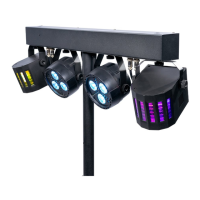
The ColorKey PartyBar FX (CKU-3030) is a versatile lighting fixture designed for creative lighting applications, suitable for professional use. It offers a range of control options and lighting effects, making it ideal for parties, events, and other performance settings.
The PartyBar FX is an all-in-one lighting solution that combines multiple light sources to create dynamic visual displays. It features LED RGB Pars, an RGBW LED Derby-style FX Light, a Red/Green Laser, and a UV+Strobe Combo. This combination allows for a wide array of lighting effects, from vibrant color washes and intricate patterns to energetic strobes and atmospheric UV glows. The fixture can operate in various modes, including DMX512 control, Auto Run, Master/Slave, and Sound Active, providing flexibility for different event requirements and user preferences.
The PartyBar FX comes with a 6-foot lighting stand and a carrying bag for easy transportation and setup. The tripod stand features a removable extension pole, which allows for a compact footprint when disassembled, enhancing portability. When assembled with the extension pole, the stand can elevate the fixtures over 7 feet, providing broader coverage. To install the extension pole, users simply press the connection collar on the tripod, insert the extension pole, push down until both poles are fully seated, and then tighten the knob. A crucial safety recommendation is to weigh down the base of the tripod with counterweights or sandbags, especially when the stand is set to its maximum height, to prevent accidental tipping and potential damage or injury. The maximum weight capacity for the stand is 10 lbs.
The device offers multiple ways to control its functions:
Display Operation: The fixture is equipped with an LED display and four buttons: MENU, UP, DOWN, and ENTER.
DMX Control: For advanced control, the PartyBar FX supports DMX512 protocol. Users can set a DMX start address (from 1-512) to control the fixture via a universal DMX controller. The device can operate in either 3-channel or 12-channel DMX modes, offering varying levels of control over individual light sources and effects. Proper DMX cabling, including the use of 3-pin XLR connectors (or 5-pin XLR with adaptors), is essential for reliable data transmission. Line termination with a 120 Ohm 1/4 W resistor between pins 2 and 3 of the last fixture in a DMX chain is recommended for longer cable runs to reduce signal problems and interference.
Auto Mode: The fixture has several pre-programmed auto modes (AT01 to AT09) that combine different lighting elements (Pars, Derby, Laser, Strobe, UV) and effects (color change). Users can select an auto mode and adjust its speed (S.01 to S.32) via the display.
Sound Active Mode: In this mode, the lights react to music or ambient sound. There are multiple sound active modes (So01 to So03) to choose from. Users can also adjust the sound sensitivity (SN01 to SN09, where 01 is low and 09 is high) to fine-tune the fixture's response to audio input.
Master/Slave Mode: Multiple PartyBar FX units can be linked together for synchronized operation. One unit is designated as the master, running a desired program (auto or sound), while other units are set to slave mode (SLAu) to follow the master's commands. All slave units must be set to the same DMX channel mode as the master unit for proper synchronization.
IR Remote Control: A dedicated IR remote provides convenient wireless control over basic functions:
Users are advised to read the manual carefully before initial start-up to prevent damage or accidents. It is crucial to ensure no damage occurred during transportation. If any damage is found, the dealer should be consulted, and the equipment should not be used. Regular checks of the equipment and power cable are recommended. The power cable should never be crimped or damaged, and all mains voltage connections should be handled with caution. The equipment should not be exposed to flammable sources, liquids, or gases, and should only be used indoors.
The fixture requires a mains supply voltage between 100-240V AC, 50/60Hz. Users should never remove warning labels, open or modify the unit, or connect it to a dimmer pack. If the equipment is dropped or damaged, the mains power supply should be disconnected immediately, and a qualified engineer should inspect it before further operation. Repairs, servicing, and power connections must only be carried out by a qualified technician, as the unit contains no user-serviceable parts.
The product is designed for professional use and not for household use. It must be installed by a qualified technician in accordance with local regulations to ensure safety and prevent risks of fire, electric shock, and falls. The manufacturer emphasizes that damages caused by user modifications or non-observance of the manual will void the warranty.
The manual provides a basic troubleshooting guide:
ColorKey offers a 2-year limited warranty. Users are encouraged to visit the ColorKeyLED website to register their product and check for updates to user manuals and specifications. For further assistance, customers can contact ColorKey directly via email.
 General
| Light Source | LED |
|---|---|
| Light Modes | Auto, Sound Active, DMX, Master/Slave |
| Power Supply | AC 100-240V, 50/60Hz |
| Input Voltage | AC100-240V |
| DMX Channels | 3 or 15 Channels |


 To Next Page