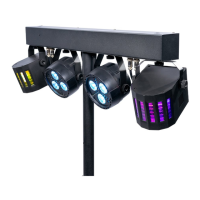
The ColorKey PartyBar GO is a versatile lighting fixture designed for creative lighting applications, suitable for professional use. It offers a range of operational modes and control options, making it adaptable for various event setups. The device is intended to be used with care, following the provided instructions to ensure safe operation and prevent damage or accidents.
Function Description
The PartyBar GO is a comprehensive lighting solution that combines multiple lighting effects within a single unit. It features two pars, each equipped with RGB and white LEDs, and two DerbyFx units, also with RGBW LEDs. This combination allows for a wide array of color mixing, dynamic patterns, and atmospheric effects. The fixture is designed to be controlled through various methods, including an IR remote, DMX512 protocol, and built-in auto-run and sound-active modes. It can also operate in a master/slave configuration, allowing multiple units to synchronize their lighting effects. The inclusion of a removable extension pole for the tripod stand enables the fixture to be elevated, providing broader coverage and enhancing the visual impact of the lighting.
Usage Features
The PartyBar GO offers flexible usage through its multiple control modes:
- DMX Control: For professional lighting designers, the PartyBar GO can be integrated into a DMX512 system. It supports 3, 6, or 15 DMX channels, allowing for granular control over individual lighting elements such as red, green, blue, and white intensity, motor speed, and strobe effects. The DMX address can be set via the onboard display, and proper DMX cabling with termination is recommended for longer runs to prevent signal interference. The device is compatible with both 3-pin and 5-pin XLR DMX connectors, with cable adaptors available for conversion.
- IR Remote Control: A convenient IR remote is included for quick and easy operation. This remote provides direct access to various functions, including blackout, DMX mode selection (3-channel or 6-channel), auto show modes (Par & Effects auto, Par auto, Effect auto), sound active modes (Par & Effects sound active, Par sound active, Effect sound active), and specific lighting effects like color change, color fade, and strobe. Users can also adjust the run speed, motor speed for effects rotation, and sound sensitivity directly from the remote.
- Auto Run Modes: The fixture features several pre-programmed auto modes that cycle through various lighting effects without external control. These modes can be selected and customized via the onboard display, allowing users to choose specific auto programs and adjust their speed.
- Sound Active Modes: For dynamic, music-synchronized lighting, the PartyBar GO includes sound active modes. These modes react to ambient sound, making the lighting effects pulse and change in rhythm with music. Users can select different sound programs and adjust the sound sensitivity to fine-tune the responsiveness of the lighting to the audio input.
- Master/Slave Operation: Multiple PartyBar GO units can be linked together in a master/slave configuration. One unit acts as the master, dictating the lighting effects, while the other units follow in synchronization. This is ideal for creating cohesive lighting displays across a larger area without the need for a DMX controller.
- Manual Mode: The manual mode allows users to individually control the intensity of red, green, blue, and white LEDs, as well as adjust strobe speed and motor speed for effects, directly through the onboard display. This provides precise control for specific lighting requirements.
- Portability and Setup: The PartyBar GO is designed for portability, featuring a carrying bag and a 6-foot lighting stand. The stand includes a removable extension pole, which reduces the stand's footprint when disassembled, facilitating transportation. When assembled with the extension pole, the stand can elevate the fixtures to over 7 feet, optimizing light distribution.
Maintenance Features
To ensure the longevity and optimal performance of the PartyBar GO, several maintenance guidelines are provided:
- General Care: Users are advised to handle the power cable and all mains voltage connections with caution, ensuring they do not come into contact with other cables. The unit should not be exposed to flammable sources, liquids, or gases. It is designed for indoor use only.
- Power Management: Always disconnect the power from the mains when the equipment is not in use or before cleaning. The power cable should only be handled by the plug, not by pulling the cable itself. The equipment should not be switched on and off in short intervals, as this can reduce its lifespan.
- Inspection and Repair: Regular checks of the equipment and power cable are recommended to ensure they are not crimped or damaged. If the equipment is dropped or damaged, the mains power supply should be disconnected immediately, and a qualified engineer should inspect it before further operation. The unit contains no user-serviceable parts, and all repairs, servicing, and power connections must be carried out by a qualified technician.
- Environmental Considerations: The product should not be disposed of with other household waste at the end of its working life. It should be separated for responsible recycling to promote sustainable reuse of material resources and prevent harm to the environment or human health.
- Temperature Acclimation: If the equipment has been exposed to drastic temperature fluctuations (e.g., after transportation), it should not be connected to power or switched on immediately. Condensation can damage the equipment, so it should be allowed to reach room temperature before use.
- Warranty and Support: ColorKey offers a 2-year limited warranty. Users are encouraged to register their product on the ColorKey website. The manufacturer also recommends checking their website periodically for updates to user manuals and specifications, or contacting them directly for support, as they continuously work to improve their products and user experience.


 To Next Page
 General