
 Need help?
Do you have a question about the COMBAT Enercal Space 10 and is the answer not in the manual?
Details the meaning of various LED indicator lights on the control unit.
Guide on how to navigate and interact with the control unit's menu system.
Procedure for setting or changing the heating program schedule.
Instructions for adjusting day and night temperature settings.
Steps to update the current time and date on the controller.
Process for modifying the access code for the control menu.
How to select the desired display language for the unit.
Instructions for adjusting temperature sensor readings for accuracy.
Details on the 'Extend' feature for temporary heating adjustments.
Procedure for restoring the control unit to its factory default settings.
Guidelines for correctly installing the control unit in its intended location.
Overview of the pre-installed program settings for initial setup.
Explanation of the fan/off/heat selector switch operation.
Information on the fault indicator lamp and reset button functionality.
Schematic illustrating the electrical connections for the unit.
Key technical data, dimensions, and operating parameters of the unit.
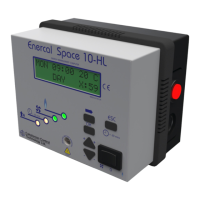
The Enercal Space 10 is an energy management computer designed for heating solutions, manufactured by Combat Heating Solutions Ltd. It serves as a control unit for heating systems, offering features for programming, temperature calibration, and system monitoring.
The primary function of the Enercal Space 10 is to manage heating systems efficiently. It allows users to program heating schedules, set desired temperatures, and monitor the system's operation. The device integrates a 100-year calendar clock with automatic summer/winter changeover, ensuring accurate timekeeping for scheduled operations. It supports both single-stage and two-stage heating systems, indicated by different light indicators. The control unit can operate a fan independently of the time switch and includes an "Extend" function to temporarily switch to day temperature for one hour. It also features a lockout lamp and reset button for fault management.
The control unit is designed for plug-in installation and should be mounted within the heated area, ideally 1.6m from the floor. It requires correct voltage and professional installation according to local standards.
The Enercal Space 10 offers a user-friendly interface with a display and navigation buttons (OK, ESC, +60 min, S, 0).
Light Indicators:
Accessing the User Menu: To access the main menu, the user presses OK when the display shows "ENTER MENU CODE 0000". The default menu code is 0000.
Menu Choices:
Extend Function: This feature allows the user to switch to the day temperature for one hour. The clock symbol LED illuminates, and the remaining time is displayed. This function can be activated or deactivated during the active hour.
Fan/Off/Heat Switch:
Lockout Lamp and Reset Button:
Resetting Default Settings: By pressing and holding the OK button for approximately 12 seconds, the user can initiate a reset to default settings. The display will show "RESET TO DEFAULT SETTINGS?" and then "DEFAULT SETTINGS RESTORED". This action will revert all programmable settings to their factory defaults, including the program schedule, temperatures, and menu code. However, if the user presses ESC during this process, the default settings will not be restored, and the device will return to the previous screen.
Battery Backup: The device includes a battery backup that can maintain the calendar clock for up to 100 years, ensuring time and date accuracy even during power outages.
Self-Calibrating: The Enercal Space 10 is designed to be self-calibrating, which helps maintain accuracy over time.
External Sensor: The device comes standard with an external sensor, which can be crucial for accurate temperature readings, especially in specific heating applications.
 General
| Brand | COMBAT |
|---|---|
| Model | Enercal Space 10 |
| Category | Controller |
| Language | English |

 To Next Page