ENEN
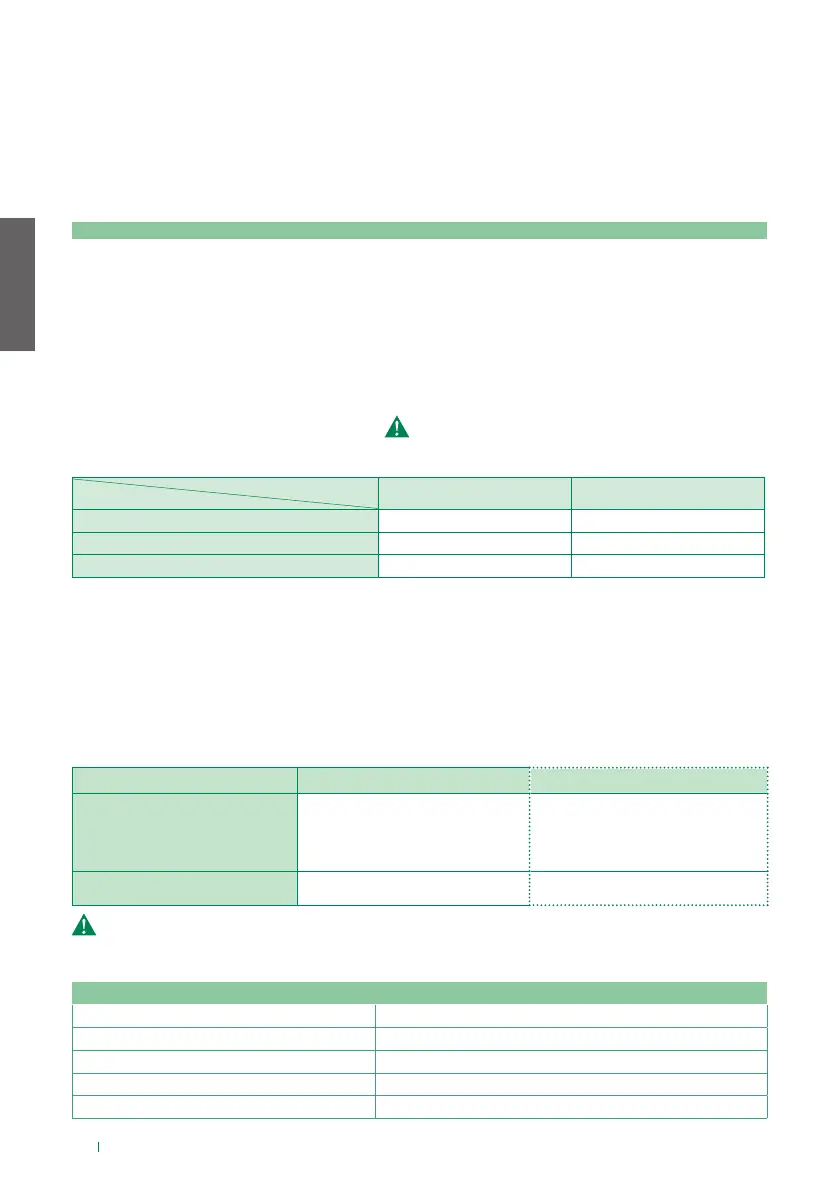
1. Power supply indicator LED
2. Connection terminals
| D | SimpleHome BUS data terminal
| + | - | 12/24 VDC power supply from alarm control panel or home automation BUS
3. Connection terminals (Not used)
4. CV1 (Not used)
5. DIP-Switches Selector for carrying out reset procedures (see “Reset procedures”)
6. SD Card Configuration backup memory ( do not remove)
7. LED indicating operation
Status
GREEN RED
NORMAL OPERATION Flashing Steadily lit
DOWNLOADING Flashing Off
MALFUNCTION Steadily lit / Off (not relevant)
LED
8. LAN ports
• HOME1 Connection to the home network - No PoE - Default IP address DHCP
• HOME2 Connection to the home network - No PoE / PoE Output* - Default IP address DHCP
* HOME2 switches from "No PoE" to "PoE Output" when a PoE Input source is connected in HOME3.
• VIP/HOME3 Connection to the home network - No PoE / PoE Input - IP address: See table
"DIP-Switch S2".
9. DIP-Switch S2 Selector for setting the network to which the ViP/HOME3 port belongs
DIP-Switch S2 position VIP/HOME3 IP address Notes:
VIP Auto IP
The network is logically separated from
the home network. When the DIP-Switch
is in this position it will not be possible
to access the private network for the
apartment from the external unit.
HOME3 DHCP
All 3 LAN ports will be in the same home
network.
If there is no server DHCP, to set the home network parameters you will need to connect to
the HOME3 port and set S2 to the ViP position.
Fig. 1
Technical features
Power supply voltage
12-24 V
Max. absorption
~2.5 W ( ~100 mA at 24 V / ~200 mA at 12 V)
Operating temperature
-5 to 45°C
Operating humidity
5 to 95%
Dimensions
95 x 70 x 59 mm (4 DIN modules)
Used in conjunction with the Comelit app, the Comelit Hub device can be used to manage your
SimpleHome system via smartphone or tablet (iOS and Android), both locally and remotely, without
any port-forwarding procedures.
Comelit Hub acts as a gateway between the various Comelit systems. It is therefore possible, via
the network connection, to interact with both the home automation system and the video entry
and alarm system. Comelit Hub features built-in astronomical twilight operation and allows the
programming of weekly timers, scenarios (max. 100) and logic rules (max. 100).
6






 To Next Page