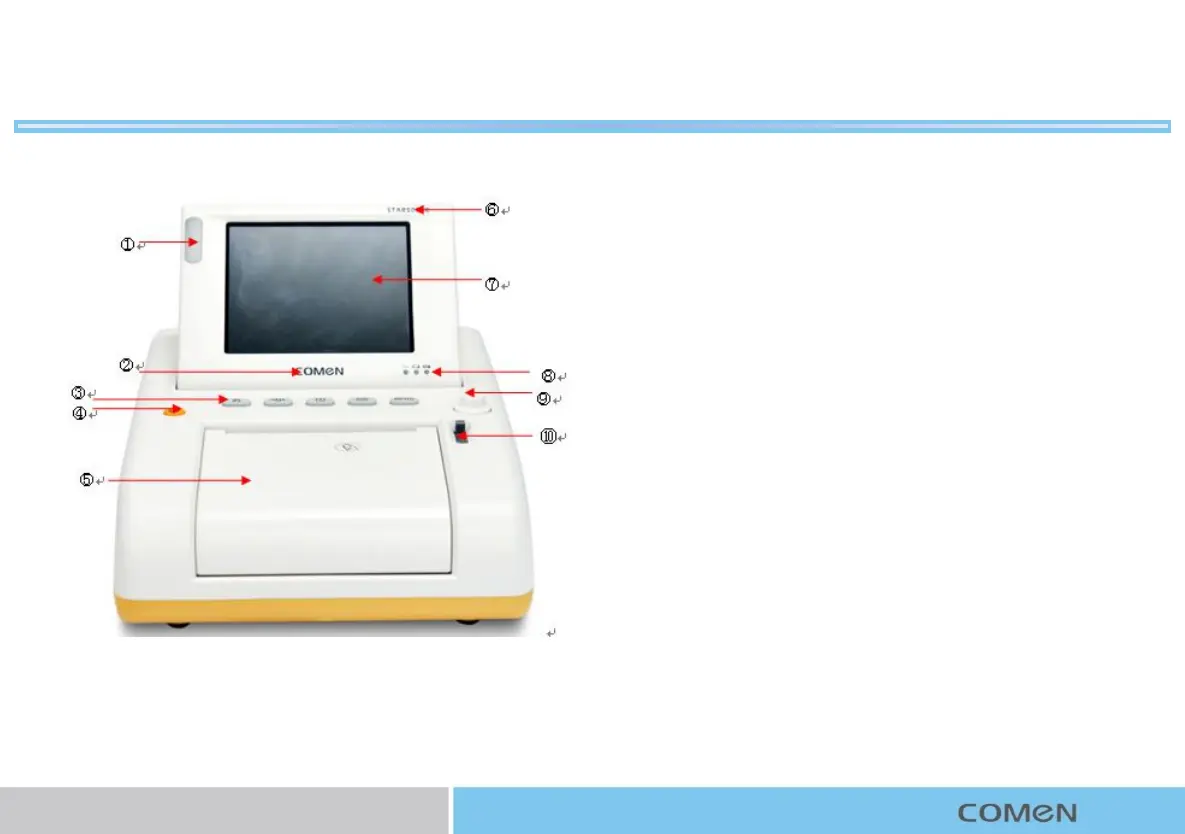
Product Introduction
①Alarm indicator: emitting light of different colors according to different
alarm levels.
②Logo: COMEN.
③Keys:
nAlarm reset key
nFreeze/unfreeze key
nRecord/stop key: press this key to start a real-time recording.
nTOCO Reset key
nMain menu key
④Power on/off key: press this key to switch on/off the monitor.
⑤Paper compartment: printing paper is put here.
⑥Monitor model
⑦Screen:5.6-inch tiltable and foldable screen to display waveforms,
menus, alarms and various parameters and data.
⑧Indicator
nAC indicator On:the monitor is powered by AC supply
n Off: the monitor is not connected to AC power.
nbattery indicator On:the monitor is powered by the battery
n Off: the monitor is not powered by the battery
nbattery charging indicator On:the battery is being charged
n Off: The battery is fully charged.
⑨ Knob: turn this knob to select menu items or change values.
⑩ Paper compartment lock: lock/unlock the compartment door.
Front View
1



 To Next Page