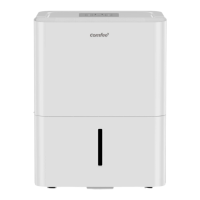
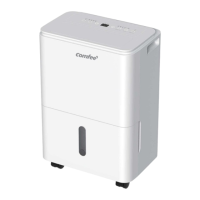
This document provides a comprehensive user manual for the Comfee CAD series dehumidifiers, covering models CAD20C1BWT, CAD30C1BWT, CAD40C1BWT, and CAD50P1BWT. It outlines the device's function, usage, and maintenance, ensuring safe and efficient operation.
The primary function of the Comfee CAD dehumidifier is to remove excess moisture from the air, thereby improving indoor air quality and preventing issues like mold, mildew, and dampness. It is designed for indoor residential applications and is not suitable for outdoor, commercial, or industrial use. The unit operates by drawing in humid air, passing it over cooling coils to condense the moisture, and then releasing drier air back into the room. The collected water can be managed in two ways: through a removable water bucket or via continuous draining using a hose.
Usage Features:
The dehumidifier features a user-friendly control panel with several buttons and an LED display for easy operation.
- POWER Button: This button turns the dehumidifier on and off.
- LED Display: The display shows the set humidity level (ranging from 35% to 85% Relative Humidity, RH) or the auto start/stop time (0-24 hours) during setting. During normal operation, it displays the actual room humidity level (with an accuracy of +/- 5%, ranging from 30% to 90% RH).
- Up/Down Buttons: These buttons are used for two main purposes:
- Humidity Set Control: To adjust the desired humidity level, users can press these buttons to set the RH between 35% and 85% in 5% increments. Pressing the "up" button increases the RH for damper air, while the "down" button decreases it for drier air.
- TIMER Set Control: When setting the timer, these buttons allow users to adjust the Timer ON or Timer OFF duration from 0 to 24 hours. Adjustments are made in 0.5-hour increments up to 10 hours, and then in 1-hour increments up to 24 hours.
- COMFORT Button: Activates the comfort dehumidifying operation. When this function is active, the set humidity is automatically controlled and cannot be manually changed. An indicator light illuminates when this mode is active.
- CONTINUE Button: Initiates continuous dehumidifying operation. Similar to the comfort mode, when continuous mode is on, the set humidity is automatic and cannot be manually adjusted. An indicator light confirms this mode is active.
- TURBO Button: Controls the fan speed. Users can select either Turbo or normal fan speed. Turbo speed is recommended for maximum moisture removal, especially when room humidity is high. Once the desired humidity level is reached, it's advised to turn off Turbo speed. An indicator light shows when Turbo mode is active.
- TIMER Button: Used to set the Timer ON and Timer OFF functions. When the unit is on, the first press activates Timer OFF, and a second press activates Timer ON. When the unit is off, the first press activates Timer ON, and a second press activates Timer OFF. Indicator lights confirm which timer program is initiated.
- FILTER Button: This feature serves as a reminder to clean the air filter. After 250 hours of operation, the LED light will flash. To reset the counter and turn off the light after cleaning the filter, simply press this button.
Other Operational Features:
- Auto Defrost: If frost builds up on the evaporator coils, the compressor will automatically cycle off, and the Auto Defrost function will run to melt the frost. An indicator light signals when auto defrost is active.
- Bucket Full Light: Illuminates when the water bucket is full and needs to be emptied.
- Auto Shut Off: The unit automatically shuts off when the water bucket is full or incorrectly positioned. It also shuts off when the set point humidity level is reached, though the fan motor will continue to operate.
- 3-Minute Compressor Operation Delay Protection: After the unit stops, it cannot be restarted for the first 3 minutes. This protects the compressor and ensures its longevity. The unit will restart automatically after this delay.
- Auto-Restart: In the event of a power cut, the unit will automatically restart with its previous function settings once power is restored.
- Error Codes and Protection Codes: The LED display will show specific codes to indicate issues:
- AS: Humidity sensor error. Users should unplug and re-plug the unit. If the error persists, customer service should be contacted.
- ES: Evaporator tube temperature sensor error. Similar to AS, unplugging and re-plugging is recommended, followed by customer service if the error continues.
- P2: Indicates the bucket is full or not in the correct position. Users should empty the bucket and ensure it's properly seated.
- Eb: Indicates the bucket is removed or not in the correct position. Users should replace the bucket in the right position.
Water Collection and Draining:
The dehumidifier offers two methods for water removal:
-
Using the Bucket:
- When the bucket is full, the "Full" indicator light will illuminate. If the unit is on, the compressor and fan will turn off, and "P2" will be displayed.
- To empty, slowly pull out the bucket using both handles, ensuring not to spill water.
- After emptying, reposition the bucket firmly into the unit. The unit will resume operation once the bucket is correctly in place.
- It's crucial not to touch internal parts when removing the bucket to avoid damage. The unit will beep 8 times and display "Eb" if the bucket is removed while operating or off.
-
Continuous Draining:
- For continuous operation without needing to empty the bucket, a water hose (not included, with specific diameter requirements) can be attached.
- Remove the plastic cover from the back drain outlet by rotating it counter-clockwise.
- Insert the drain hose through the outlet and lead it to a floor drain or suitable drainage facility.
- Ensure the hose is secure, free of kinks, and sloped downwards to allow water to flow freely without leaks.
- After removing the plastic cover, any residual water in the drain outlet should be dried.
- When continuous draining is not in use, the drain hose should be removed, and the outlet dried.
Installation Instructions:
Proper positioning is crucial for optimal performance:
- The unit should be placed on a smooth, level floor strong enough to support it when the water bucket is full.
- Maintain at least 8 inches of air space on all sides of the unit for adequate air circulation, with at least 16 inches for the air outlet.
- Avoid using the unit outdoors.
- Do not place the unit in small, enclosed spaces, as this can lead to overheating and reduced efficiency.
- Keep the unit away from heat sources like clothes dryers, heaters, or radiators.
- Ensure the room temperature does not fall below 41°F (5°C), as lower temperatures can cause frost buildup on coils, reducing performance.
- Close all doors, windows, and other outside openings to the room to maximize dehumidification efficiency.
Maintenance Features:
Regular maintenance ensures the dehumidifier's longevity and efficient operation.
-
Cleaning the Grill and Case:
- Use water and a mild detergent for cleaning. Avoid bleach or abrasive cleaners.
- Do not splash water directly on the unit to prevent electric shock, insulation deterioration, or rust.
- The air intake and outlet grills can be cleaned with a vacuum cleaner or brush to remove dust and debris.
-
Cleaning the Bucket:
- Clean the water bucket every few weeks to prevent the growth of mold, mildew, and bacteria.
- Partially fill the bucket with clean water and a mild detergent, swish it around, then empty and rinse thoroughly.
- Important: Do not use a dishwasher to clean the bucket.
-
Cleaning the Air Filter:
- The air filter should be cleaned regularly (every two weeks is recommended, or when the filter indicator light flashes).
- To remove the filter, pull it outwards from the unit.
- Wash the filter with clean water and allow it to dry completely.
- Re-install the filter and replace the bucket.
- Caution: Operating the dehumidifier without a filter can lead to reduced performance and damage to the unit.
-
Storage for Long Periods:
- Before storing, allow the unit to rest for a full day to ensure the system dries out naturally.
- Clean the unit, water bucket, and air filter.
- Wrap the power cord using the provided power cord buckle.
- Cover the unit with a plastic bag to protect it from dust.
- Store the unit upright in a dry, well-ventilated area.
Safety Precautions:
The manual emphasizes several safety precautions to prevent injury and damage:
- Always ensure the power plug is properly inserted and the unit is effectively grounded to prevent electric shock or fire.
- Do not modify the power cord or share outlets with other appliances.
- Unplug the unit immediately if strange sounds, smells, or smoke occur.
- Ventilate the room if there is a gas leak from other appliances.
- Do not operate or stop the unit by inserting or pulling out the power plug.
- Prevent water from entering electrical parts.
- Do not use loose or damaged power outlets.
- Keep the power cord away from heating appliances or heat sources.
- Do not disassemble or modify the unit.
- If the power cord is damaged, it must be replaced by authorized personnel.
- Do not use the unit near flammable gases or combustibles.
- Always unplug the unit before cleaning.
- Do not remove the water bucket during operation, as this can activate protection and risk electric shock.
- Never insert fingers or foreign objects into grills or openings, especially around children.
- Do not climb or sit on the unit.
- Ensure filters are securely inserted.
- If water enters the unit, turn it off and disconnect power, then contact a qualified technician.
- Do not place flower vases or other water containers on top of the unit.
- In a thunderstorm, disconnect power to the unit.
- Do not run the power cord under carpeting or cover it with rugs; route it away from traffic areas to prevent tripping hazards.
- Electrical installation, if needed, must be performed by qualified personnel according to national regulations.
- Do not use extension cords or adapter plugs, and do not remove any prongs from the power cord.
By following these guidelines for function, usage, and maintenance, users can ensure the safe and effective operation of their Comfee CAD dehumidifier.


 To Next Page
 General