26
Get to know your AC
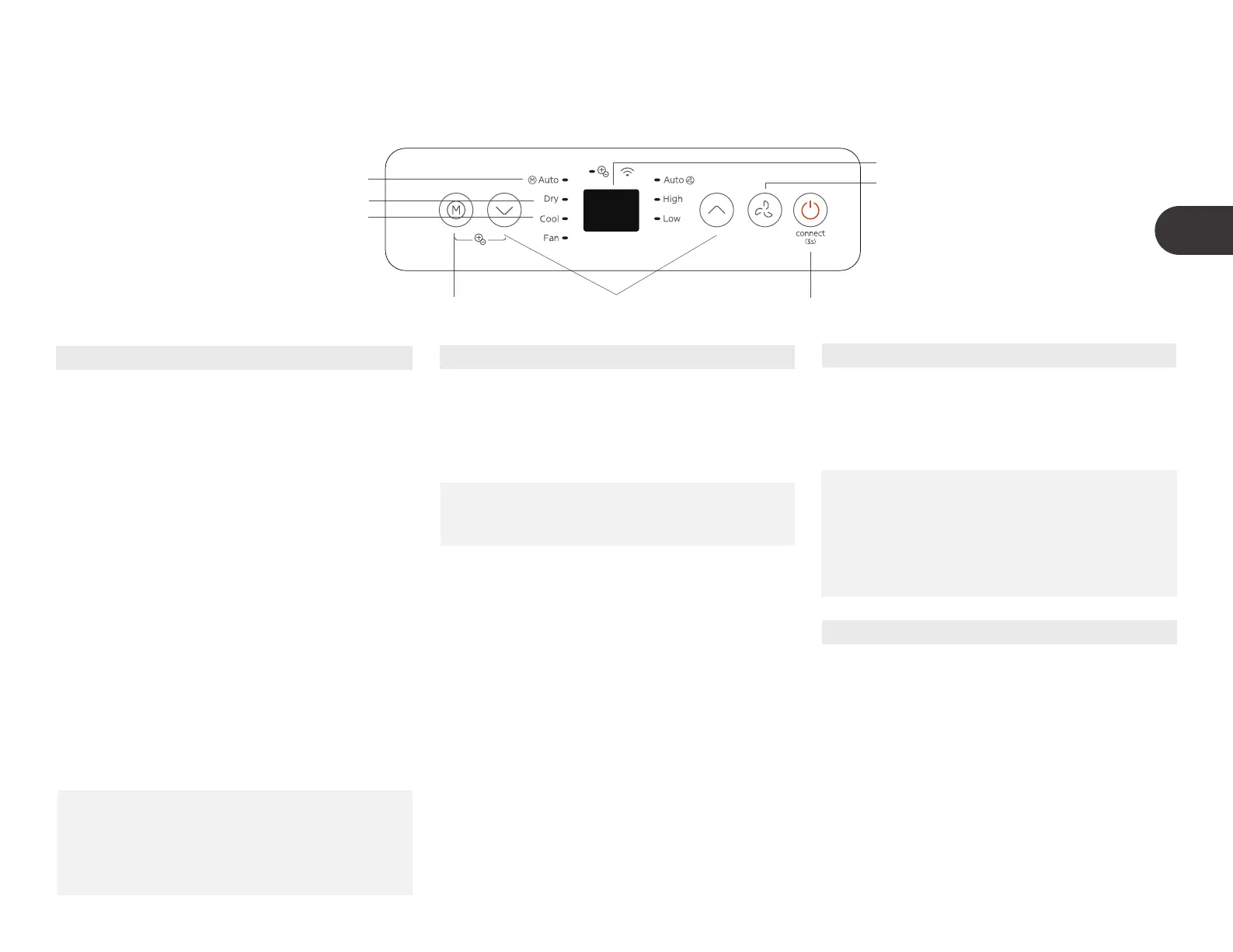
Electronic control operating instructions
1
5
6
7
8
2
4
3
1. POWER button
Power switch on/o.
Shows the set temperature while on Cool,
or Auto mode. It shows the room
temperature on DRY and FAN modes.
Shows Error codes:
E0-EEPROM error.
E1-Room temperature sensor error.
E2-Evaporator temperature sensor error.
E3-Condenser temperature sensor error
(on some models).
2. MODE function
Selects the appropriate operating mode. Each
time you press the button, the mode is selected
in a sequence that goes from AUTO, DRY, COOL
and FAN, The mode indicator light illuminates
under the dierent mode setting.
NOTE: In AUTO mode, the FAN
speed will be adjusted automatically.
4. Display
3. UP and DOWN buttons
Used to adjust (increasing/decreasing)
temperature settings in
1°C/2°F (or 1°F) increments in a range
of 16°C/60°F to 30°C/88°F (or 86°F).
NOTE: The control is capable of
displaying temperature in degrees
Fahrenheit or degrees Celsius. To
convert from one to the other, press
and hold the Up and Down buttons
at the same time for 3 seconds.
FRESH operation(on some models)
Press MODE and DOWN (-) buttons at the
same time for 3 seconds to initiate FRESH
feature and the FRESH light illumiantes on
some models, the LED DISPLAY shows 'On' for
3 seconds. The ion generatoris energized and
will help to purify the air inside. Press it for 3
seconds again to stop the FRESH feature and
the FRESH light turn dark on some models, the
LED DISPLAY shows 'OF' for 3 seconds for
some units.
Wireless operation(on some models)
NOTE:
When you restart the wireless
function, it may take a period of time
to connect to the network
automatically.
Used to initiate the wireless connection mode.
For the first time to use wireless function,
press the POWER button for 3 seconds to
initiate the wireless connection mode . The LED
DISPLAY shows 'AP' to indicate you can set
wireless connection. If connection(router) is
successful within 8 minutes, the unit will exit
wireless connection mode automatically and
the wireless indicator illuminates. If connection
is failure within 8 minutes, the unit exits wireless
connection mode automatically. After Wireless
connection is successful, for some models you
can press MODE and UP (+) buttons at the
same time for 3 seconds to turn o Wireless
function and the LED DISPLAY shows 'OF' for
3 seconds, press MODE button and UP(+) to
turn on Wireless function and the LED DISPLAY
shows 'On' for 3 seconds.
EN



 To Next Page