
 Need help?
Do you have a question about the Comica CVM-WM300C and is the answer not in the manual?
Key specifications for the lavalier transmitter, including channels, frequency, and power.
Key specifications for the hand-held transmitter, including channels, frequency, and power.
Key specifications for the receiver, including channels and frequency.
Dual transmitters, A/B groups, multiple device support.
Working distance, LCF, auto-scan, IR sync, RF strength.
Rechargeable battery, LCD display, volume levels, metal build.
Covers distance, sync, environment, RF strength, and phone use.
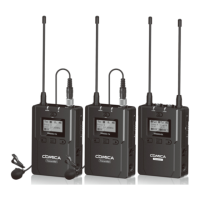
Lists accessory items and identifies core system components.
Configuration: 2 Transmitters + 1 Receiver.
Configuration: 1 TX + 1 HTX + 1 Receiver.
Configuration: 1 TX + 1 Receiver.
Configuration: 1 HTX + 1 Receiver.
Lists all accessory items provided with the system.
Details accessory inclusion for each WM300 kit model.
Identifies antenna, screen, buttons, MIC/LINE IN, and charging socket.
Explains the reset hole for system recovery procedures.
Identifies microphone, LCD, buttons, IR screen, and switches.
Details the function of Low Cut and RF signal strength switches.
Identifies antennas, indicators, screen, buttons, sockets, and clip.
Details IR sensor, monitoring/charging sockets, and reset hole.
Explains Power/Muting, SET, and +/- button functions.
Details Power/Muting button and LCF/RF switch functions.
Describes impact of high/low signal strength on range and battery.
Explains AUDIO and IR indicator lights for transmitters.
Explains A IR/RF and B IR/RF indicator lights for receivers.
Instructions for inserting the audio input line.
Guide to powering on the lavalier transmitter.
Reminder for channel matching before operation.
Connecting MIC and checking volume indicator.
How to attach the belt clip to the transmitter.
Final step of channel matching with receiver.
Guide to installing AA batteries correctly.
Instructions for powering on the HTX.
Reminder for channel matching before operation.
How to connect the receiver to a camera using the hot-shoe mount.
Connecting output line and headphones for monitoring.
Guide to powering on the receiver.
Final step of channel matching with transmitter.
Icons for signal, mute, power, and audio bar.
Steps for selecting and confirming a transmitter channel.
How to switch between Group A and Group B.
Guide to changing input mode between MIC and LINE IN.
Adjusting Low Cut Filter to High, Low, or OFF.
Explains the purpose of Mic and Line In modes.
Steps to set RF power to High or Low.
How to enable or disable the muting feature.
How to control muting via button press.
Setting backlight duration or turning it off.
Setting backlight timer to 15s, 60s, or 00s.
Changing system language to English or Chinese.
Guide to selecting system language (English, Chinese).
Steps for resetting the transmitter to default settings.
Steps to confirm and execute a factory reset.
How to navigate to and view the firmware version.
Icons for normal/muting mode, power, channel.
Turning on/off and switching the muting mode.
Long press for power, short press for muting.
Controlling muting via screen and buttons.
Setting channels using infrared sync.
Setting different channels for combined transmitter use.
Visual guide for infrared sync.
Using the Low Cut and RF signal switches.
Signal strength, power, channel, transmit power.
Background color for Group A/B on/off status.
Steps to select and confirm channels for Group A/B.
Navigating between Group A and B views.
Selecting Stereo or Mono output modes.
Accessing and editing Group A/B settings.
Steps to turn Group A/B power ON or OFF.
How to adjust volume for Group A and Group B.
Performing an automatic channel scan.
Steps for IR sync matching between devices.
Setting the receiver's backlight duration.
Changing the system language for the receiver.
Steps to perform a factory reset.
How to view the receiver's firmware version.
Specs for signal/noise, antenna, and stray radiation.
Details sound delay, distortion, and battery.
Device dimensions and operating/storage temperatures.
Specs for signal/noise, antenna, and stray radiation.
Details sound delay, distortion, and battery type.
Device dimensions and operating/storage temperatures.
Specs for signal/noise, antenna, and stray radiation.
Details sensitivity, delay, distortion, and battery.
Device dimensions and operating/storage temperatures.
 General
| Type | Wireless Microphone System |
|---|---|
| Battery Life | 6 hours |
| Output Connector | 3.5mm TRS |
| Modulation Mode | FM |
| RF Power | 10mW |
| Antenna | Built-in |
| Transmitter Power | 10mW |
| Signal-to-Noise Ratio | ≥80dB |
| Transmission Range | 100m |
| Channels | 2 |
| Compatibility | Cameras, Smartphones |
| Operating Frequency | 630-690 MHz |













 To Next Page