3
4
5
6
7
1
2
9
8
10
11
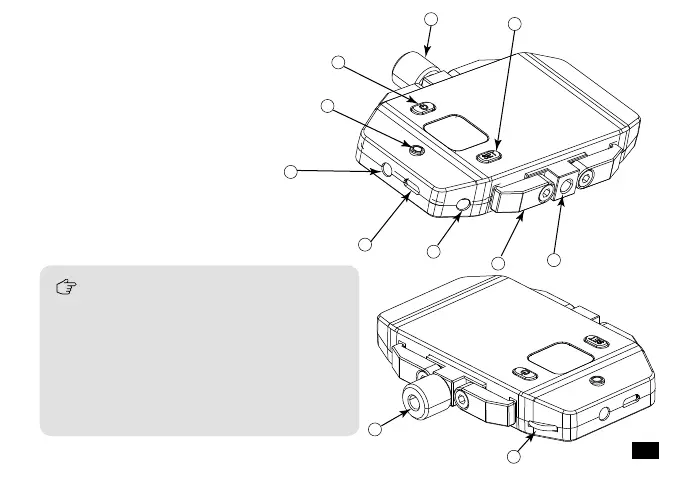
Receiver
1.Set Button for Channel Selection
2.Adjusting Screw
3.On/Off Button
4.Working Status Indicator Light
5.3.5mm Audio Output Socket/ Reset Hole
6.Micro USB Charging Socket
7.3.5mm Monitoring Socket
8.Smartphone Clamp
9.1/4 Thread at the bottom
10.1/4 Thread at the top
11.Volume Adjusting Button
External light and other equipment can be
used on 1/4 thread at the top; Grip can be
used for 1/4 thread at the bottom.
The function of reset hole:When function
program of the product is disorganized and
unable to make normal adjustment or even
shutdown, you can use an appropriate
taper tool to insert the reset hole to realize
the function reset.
7














 To Next Page