①
②
③
④
⑤ ⑥ ⑦
⑧
Long-press the CH1 button and CH2 button in sync to reset the Bluetooth. After resetting, the microphone can be
connected to a new phone by Comica Audio App
Receiver
8
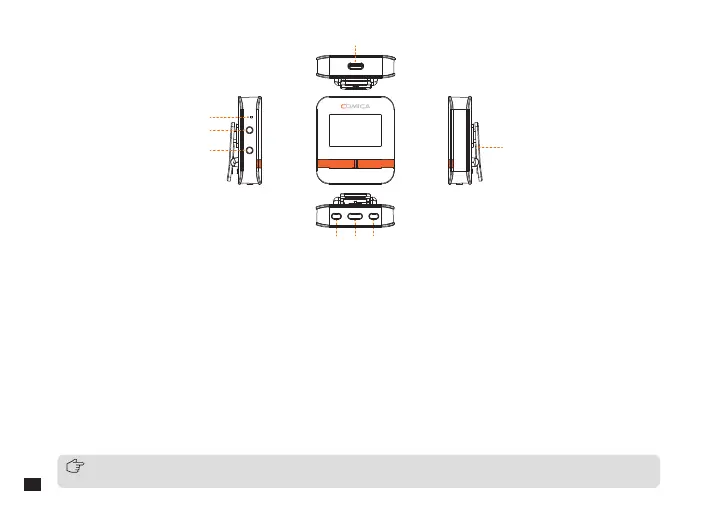
1. USB-C Output/Charging Port: Connect USB device to output digital audio; connect to a power source for charging
2. Pairing Hole: When the wireless connection is abnormal, use the pin to short-press the pairing hole to re-pair
3. 3.5mm Output Port: To identify TRS/TRRS plug automatically and output analog audio
4. 3.5mm Monitoring Port: Plug in 3.5mm TRS/TRRS earphones for monitoring
5. CH1/Denoise Button: In single channel, short press to reduce microphone gain; in dual channel, short press to
increase and decrease the gain of channel 1 in a cycle; long press to adjust the denoise of channel 1 and channel 2 in
a cycle(turn on 1st level denoise - turn on 2nd level denoise - turn o denoise)
6. Power/Mode Button: Long press to power on/o; short press to switch mono/stereo/safety mode
7. CH2/On-board Recording Button: In single channel, short press to increase microphone gain; in dual channel, short
press to increase and decrease the gain of channel 2 in a cycle; long press to turn on/o the on-board recording of
channel 1 and channel 2 in sync
8. Belt Clip


 To Next Page