Screen Display Instruction
+06
Safety
Mono
:
Mono Mode
Stereo
:
Stereo Mode
Safety
:
Safety Mode
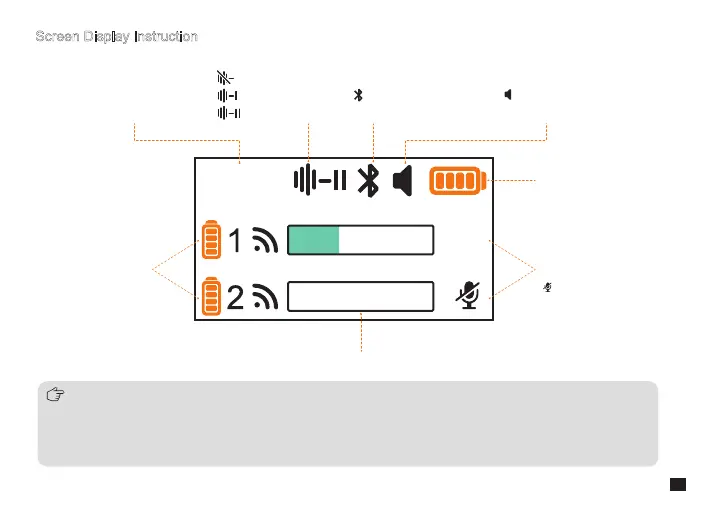
Denoise O
1st Level Denoise
2nd Level Denoise
Bluetooth Paired
Bluetooth Not Paired
Phone Speaker Monitoring On
Phone Speaker Monitoring O
Gain Level
Muting On
Receiver Power
Transmitter Power
Audio Dynamic Bar
1. When the receiver outputs audio through the USB port, it is monitored by the phone speaker by default. Users can
switch between phone speaker monitoring and receiver headphone monitoring through the Comica Audio App. For
detailed instructions, kindly refer to the App operation guide at the manual's end
2. One audio dynamic bar is displayed in one channel, and two audio dynamic bars are displayed in two channels
3. The mute function can be turned on/o through the App
9
+06



 To Next Page