Sounds Control
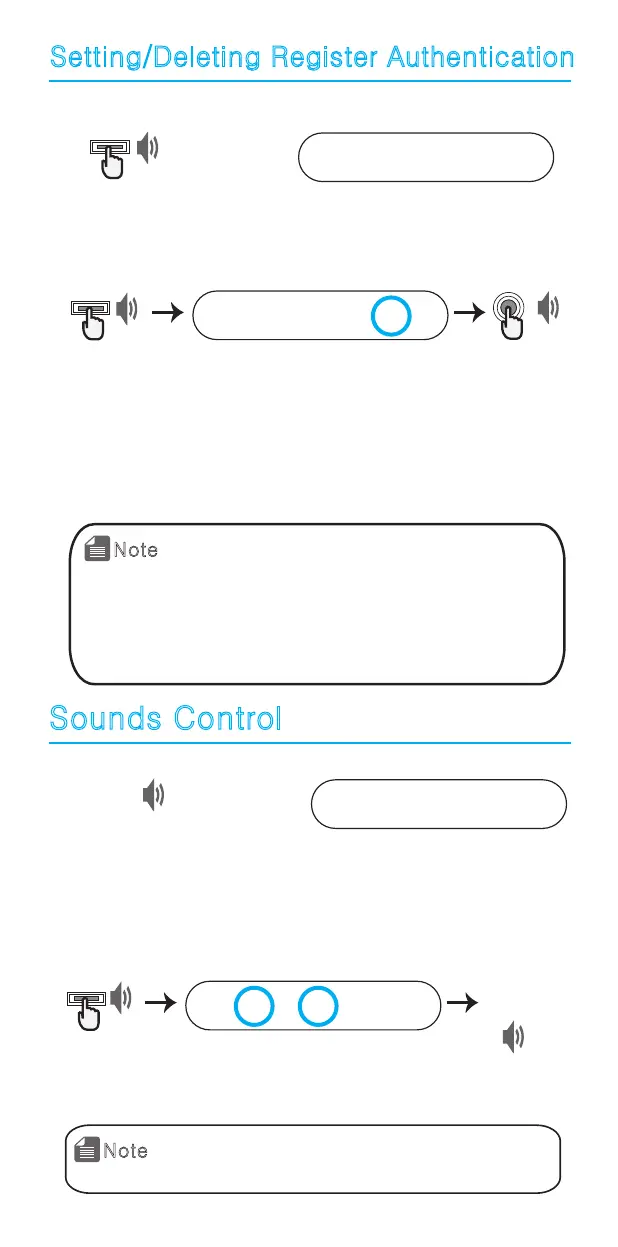
Setting/Deleting Register Authentication
1. Press [Start] button. 2.Enter password.
0 1 2 3 4 5 *
Press [Start] button from
the outdoor handle.
Enter registered password
when LED light is on.
3. Press [Start] button.
0 1 2 3 4 5 *
Press [Start] button twice in a row, press [5] and open the battery cover
of the indoor main part and press [Register] button, and 3D touch
setting/delete will be changed.
- Setting alarm : Beeeeeep
- Delete alarm : Beep
[Register]
Press [start] button 2 times
Beep
Beep
Beep
1. When Register Authentication mode is set, you
need to authenticate with existing password to
use registration mode.
* Register Authentication mode not set when it is
in factory reset mode.
* Register authentication mode is deleted when
you set in same way of registration.
Note
1. Press [Start] button. 2.Enter password.
0 1 2 3 4 5 *
Press [Start] button from
the outdoor handle.
Enter registered password
when LED light is on.
3.After you press [start] button, change the volume with
[1] and [3] buttons.
0 1 2 3 4 5 *
Beep
Press [1] to decease the volume.
Press [3] to increase the volume
[*]Button
[Start]
1. You can set the sound volume in 8 different stages.
2. Under the temporary pause mode, the lamp on
keypad will keep blinking when you push the buttons.
Note
Beep
Beep



 To Next Page