8
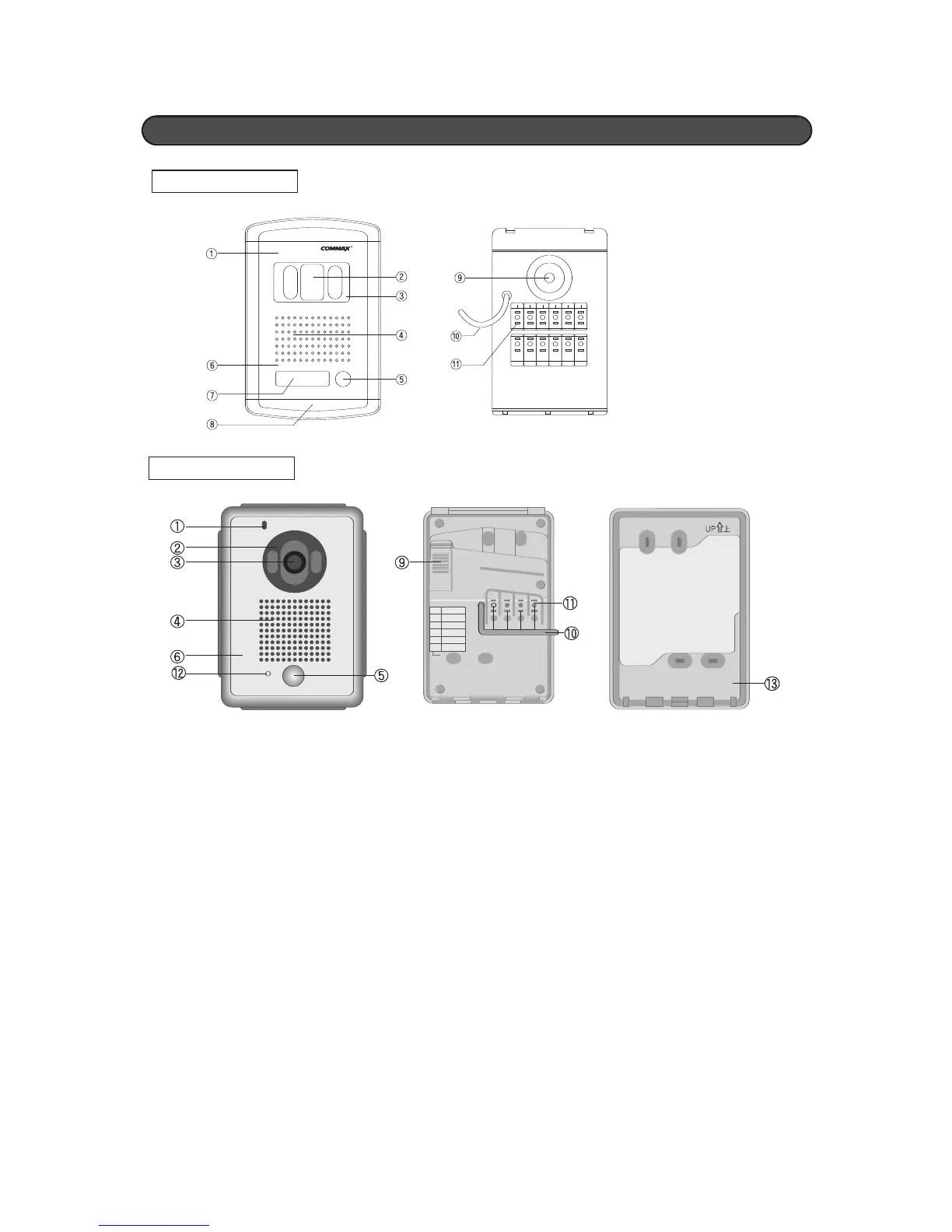
Microphone
Press the[CALL] button on the panel to
communicate with the visitor.
C.C.D. Camera Lens
Built-in Color 1/4”C.C.D lens
Camera Protection Window
Prevent the scratching of the lens
Speaker Transmits audio
Calling Button
Press the call button to initiate conversation
Front Panel
Made of anodized aluminum material to prevent
corrosion
Name Card Slot
Indicates the resident's name (and/or address)
Screw Hole
➒ Viewing angle Adjustment
The viewing angle of the camera lens can be
adjusted manually using the adjustment knob on
the back of the camera
➓ Connection Wire Release
Connection Terminal
Used to connect wires to the individual households
Operation Indication Lamp
Bracket for Wall mounting
Note
:
Do not make any wire connections to these
terminals or take the cover off while the unit
is plugged into a DC power source
DRC-4CA
DRC-40CS
Location And Function of Control (For Camera)


 To Next Page