8
* Calling of Interphone
ྙ In case of installing additional interphone, when a visitor calls from door camera, a calling
tone(sound) will be ringed in the interphone as well.
- Max 60 seconds for call and talk time
ྚ When you pick up the handset, it’s available to talk with door camera.
ྛ During a call, press the door open button to open the door.
(In case door camera is interlocked with door release function)
ྜ Put the handset back on and the call ends.
- The interphone call ends when the connected video phone call finished.
4-
3 CCTV
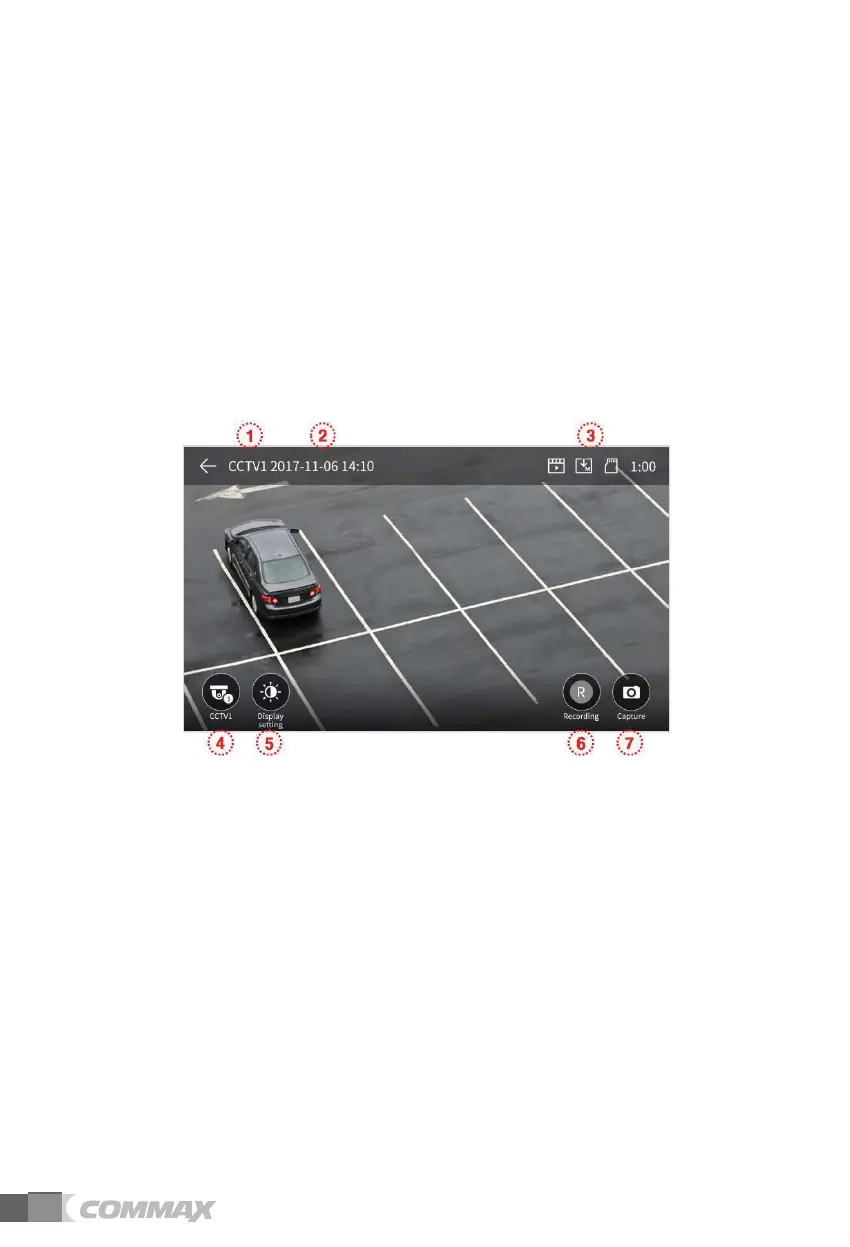
- When you touch a CCTV button, the below screen will be shown.
- Monitoring time is max. 60 seconds. The video-clip storage can be proceeded within 60
seconds.
- You cannot use CCTV functions if cameras are not installed.
£G CCTV sign: To show the current working CCTV.
¤G Date & Time: Current date and time will be indicated.
¥G Icon set: To show motion detection and video storage. (Monitor section for more details)
¦G CCTV screen change: To see CCTV 1 screen and CCTV 2 screen.
- You cannot use this function when only one camera is connected.
§G Video quality adjustment: To change Brightness/Light & Shade/Chroma.
(Monitor section for more details)
ྞ Video storage: To store (save) a video-clip.
- When you touch a button, the storage will be started.
- The below icon will be shown during image storage. And the remaining time will be shown
on the right upper.



 To Next Page