EasyManua.ls Logo

Commodore AMIGA 1081 - Power Connection and Safety; Mains Supply and Earthing; Monitor Placement and Operation; Powering the Monitor

Commodore AMIGA 1081
6 pages
Print Icon
To Next Page IconTo Next Page
To Previous Page IconTo Previous Page
Loading...
English
Introduction
Your
monitor
has
been
designed
and
manufactured
to
the
highest
standards,
and
subject
to
rigorous
testing.
Provided
it
is
properly
operated
and
maintained
it
will
perform
well
for
many
years.
This
colour
monitor
is
suitable
for
use
with
home
and
personal
computers,
video
recorders,
LaserVision
Players
and
TV
Tuners.
Connection
to
the
mains
Your
new
monitor
is
designed
to
operate
from
an
a.c.
mains
supply
of 220-240
volts,
50
Hz.
Stabilising
circuits
ensure
satisfactory
performance
within
normal
supply
variations.
Important:
This
apparatus
must
be
earthed.
This
can
be achieved
by fitting
a
3
pin
plug.
The
wires
in the
earthed
mains
lead are
coloured
according
to
the
following
code:
BLUE
=
NEUTRAL
BROWN =
LIVE
GREEN/YELLOW
=
EARTH
If
the
mains
plug
(or
adaptor)
contains
a
fuse,
the value
of
this fuse
should
be
3
Amp.
Alternatively,
if
another
type
of
plug
(not
fused)
is
used,
the
fuse
at the
distribution
board
should
not
be
greater
than
5 Amp.
If the
colours
of
the
wires in
the
mains
lead
do
not
correspond
with
the
coloured
markings
identifying
the
terminals
in
your
plug,
proceed
as
follows
. . .
The
BLUE
wire should
be connected
to
the
terminal
marked
'N' or
coloured
black.
The
BROWN
wire
should
be connected
to the
terminal
marked
'L' or
coloured
red.
The GREEN
and
YELLOW
wire
must
be
connected
to the
terminal in
the
plug
marked
by 'E'
or
the
earth
symbol
A,
or
coloured
green
or
green
and
yellow.
Before
replacing
the
plug
cover,
make
certain
that
the
cord
grip
is
clamped
over
the
sheath
of
the
lead
-
not
simply
over
the
three
wires.
Positioning/Ventilation
In order
to prevent overheating,
ensure
that the ventilation
openings in
the monitor
are not covered.
The monitor
should
not be placed
near
a
source of
heat nor
on a soft
surface since
this would
block the
ventilation
slots on
the bottom.
Movable
support
You can
tilt the monitor
into
a convenient
position with
regard to
the computer
by
using
the movable
support.
Connection
to the
mains
You
can connect
your monitor
to a mains
voltage
of
between 220
and 240 V.
If the
mains
voltage
in your home
is different
from this,
consult your
dealer.
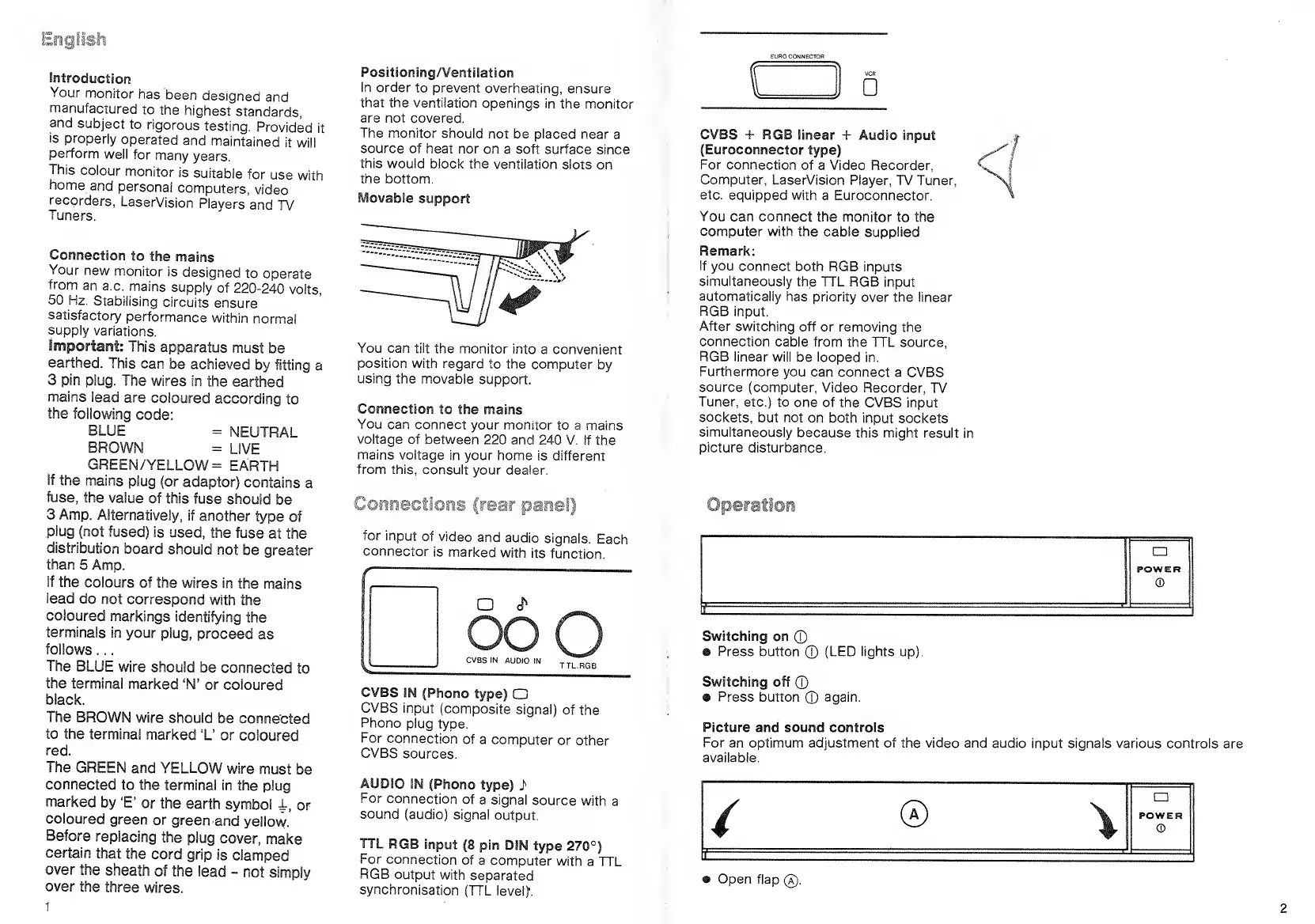
Connecfio
ar
panel)
for
input
of video
and
audio
signals.
Each
connector
is
marked
with
its
function.
O <P
ooo
CVBS IN
AUDIO
IN
CVBS
IN
(Phono
type)
CD
CVBS
input
(composite
signal)
of
the
Phono
plug
type.
For
connection
of a
computer
or other
CVBS
sources.
AUDIO
IN
(Phono
type)
i
For
connection
of
a signal
source
with
a
sound
(audio)
signal
output.
TTL
RGB
input
(8
pin
DIN
type
270°)
For
connection
of
a computer
with
a TTL
RGB
output
with
separated
synchronisation
(TTL leveljf.
f
D
CVBS
+ RGB linear
+
Audio
input
(Euroconnector
type)
For connection
of a
Video
Recorder,
Computer,
LaserVision Player,
TV Tuner,
etc.
equipped with
a Euroconnector.
You
can connect the
monitor to the
computer with the
cable supplied
Remark:
If
you connect
both
RGB inputs
simultaneously
the TTL RGB
input
automatically
has
priority
over the linear
RGB input.
After
switching off
or removing
the
connection
cable from
the TTL
source,
RGB linear
will
be looped in.
Furthermore
you can
connect a CVBS
source (computer,
Video Recorder,
TV
Tuner,
etc.) to
one of the CVBS
input
sockets,
but not
on both input
sockets
simultaneously
because
this might result
in
picture
disturbance.
Operation
Switching
on
©
®
Press
button
©
(LED lights up).
Switching off
©
» Press button
©
again.
Picture and sound controls
For
an optimum adjustment of the video and audio
input signals various controls
are
available.
® Open flap
®.

Related product manuals