CD -ft
o
®
CD
*•&
m. CVBS O 9
POWER
—
o
H.CENTERING
O
BRIGHTNESS
o
CONTRAST
o
COLOR
o
SHARPNESS
O
DD
VOLUME A RGB
GREEN
_
©
®
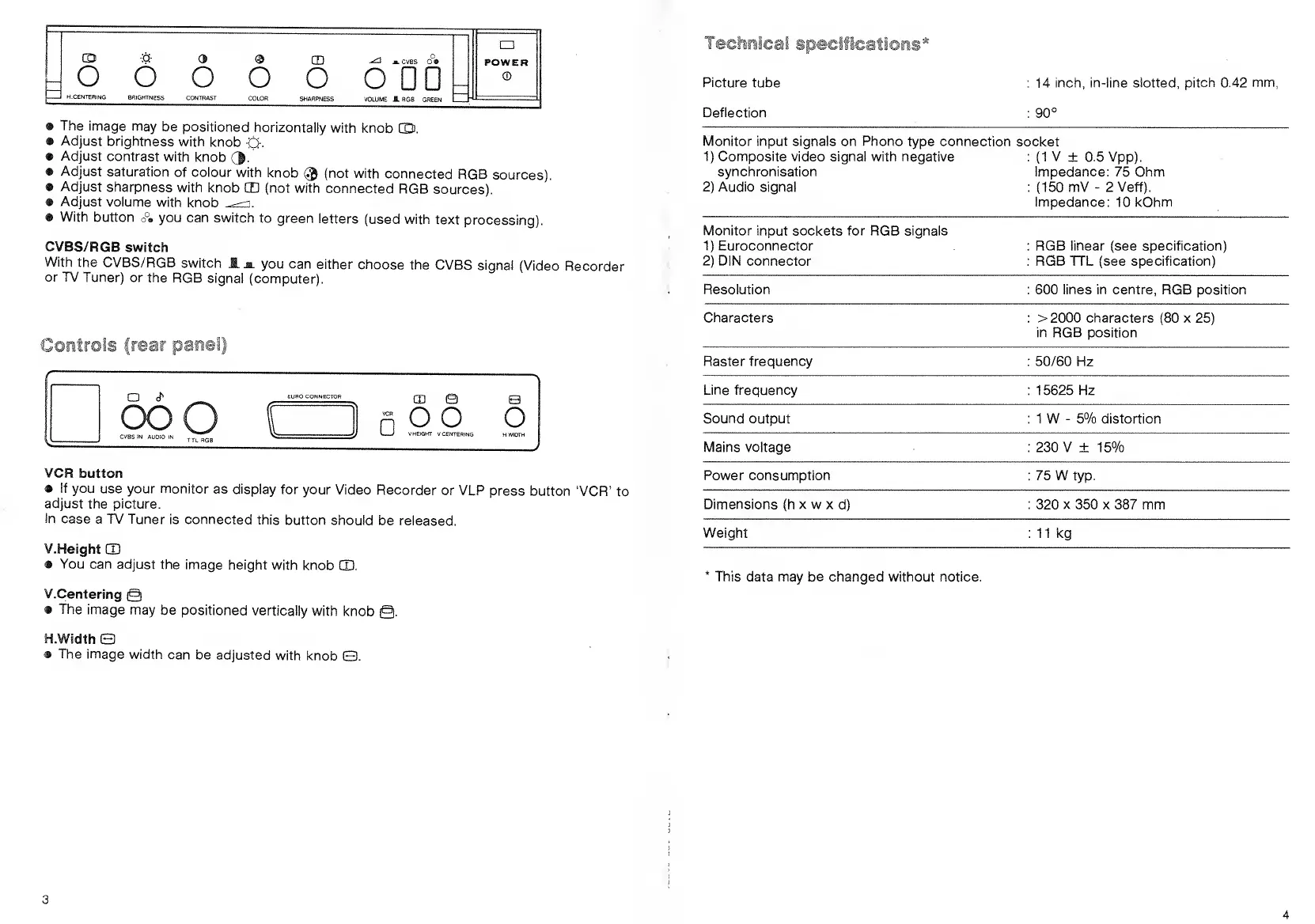
The
image
may
be positioned
horizontally
with
knob
CD.
• Adjust
brightness
with
knob
0.
•
Adjust
contrast
with
knob
(|.
•
Adjust
saturation
of colour
with knob
®
(not with
connected
RGB
sources).
•
Adjust
sharpness
with knob
CD
(not
with
connected
RGB
sources).
•
Adjust
volume
with
knob
^\
•
With
button
o°»
you
can switch
to green
letters
(used with
text
processing).
CVBS/RGB
switch
With
the
GVBS/RGB
switch
JL jl
you can
either
choose
the
CVBS signaJ
(Video
Recorder
or TV
Tuner) or
the RGB
signal
(computer).
a
z>
ooo
EURO CONNECTOR
CVBS IN
AUDIO \\
CD Q
O
oo o
V.HEiGHT
V.CENTERING
VCR
button
•
If you
use your monitor
as display
for
your Video
Recorder
or VLP
press button
'VCR'
to
adjust
the picture.
In
case
a TV Tuner
is connected
this
button should
be released.
V.Height
CD
•
You can
adjust
the image
height with
knob
CD.
V.Centering
@
•
The
image
may
be positioned
vertically
with
knob
@.
H.Width
Q
•
The
image
width
can be
adjusted
with knob
ED.
finical
specifications'*
Picture
tube
Deflection
: 14 inch, in-line slotted,
pitch 0.42 mm,
:
90°
Monitor input signals on Phono
type
connection
1
)
Composite
video signal with negative
synchronisation
2)
Audio
signal
socket
:
(1
V
±
0.5
Vpp).
Impedance: 75 Ohm
:
(150
mV
-
2 Veff).
Impedance:
10 kOhm
Monitor input sockets for RGB signals
1)
Euroconnector
2)
DIN
connector
RGB linear (see specification)
RGB TTL (see specification)
Resolution 600 lines in centre, RGB position
Characters > 2000 characters
(80
x
25)
in RGB position
Raster frequency 50/60 Hz
Line frequency
15625 Hz
Sound
output 1 W
-
5% distortion
Mains voltage 230 V ± 15%
Power consumption 75 W
typ.
Dimensions
(h
x w
x
d)
320
x
350 x 387 mm
Weight
11 kg
This data may be
changed
without notice.



 To Next Page