EasyManua.ls Logo

Commodore AMIGA 520 - Page 6

Commodore AMIGA 520
10 pages
Print Icon
To Next Page IconTo Next Page
To Previous Page IconTo Previous Page
Loading...
.
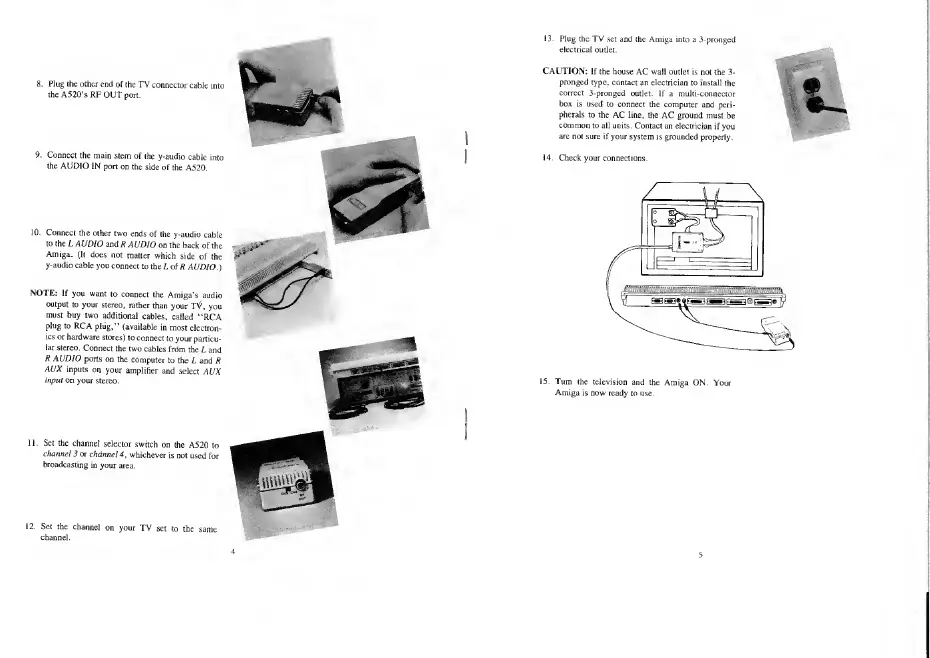
Plug the other
end of
the
TV
connector
cable
i
the
A520's
RF OUT
port.
Connect
the main
stem
of the
y-audio
cable
i;
the
AUDIO IN
port
on the
side of
the A520.
10. Connect
the other
two
ends
of the
y-audio cable
to
the L AUDIO
and
R AUDIO
on
the back
of the
Amiga.
(It does
not
matter which
side
of
the
y-audio
cable
you connect
to
the L of
R AUDIO.
)
NOTE:
If
you
want
to connect
the
Amiga's
audio
output
to your
stereo,
rather than
your TV\
you
must
buy two
additional
cables,
called
"RCA
plug to RCA
plug,"
(available
in most
electron-
ics or
hardware
stores)
to connect
to
your
particu-
lar
stereo.
Connect
the two
cables
from
the L and
R
AUDIO
ports
on the
computer
to
the L
and R
AUX
inputs
on
your
amplifier
and
select
AUX
input
on
your stereo.
11. Set the
channel
selector
switch i
channel
3 or
channel 4
,
whicheve
i the
A520
to
is not
used
for
12. Set the
channel
<
channel.
your TV
set to
the same
13.
Plug the
TV
set and
[he Amiga into
a 3-pronged
I'lixlriLa]
outlet.
CAUTION:
If the house
AC
wall
outlet is not
the
3-
pronged type,
contact an electrician
to install
the
correct
3-pronged outlet.
If a multi-connector
box is
used to
connect the computer
and peri-
pherals
to the
AC line, the AC
ground must
be
common
to all units. Contact
an electrician
if you
are not
sure if your system
is grounded
properly.
14.
Check
your connections.
L
15. Turn
the television
and the
Amiga ON.
Your
Amiga is now
ready to
use.

Other manuals for Commodore AMIGA 520

Related product manuals