INITIALIZE PRINTER
(AH
=
01 H)
INPUT: DX
=
Printer Status Port address
=
(Printer Table contents
+
1)
OUTPUT: AH
=
Printer Status
RETURN PRINTER STATUS
(AH
=
02H)
INPUT:
DX
=
Index to Printer table port
+
1
(the Status port)
CH must have correct value of
timeout flag
OUTPUT: AH
=
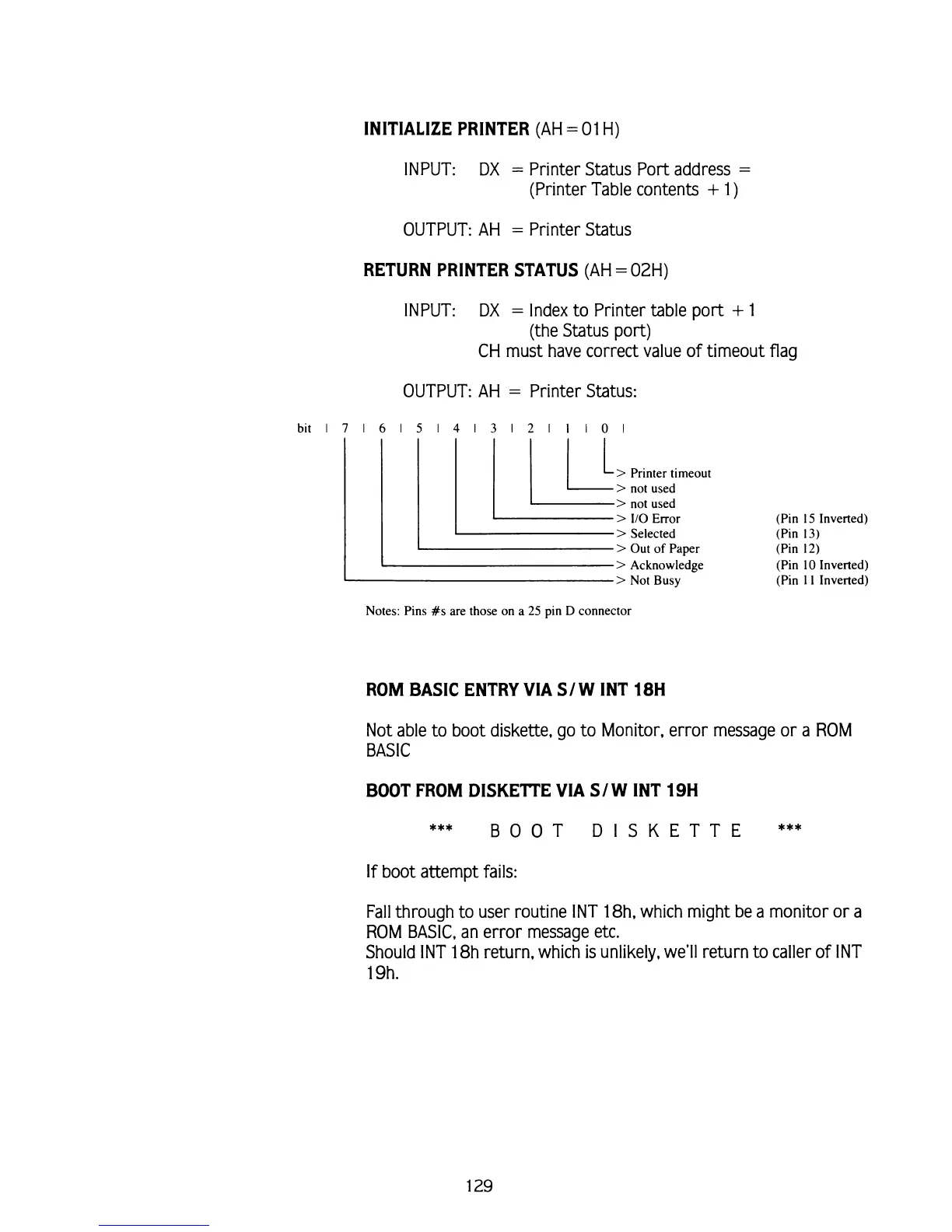
Printer Status:
>
Printer timeout
>
not used
>
not used
>
I10 Error (Pin 15 Inverted)
>
Selected (Pin
13)
>
Out of Paper (Pin 12)
>
Acknowledge (Pin 10 Inverted)
L
>
Not Busy (Pin
l
I
Inverted)
Notes: Pins
#S
are those on a 25 pin
D
connector
ROM BASIC ENTRY VIA
S/
W
INT 18H
Not able to boot diskette, go to Monitor, error message or a ROM
BASIC
BOOT FROM DISKE7TE VIA S/
W
INT 19H
***
BOOT DISKETTE
***
If boot attempt fails:
Fall through to user routine INT
18h, which might be a monitor or a
ROM BASIC, an error message etc.
Should INT
18h return, which
is
unlikely, we'll return to caller of INT
19h.















 To Next Page