EasyManua.ls Logo

Commodore Amiga - Page 41

Commodore Amiga
162 pages
Print Icon
To Next Page IconTo Next Page
To Previous Page IconTo Previous Page
Loading...
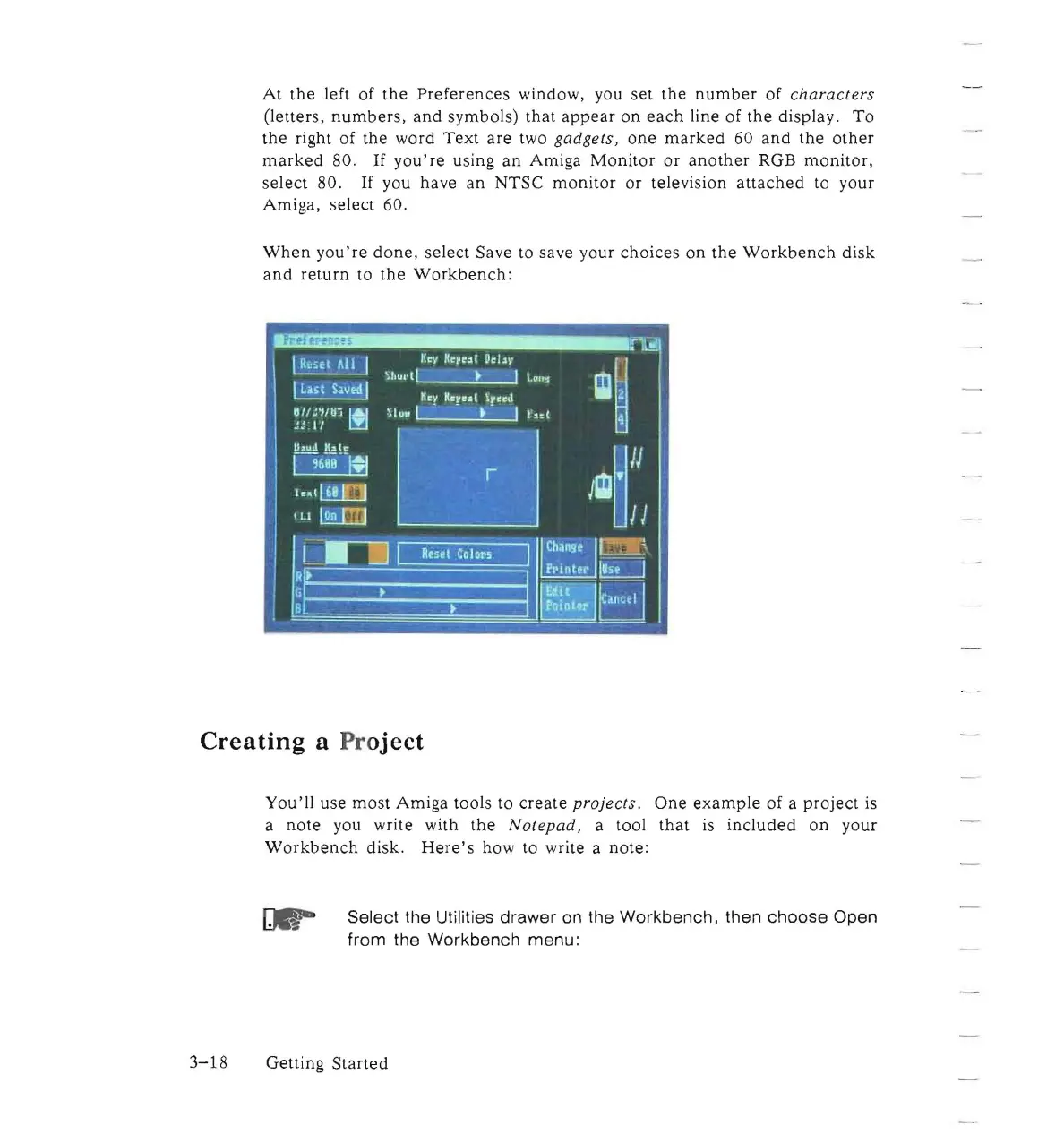
At
the
left of
the
Preferences
window, you
set
the
number
of
characters
(letters,
numbers,
and
symbols)
that
appear
on
each
line of
the
display.
To
the
right of
the
word
Text
are
two
gadgets
,
one
marked
60
and
the
other
marked
80.
If
you're
using
an
Amiga
Monitor
or
another
RGB
monitor,
select
80.
If
you have
an
NTSC
monitor
or
television
attached
to
your
Amiga,
select
60.
When
you're
done,
select Save to save your
choices
on
the
Workbench
disk
and
return
to
the
Workbench
:
Creating
a
Pr
oject
You'll
use
most
Amiga
tools to
create
projects.
One
example
of a
project
is
a
note
you write with
the
Notepad,
a tool
that
is
included
on
your
Workbench
disk.
Here's
how to write a note:
Select
the Utilities
drawer
on the
Workbench,
then
choose
Open
from
the
Workbench
menu:
3-18
Getting
Started

Other manuals for Commodore Amiga

Related product manuals