• •
••
Printers
If
you've
attached
a
printer
to the Amiga, you
need
to tell the Amiga the
type of
printer
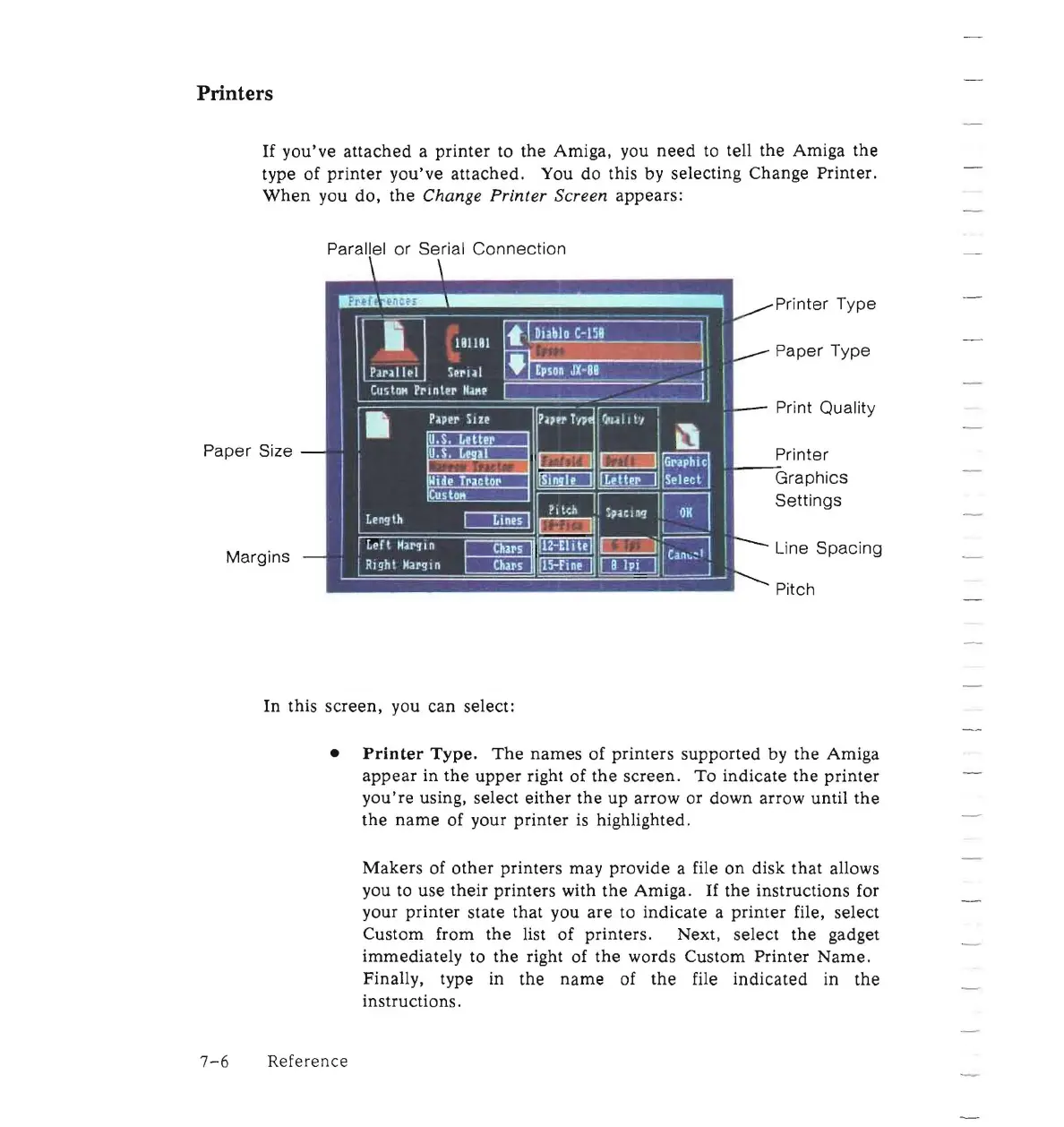
you've attached. You do this by selecting Change Printer.
When
you do,
the
Change Printer Screen appears:
•
l;=;t l,1
~
DI
:
~~~~-
\
~5~
" 11\
11
\
I.
181101
PaNII~1
S~rlll
• • 1
Epson
JX-88
_ • _ _
II
I
CustD"
Prl
nter
1101"'
~~
:.;;;
•
P~per
SI zr
1.?'~
r,lP
;
'1,,~
II
t'/
~
U.S.
LeHer
U.S,
L
i:m
e
ill
c=l
c=J
IR
GNPhiC
I
lIide
Tractor
Cu
lt1
to
ll!l
Leng
th
DIillJ
c=:=J
ULeft
H~I'~i
n
II
Chars
~~B
Can~:1
mRight )largln II
Chil's
~OJEIJ
!
Paper Size
Margins
. - .
•
~
-
~
In this screen, you can select:
~~Select
?lteh
U
~~
.IL.-!
I
.-
Paper Type
:
•
Line
Spacing
•
Printer
Type.
The
names
of printers supported by the Amiga
appear
in
the
upper
right of
the
screen.
To
indicate the
printer
you're
using, select
either
the up arrow or down arrow until
the
the
name
of your
printer
is highlighted,
Makers
of
other
printers may provide a file
on
disk that allows
you
to
use their printers with
the
Amiga.
If
the instructions for
your
printer
state that you
are
to indicate a
printer
file, select
Custom from
the
list of printers, Next, select the gadget
immediately to the right of
the
words Custom Printer
Name,
Finally, type in the
name
of
the
file
indicated
in
the
instructions.
7-6
Reference














 To Next Page