EasyManua.ls Logo

Commodore PC - Page 132

Commodore PC
414 pages
Print Icon
To Next Page IconTo Next Page
To Previous Page IconTo Previous Page
Loading...
60
MS-DOS
User's
Reference
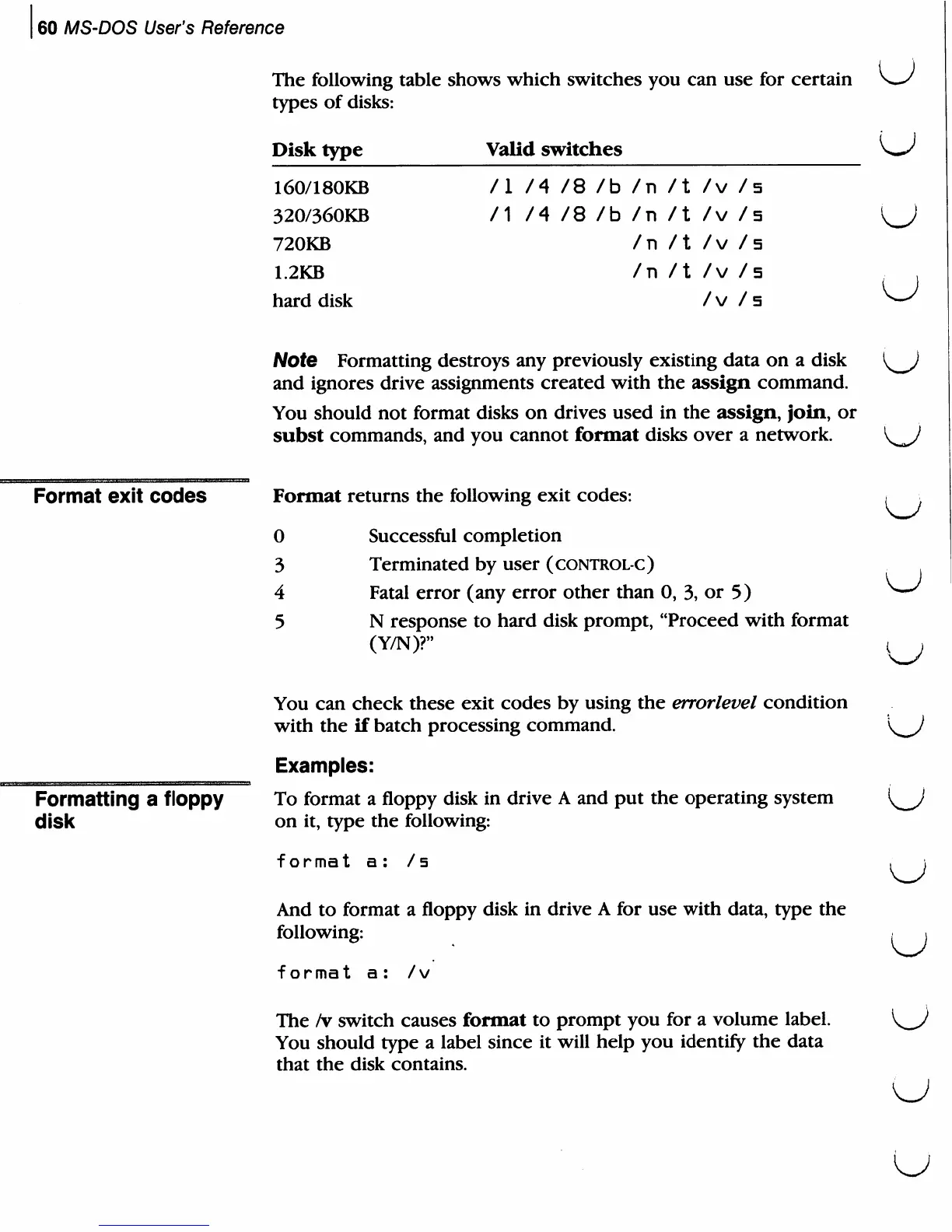
The
following
table
shows
which
switches
you
can
use
for
certain
\~s
types
of
disks:
U
u
Disk
type
160/180KB
320/360KB
720KB
1.2KB
hard
disk
Valid
switches
/I
/4
/8
/b
/1
/4
/8
/b
/n
/n
/n
/n
/t
/t
/t
/t
/v
-
/v
-
/v
-
/v
-
/v
t
/
5
/5
/5
/s
Format
exit
codes
Note
Formatting
destroys
any
previously
existing
data
on
a
disk
and
ignores
drive
assignments
created
with
the
assign
command.
You
should
not
format
disks
on
drives
used
in
the
assign,
join,
or
subst
commands,
and
you
cannot
format
disks
over
a
network.
Format
returns
the
following
exit
codes:
0
Successful
completion
3
Terminated
by
user
(control-c)
4
Fatal
error
(any
error
other
than
0,
3,
or 5)
5
N
response
to
hard
disk
prompt,
"Proceed
with
format
(Y/N)?"
Formatting
a
floppy
disk
You
can
check
these
exit
codes
by
using
the
errorlevel
condition
with
the
if
batch
processing
command.
Examples:
To
format
a
floppy
disk
in
drive
A
and
put
the
operating
system
on
it,
type
the
following:
format
a:
/s
And
to
format
a
floppy
disk
in
drive
A
for
use
with
data,
type
the
following:
format
a:
/v
The
/v
switch
causes
format
to
prompt
you
for
a
volume
label.
You
should
type
a
label
since
it
will
help
you
identify
the
data
that
the
disk
contains.
KJ
U

Related product manuals