EasyManua.ls Logo

Commodore PC - Page 147

Commodore PC
414 pages
Print Icon
To Next Page IconTo Next Page
To Previous Page IconTo Previous Page
Loading...
MS-DOS
Commands
75
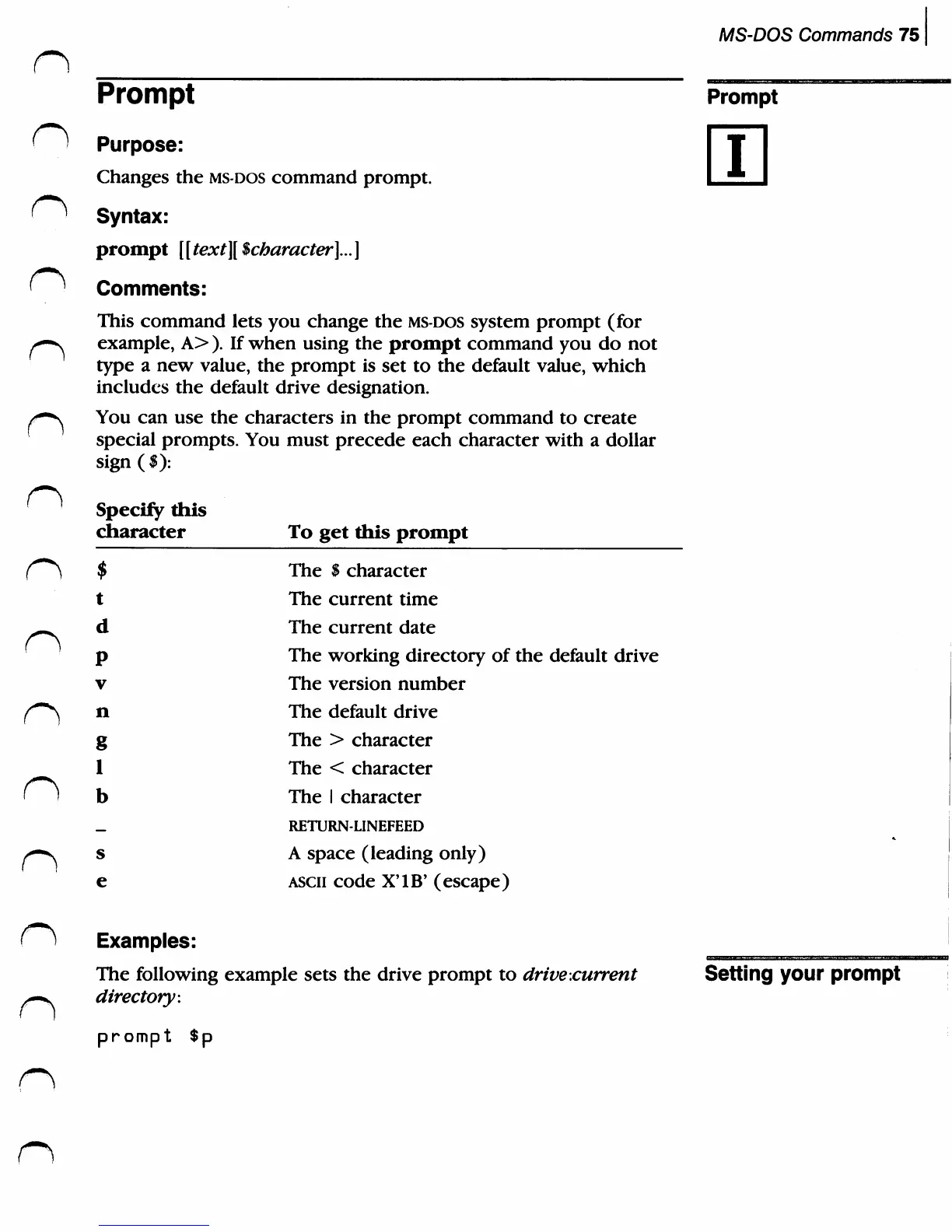
Prompt
'
)
Purpose:
Changes
the
ms-dos
command
prompt.
<^
Syntax:
prompt
[ [
text][
$character]...
]
<^
Comments:
This
command
lets
you
change
the
ms-dos
system
prompt
(for
/*-v
example,
A>
).
If
when
using
the
prompt
command
you
do
not
type
a
new
value,
the
prompt
is
set
to
the
default
value,
which
includes the
default
drive
designation.
/■"■s
You
can
use
the
characters
in
the
prompt
command
to
create
special
prompts.
You
must
precede
each
character
with
a
dollar
sign($):
Prompt
n
n
I
Specify
this
character
$
t
d
P
V
n
g
1
b
_
s
e
To
get
this
prompt
The
$
character
The
current
time
The
current
date
The
working
directory
of
the
default
drive
The
version
number
The
default
drive
The
>
character
The
<
character
The
1
character
RETURN-LINEFEED
A
space
(leading
only)
ascii
code
X'lB'
(escape)
Examples:
The
following
example
sets
the
drive
prompt
to
drive
.current
directory:
prompt
$p
Setting
your
prompt

Related product manuals