EasyManua.ls Logo

Commodore PC - Page 389

Commodore PC
414 pages
Print Icon
To Next Page IconTo Next Page
To Previous Page IconTo Previous Page
Loading...
Appendix
F
Configuring
Your
Hard
Disk
(Fdisk)
3171
r
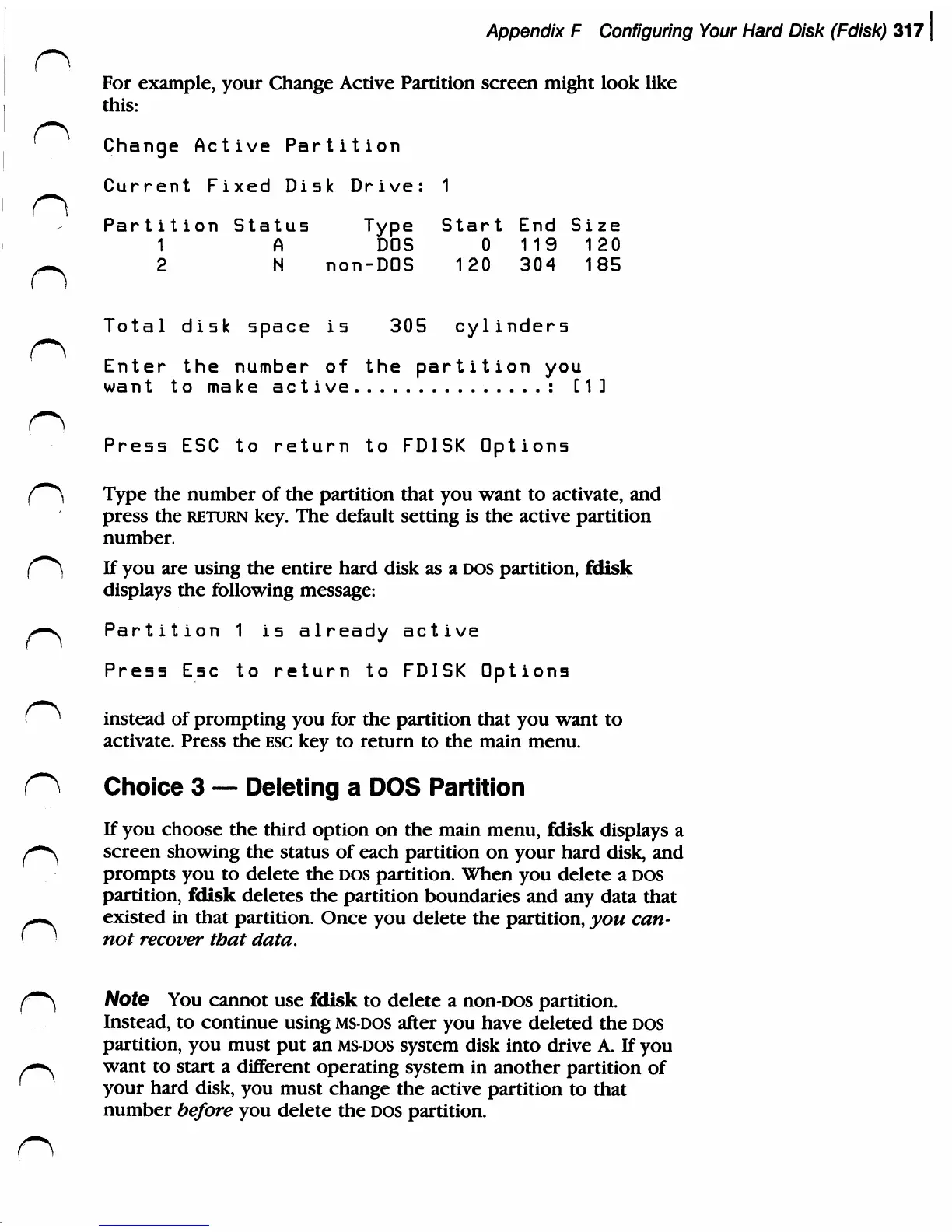
For
example,
your
Change
Active
Partition
screen
might
look
like
this:
'
Change Active
Partition
Current
Fixed
Disk
Drive:
1
Partition
Status
Type
Start
End
Size
1
A
DOS
0
119
120
-^
2
N
non-DOS
120
304
185
Total
disk
space
is
305
cylinders
Enter
the
number
of
the
partition
you
want
to
make
active
:
[11
Press
ESC
to
return
to
FDISK
Options
i^^
Type
the
number
of
the
partition
that
you
want
to
activate,
and
press the
return
key.
The
default
setting
is
the
active
partition
number.
(****)
If
you
are
using
the
entire
hard
disk
as
a
DOS
partition,
fdisk
displays
the
following
message:
>-s
Partition
1
is
already
active
Press
Esc
to
return
to
FDISK
Options
(
^
instead
of
prompting
you
for
the
partition
that
you
want
to
activate.
Press
the
esc
key
to
return
to
the
main
menu.
O
Choice
3
Deleting
a
DOS
Partition
If
you
choose
the
third
option
on
the
main
menu,
fdisk
displays
a
f~^
screen
showing
the
status
of
each
partition
on
your
hard
disk,
and
prompts
you
to
delete
the
DOS
partition.
When
you
delete
a
DOS
partition,
fdisk
deletes
the
partition
boundaries
and
any
data
that
n
existed
in
that
partition.
Once
you
delete
the
partition,
you
can
not
recover
that
data.
f*\
Note
You
cannot
use
fdisk
to
delete
a
non-DOS
partition.
Instead,
to
continue
using
ms-dos
after
you
have
deleted
the
DOS
partition,
you
must
put an
ms-dos
system
disk
into
drive
A.
If
you
y—-v
want
to
start
a
different
operating
system
in
another
partition
of
your
hard
disk,
you
must
change
the
active
partition
to
that
number
before
you
delete
the
DOS
partition.