EasyManua.ls Logo

Commodore PC - Page 390

Commodore PC
414 pages
Print Icon
To Next Page IconTo Next Page
To Previous Page IconTo Previous Page
Loading...
1318
MS-DOS
User's
Reference
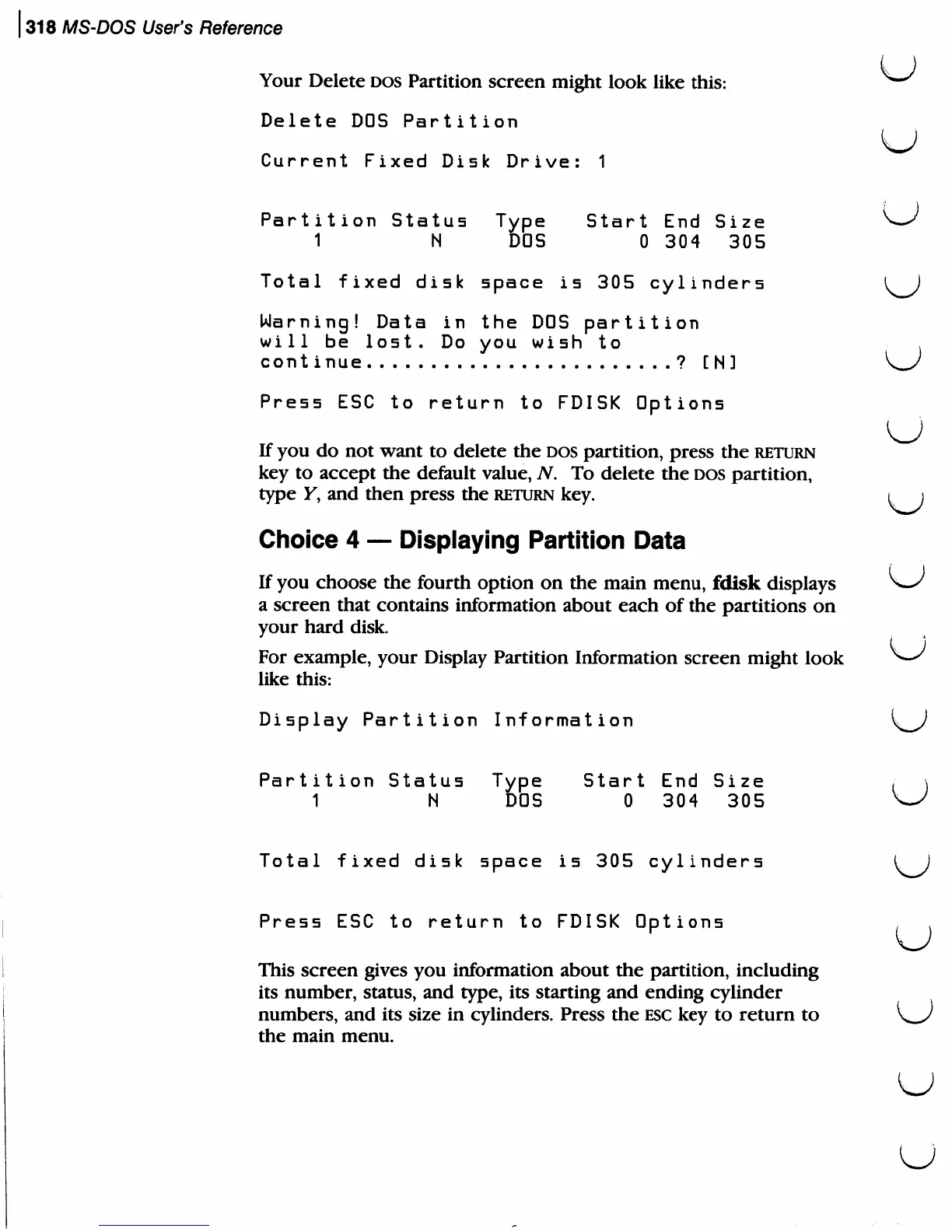
Your
Delete
DOS
Partition
screen
might
look
like
this:
^"^
Delete
DOS
Partition
U
Current
Fixed
Disk
Drive:
1
Partition
Status
Type
Start
End
Size
O*
1
N
DOS
0
304
305
Total
fixed
disk
space
is
305
cylinders
\^J
Warning!
Data
in
the
DOS
partition
will
be
lost.
Do
you
wish
to
,
continue
?
[
N
]
W
Press
ESC
to
return
to
FDISK
Options
If
you
do
not
want
to
delete
the
DOS
partition,
press
the
return
key
to
accept
the
default
value,
N.
To
delete
the
dos
partition,
type
K,
and
then
press
the
return
key.
t
j
Choice
4
Displaying
Partition
Data
If
you
choose
the
fourth
option
on
the
main
menu,
fdisk
displays
>w/
a
screen
that
contains
information
about
each
of
the
partitions
on
your
hard
disk.
For
example,
your
Display
Partition
Information
screen
might
look
^-^
like
this:
Display
Partition
Information
^J
Partition
Status
Type
Start
End
Size
;
\
1
N
DOS
0
304
305
w
Total
fixed
disk
space
is
305
cylinders
I
i
Press
ESC
to
return
to
FDISK
Options
This
screen
gives
you
information
about
the
partition,
including
its
number,
status,
and
type,
its
starting
and
ending
cylinder
numbers,
and
its
size
in
cylinders.
Press
the
esc
key
to
return
to
the
main
menu.
(
u