EasyManua.ls Logo

Commodore Plus 4 - Page 102

Commodore Plus 4
464 pages
Print Icon
To Next Page IconTo Next Page
To Previous Page IconTo Previous Page
Loading...
90
The
BASIC
Language
Parameters:
string
variable,
corner
coordinates,
opposite
corner
coordinates
1.
The
string
variable
is
the
name
assigned
to
the
graphic
screen
area
saved
with
the
SSH
APE
command.
Retrieve
the
area
with
GSH
APE
by
using
the
same
string-variable
name
used
in
the
SSHAPE
command.
2.
Give
the
coordinates
for
one
corner
of
the
shape
you
want
to
save.
3.
Give
the
coordinates
for
the
opposite
(diagonal)
corner.
Example:
10
GRAPHIC
1,1
SO
FOR
X
=
0
TO
90STEP
10
30
CIRCLE,
160,100,
60,50,,,X,120
40
NEXT
45
REM
SAVE
AN
AREA
PROM
THE
DRAWING
50
SSHAPE
A$,
90,60,
200,72
55
REM
DISPLAY
THE
SAVED
AREA
IN
REVERSE
AT
THE
TOP
OF
THE
SCREEN
60
GSHAPEAl,
0,5,1
STatus
Abbr.
none
Reserved
variable
name
that
contains
a
value
representing
the
status
of
the
most
recent
input/output
operation.
You
can
read
the
status
of
most
peripheral
devices.
PRINT
ST
to
display
the
status
of
the
last
operation
using
a
peripheral;
0
usually
means
the
operation
was
successful.
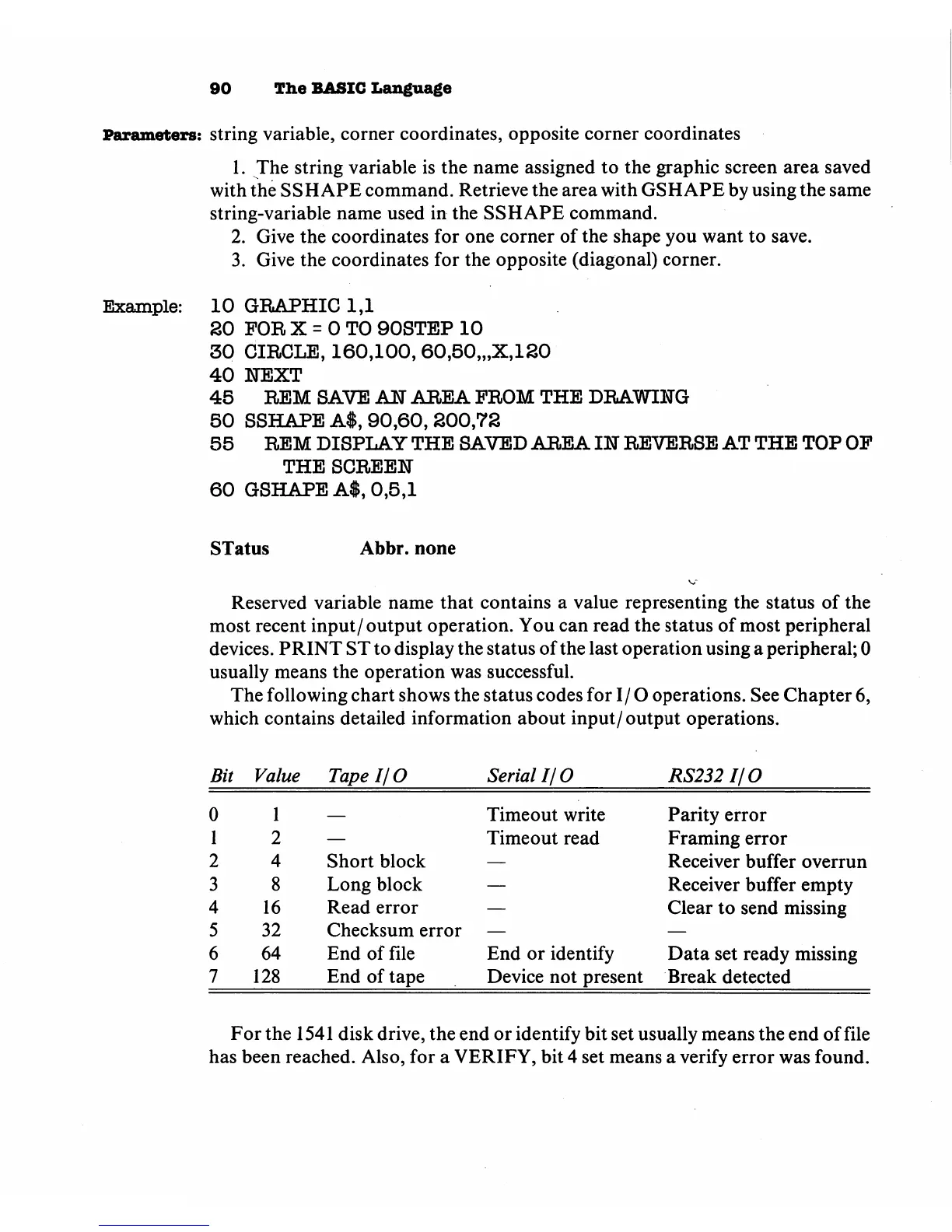
The
following
chart
shows
the
status
codes
for
I/O
operations.
See
Chapter
6,
which
contains
detailed
information
about
input/output
operations.
Bit
Value
Tape
I/O
Serial
I/O
RS232I/O
0
1
2
3
4
5
6
7
1
2
4
8
16
32
64
128
Short
block
Long
block
Read
error
Checksum
error
End
of
file
End
of
tape
Timeout
write
Timeout
read
End
or
identify
Device
not
present
Parity
error
Framing
error
Receiver
buffer
overrun
Receiver
buffer
empty
Clear
to
send
missing
Data
set
ready
missing
Break
detected
For
the
1541
disk
drive,
the
end
or
identify
bit set
usually
means
the
end
of
file
has
been
reached.
Also,
for
a
VERIFY,
bit
4
set
means
a
verify
error
was
found.

Other manuals for Commodore Plus 4

Related product manuals