EasyManua.ls Logo

Commodore Plus 4 - Page 167

Commodore Plus 4
464 pages
Print Icon
To Next Page IconTo Next Page
To Previous Page IconTo Previous Page
Loading...
Using
the Screen
188
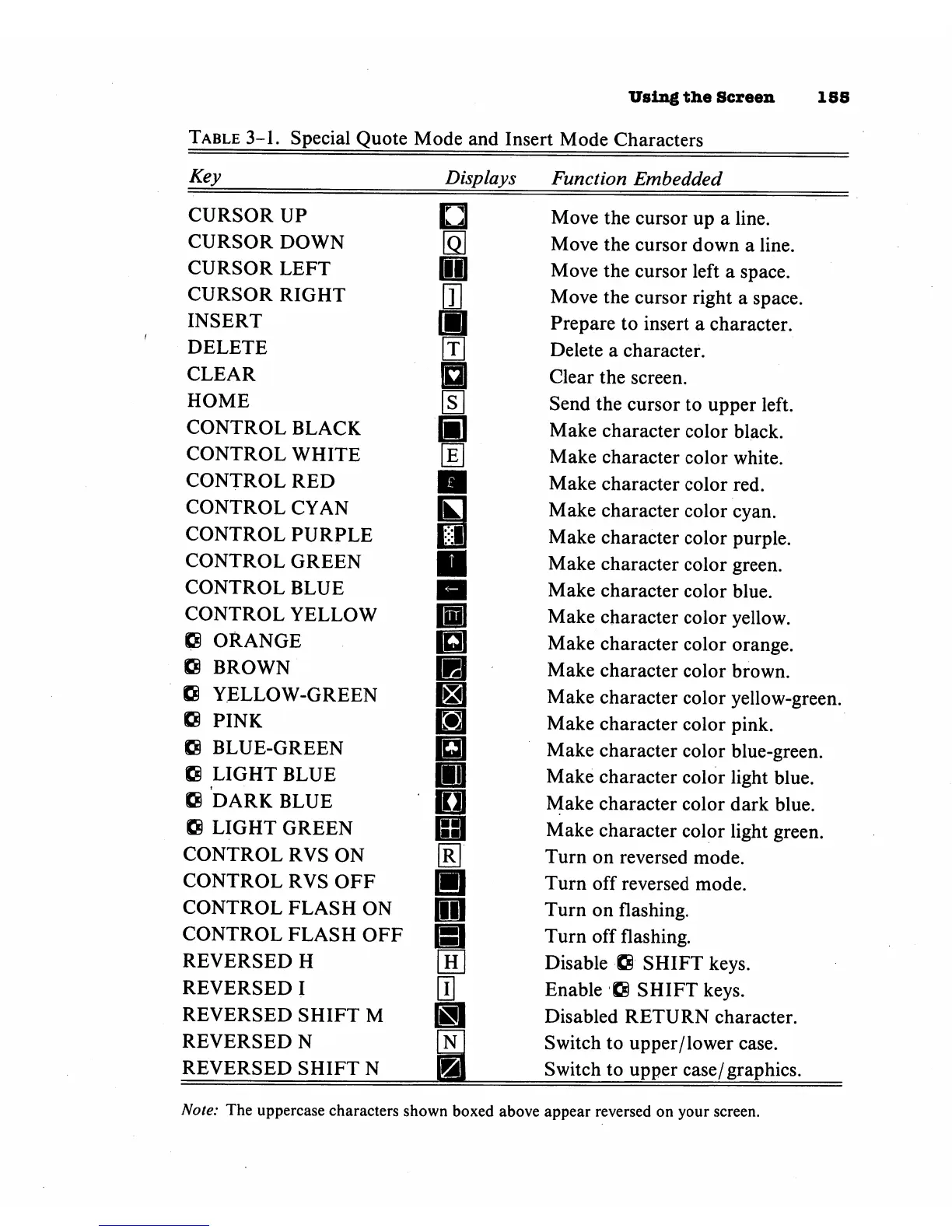
Table
3-1.
Special
Quote
Mode
and
Insert
Mode
Characters
Key
Displays
Function
Embedded
CURSOR
UP
CURSOR
DOWN
CURSOR
LEFT
CURSOR
RIGHT
INSERT
DELETE
CLEAR
HOME
CONTROL
BLACK
CONTROL
WHITE
CONTROL RED
CONTROL
CYAN
CONTROL
PURPLE
CONTROL
GREEN
CONTROL
BLUE
CONTROL
YELLOW
K8
ORANGE
G
BROWN
C
YELLOW-GREEN
£8
PINK
88
BLUE-GREEN
Kg
LIGHT
BLUE
SB
DARK
BLUE
SS
LIGHT
GREEN
CONTROL
RVS
ON
CONTROL
RVS
OFF
CONTROL
FLASH
ON
CONTROL
FLASH
OFF
REVERSED
H
REVERSED
I
REVERSED
SHIFT
M
REVERSED
N
REVERSED
SHIFT
N
i i
Move
the
cursor
up
a
line.
Move
the
cursor
down
a
line.
Move
the
cursor
left
a
space.
Move
the
cursor
right
a
space.
Prepare
to
insert
a
character.
Delete
a
character.
Clear
the
screen.
Send
the
cursor
to
upper
left.
Make
character
color
black.
Make
character
color
white.
Make
character
color
red.
Make
character
color
cyan.
Make
character
color
purple.
Make
character
color
green.
Make
character
color
blue.
Make
character
color
yellow.
Make
character
color
orange.
Make
character
color
brown.
Make
character
color
yellow-green.
Make
character
color
pink.
Make
character
color
blue-green.
Make
character
color
light
blue.
Make
character
color
dark
blue.
Make
character
color
light
green.
Turn
on
reversed
mode.
Turn
off
reversed
mode.
Turn
on
flashing.
Turn
off
flashing.
Disable
ffi
SHIFT
keys.
Enable
-Q
SHIFT
keys.
Disabled
RETURN
character.
Switch
to
upper/
lower
case.
Switch
to
upper
case/graphics.
Note:
The
uppercase
characters
shown
boxed
above
appear
reversed
on
your
screen.

Other manuals for Commodore Plus 4

Related product manuals