EasyManua.ls Logo

Commodore Plus 4 - Page 390

Commodore Plus 4
464 pages
Print Icon
To Next Page IconTo Next Page
To Previous Page IconTo Previous Page
Loading...
Example:
378
Using
Peripheral
Devices
2.
Check
for
errors
by
examining
the
carry
bit
and
status
byte.
All
the
files
in
use
can
be
closed
and
the
input
and
output
channels
reset
to
their
default
devices
by
calling
CLALL
($FFE7).
Print
The
following
outlines
the
operations
required
to
send
a
byte
(data
or
control)
to
an
open
printer
file:
1.
Load
.X
with
the
logical
file
number
of
the
printer
file.
Designate
it
as
the
output
channel
by
calling
CHOUT
($FFC9).
2.
Check
for
errors.
3.
Send
data
to
the
channel
with
BSOUT
($FFD2).
4.
When
all
data
has
been
sent,
return
the
input
and
output
channels
to
default
(keyboard
and
screen)
by
calling
CLRCH
($FFCC)
and
close
the
file.
Or
call
CLALL
($FFE7)
to
close
all
the
files
and
reset
the
input
and
output
channels.
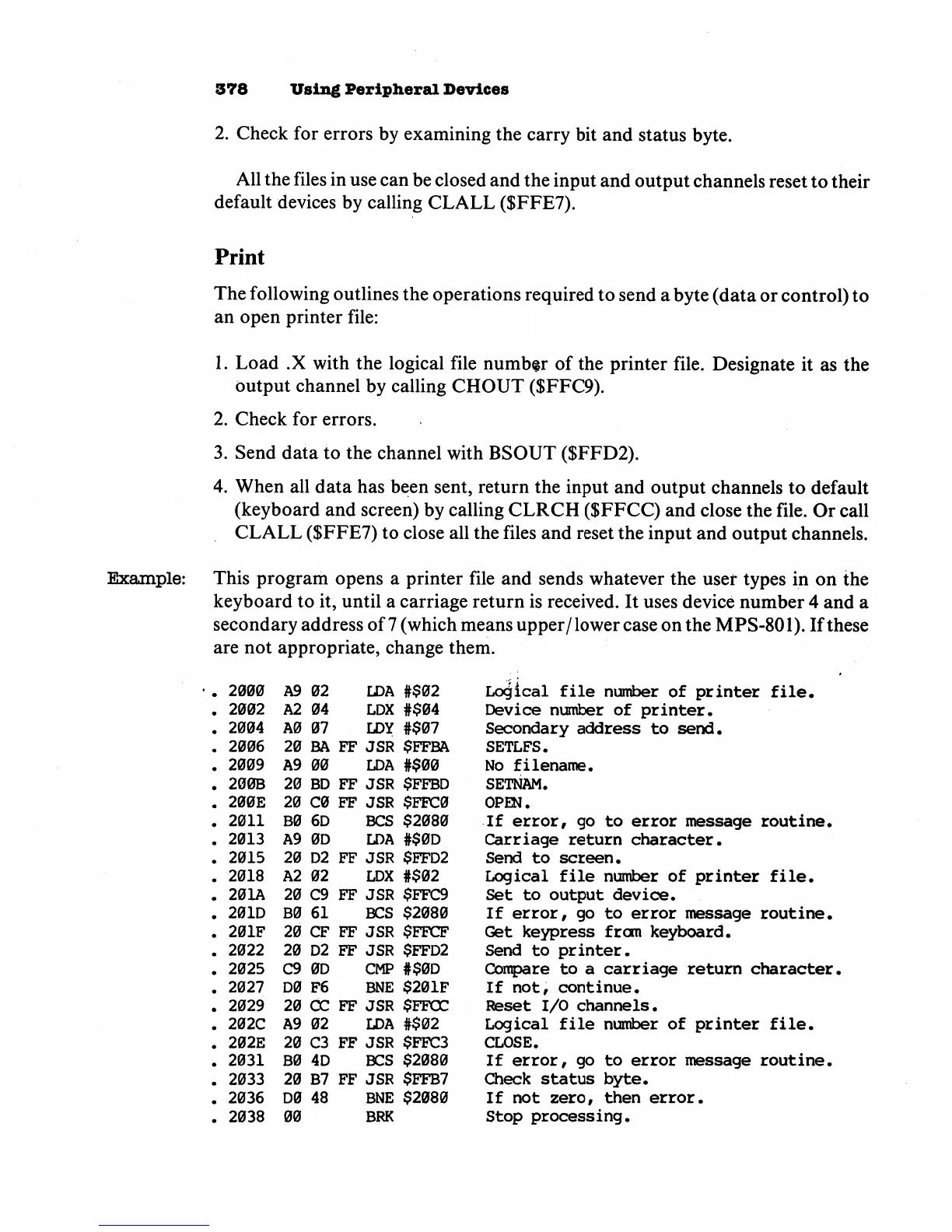
This
program
opens
a
printer
file
and
sends
whatever
the
user
types
in
on
the
keyboard
to
it,
until
a
carriage
return
is
received.
It
uses
device
number
4
and
a
secondary
address
of
7
(which
means
upper/lower
case
on
the
MPS-801).
If
these
are
not
appropriate,
change
them.
2000
2002
2004
2006
2009
200B
200E
2011
2013
2015
2018
201A
201D
201F
2022
2025
2027
2029
202C
202E
2031
2033
2036
2038
A9
A2
A0
20
A9
20
20
B0
A9
20
A2
20
B0
20
20
C9
D0
20
A9
20
B0
20
D0
00
02
04
07
BA
00
BD
C0
6D
0D
D2
02
C9
61
CF
D2
0D
F6
CC
02
C3
4D
B7
48
FF
FF
FF
FF
FF
FF
FF
FF
FF
FF
LDA
LDX
LDY
JSR
LDA
JSR
JSR
BCS
LDA
JSR
LDX
JSR
BCS
JSR
JSR
CMP
BNE
JSR
LDA
JSR
BCS
JSR
BNE
BRK
#$02
#$04
#$07
$FFBA
#$00
$FFBD
$FFC0
$2080
#$0D
$FFD2
#$02
$FFC9
$2080
$FFCF
$FFD2
#$0D
$201F
$FFOC
#$02
$FFC3
$2080
$FFB7
$2080
Logical
file
number
of
printer
file.
Device
number
of
printer.
Secondary
address
to
send.
SETLFS.
No
filename.
SETNAM.
OPEN.
If
error,
go
to
error
message
routine.
Carriage
return
character.
Send
to
screen.
Logical
file
number
of
printer
file.
Set
to
output
device.
If
error,
go
to
error
message
routine.
Get
keypress
from
keyboard.
Send
to
printer.
Compare
to
a
carriage
return
character
If
not,
continue.
Reset
I/O
channels.
Logical
file
number
of
printer
file.
CLOSE.
If
error,
go
to
error
message
routine.
Check
status
byte.
If
not
zero,
then
error.
Stop
processing.