EasyManua.ls Logo

Commodore Plus 4 - Page 101

Commodore Plus 4
234 pages
Print Icon
To Next Page IconTo Next Page
To Previous Page IconTo Previous Page
Loading...
To
switch
from
normal
graphics
(also
called
Text
Mode)
to
high-res,
just
type
the
command
GRAPHIC
2,1
and
hit
RETURN
.
What
hap
pens?
The
screen
goes
blank
and
the
cursor
reappears
near
the
bot
tom
of
the
screen.
The
Plus/4
divided
up
the
screen
into
2
separate
sections
the
top
for
g'aphics
and
the
bottom
five
lines
for
text-
If
you
don't
want
the
bottom
five
lines
for
text,
you
can
use
the
command
GRAPHIC
1.1,
but
you
won't
be
able
to
see
any
commands
you
type.
You
can
switch
back
and
forth
from
graphics
to
text
using
the
GRAPHIC
command.
The
command GRAPHIC
0
switches
the
screen
back
to
text,
while
GRAPHIC
2
switches
back
to
high-res
without
eras
ing
the
screen.
Adding
,1
after
the
command
erases
the
screen
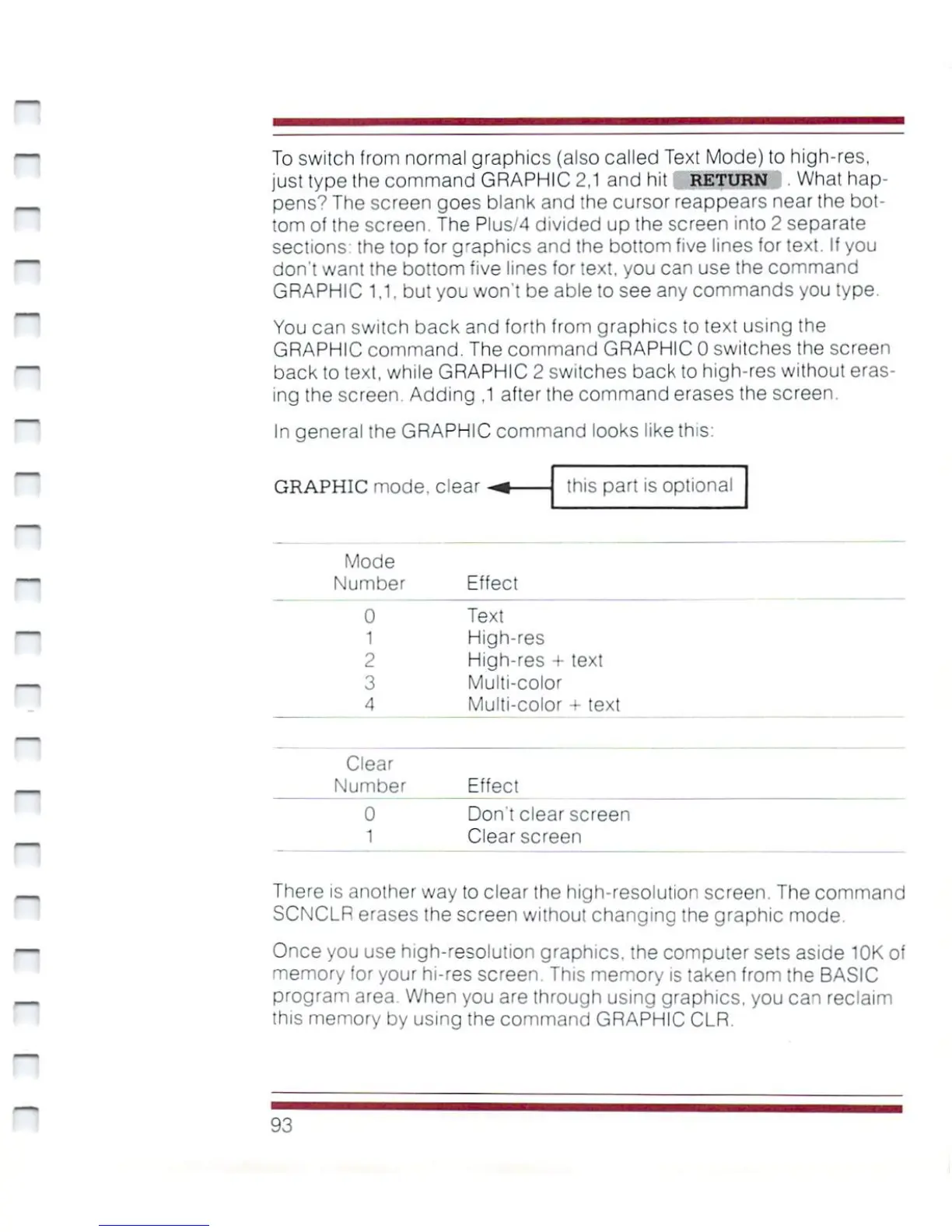
In
general
the
GRAPHIC
command
looks
like
this:
GRAPHIC
mode,
dear
this
part
is
optional
Mode
Number
Effect
Text
High-res
High-res
+
text
Multi-color
Multi-color
+
text
Clear
Number
0
1
Effect
Don't
clear
screen
Clear
screen
There
is
another
way
to
clear
the
high-resolution
screen.
The
command
SCNCLR
erases
the
screen
without
changing
the
graphic
mode.
Once
you use
high-resolution
graphics,
the
computer
sets
aside
10K
of
memory
for
your
hi-res
screen.
This
memory
is
taken
from
the
BASIC
program
area.
When
you
are
through
using
graphics,
you
can
reclaim
this
memory
by
using
the
command
GRAPHIC
CLR.
93

Other manuals for Commodore Plus 4

Related product manuals