EasyManua.ls Logo

Commodore Plus 4 - Page 111

Commodore Plus 4
234 pages
Print Icon
To Next Page IconTo Next Page
To Previous Page IconTo Previous Page
Loading...
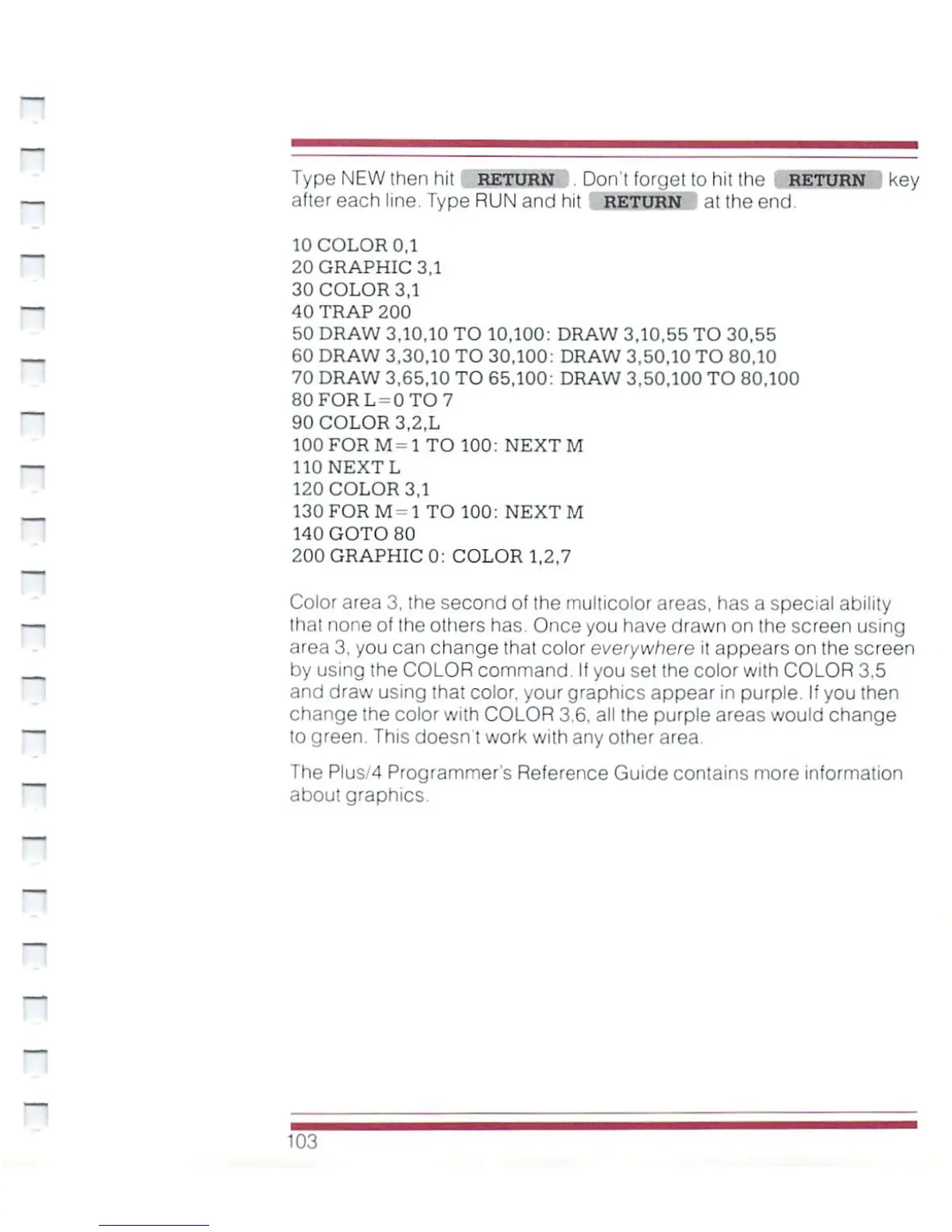
Type
NEW
then
hit
'
RETURN
.
Don't
forget
to
hit
the
RETURN
key
after
each
line.
Type
RUN
and
hit
RETURN
at
the
end
10
COLOR
0,1
20
GRAPHIC
3,1
30
COLOR
3,1
40
TRAP
200
50
DRAW
3.10,10
TO
10,100:
DRAW
3,10.55
TO
30.55
60
DRAW
3,30,10
TO
30,100:
DRAW
3,50,10
TO
80,10
70
DRAW
3,65,10
TO
65,100:
DRAW
3,50.100
TO
80,100
80FORL
=
0TO7
90
COLOR
3,2,L
100
FOR
M=
1
TO
100:
NEXT
M
110
NEXT
L
120
COLOR
3,1
130FORM-1
TO
100:
NEXT
M
140
GOTO
80
200
GRAPHIC
0;
COLOR
1,2,7
Color
area
3,
the
second
of
the
multicolor
areas,
has
a
special
ability
that
none
of
the
others
has.
Once
you
have
drawn
on
the
screen
using
area
3,
you
can
change
that
color
everywhere
it
appears
on
the
screen
by
using
the
COLOR
command.
If
you
set
the
color
with
COLOR
3.5
and
draw
using
that
color,
your
graphics
appear
in
purple.
If
you
then
change
the
color
with
COLOR
3.6.
all
the
purple
areas
would
change
to
green.
This
doesn
t
work
with
any
other
area
The
Plus/4
Programmer's
Reference
Guide
contains
more
information
about
graphics
103

Other manuals for Commodore Plus 4

Related product manuals