EasyManua.ls Logo

Commodore Plus 4 - Page 21

Commodore Plus 4
234 pages
Print Icon
To Next Page IconTo Next Page
To Previous Page IconTo Previous Page
Loading...
If
an
Adapter
is
Necessary
Remove
to
Connect
Anlenna
Lead
lo
TV
Selecting
A
Channel
On
Your
TV
YOUr
Pnmmnrinro
PI
I
I<!/A
UOmmOQOre
rLUO/4
tO
a
Monitor
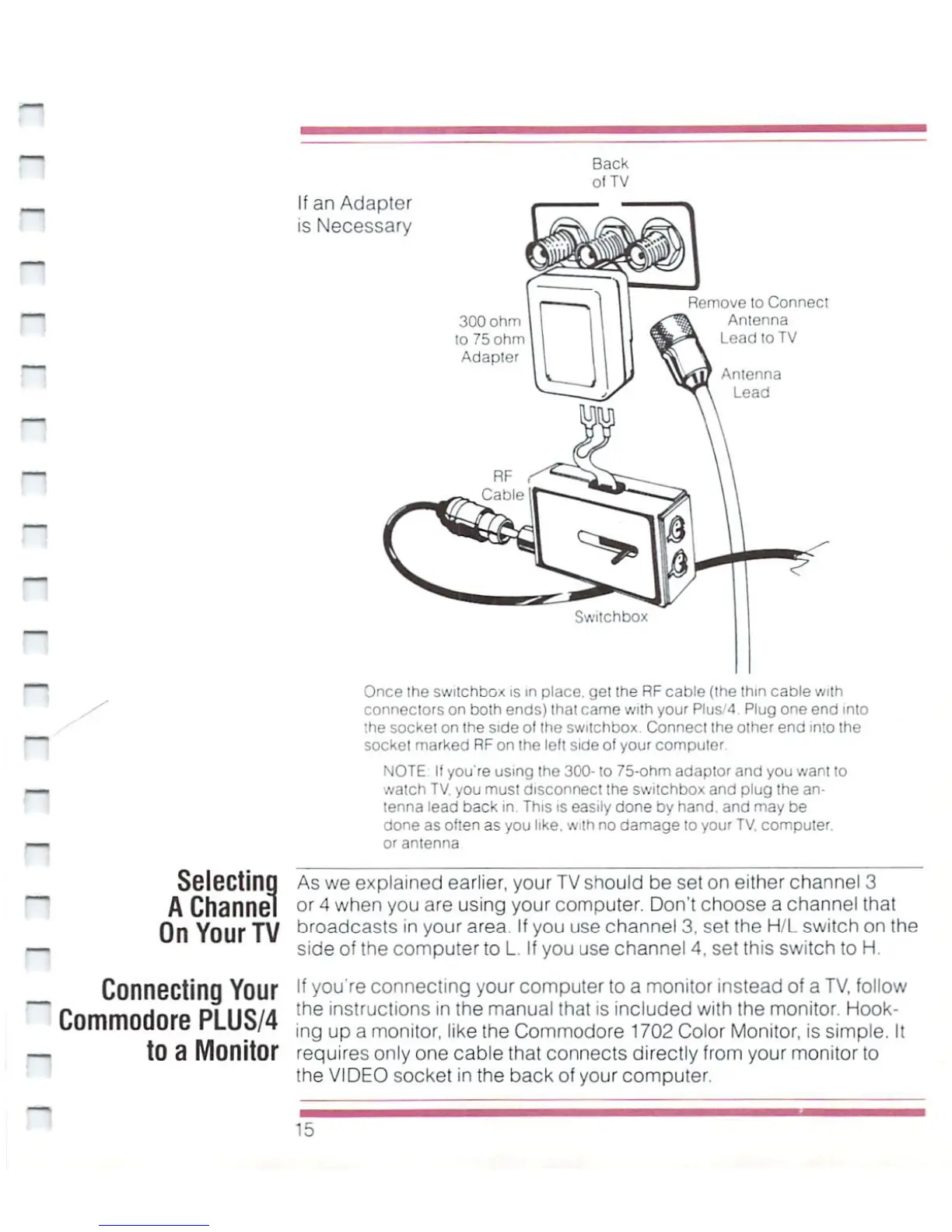
Once
the
switchbox
is
m
place,
gel the
RF
cable
(the
thin
cable
with
connectors
on
both
ends)
that
came
with
your
Plus"!
Plug
one
end
into
;he
sockei
on
the
side
of
the
switchbox.
Conned
the
other
end
into
the
socket
marked
RF
on
the
lelt
side
of
your
computer
NOTE
II
you're
using
the
300-
to
75-ohm
adaptor
and
you
want
to
watch
TV,
you
must
disconnect
the
switchbox
and
plug
the
an
tenna
lead
back
in.
This
is
easily
done
by
hand,
and
may
be
done
as
often
as
you
like,
with
no
damage
to
your
TV.
computer,
orantenna
As
we
explained
earlier,
your
TV
should
be
set
on
either
channel
3
or
4
when
you
are
using
your
computer.
Don't
choose
a
channel
that
Droadcas!s
in
your
area.
If
you use
channel
3,
set
the
H/L
switch
on
the
side
of
the
computer
to
L.
If
you
use
channel
4.
set
this
switch
to
H.
lf
y°u
re
connecting
your
computer
to
a
monitor
instead
of
a
TV,
follow
'^e
'ns'ruc''ons
'n
tne
manual
thai
is
included
with
the
monitor.
Hook-
ing
up
a
monjtori
|jj<e
the
Commodore
1702
Color
Monitor,
is
simple.
It
requires
only
one
cable
that
connects
directly
from your
monitor
to
the
VIDEO
socket
in
the
back
of
your
computer.
'-"

Other manuals for Commodore Plus 4

Related product manuals