EasyManua.ls Logo

Commodore Plus 4 - Page 20

Commodore Plus 4
234 pages
Print Icon
To Next Page IconTo Next Page
To Previous Page IconTo Previous Page
Loading...
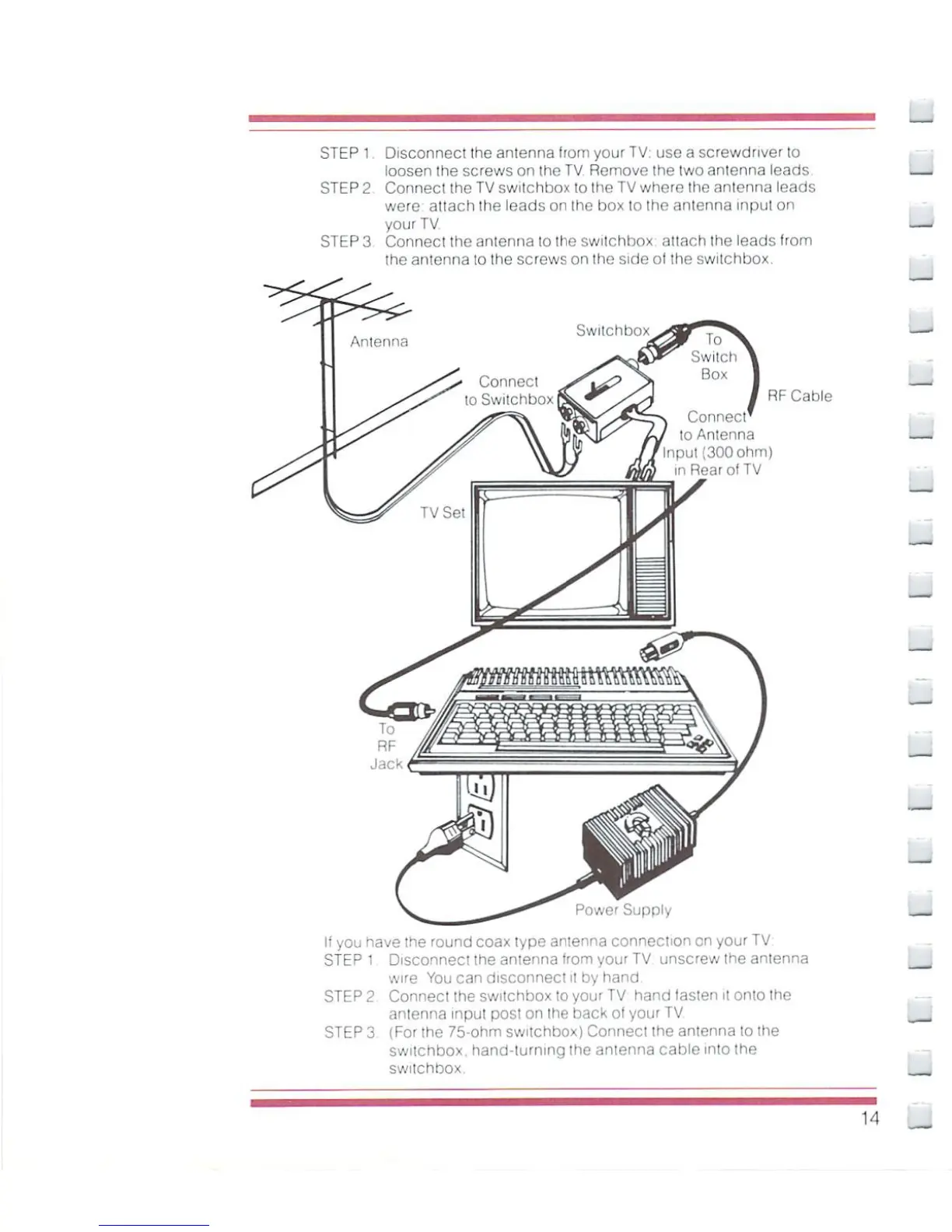
STEP
1
Disconnect
the
antenna
from
your
TV:
use
a
screwdriver
to
loosen
the
screws
on
the
TV
Remove
the
two
antenna
leads
STEP
2
Connect
the
TV
swilchbox
lo
Ihe
TV
where
Ihe
anienna
leads
were
attach
the
leads
on
the
box
to
Ihe
antenna
inpul
on
your
TV
STEP
3
Connect
the
antenna
to
Ihe
swilchbox
attach
the
leads
from
the
antenna
to
the
screws
on
the
side
of
the
switchbox.
Connect
to
Antenna
input
(300
ohm]
n
Rear
of
TV
RF
Cable
Power
Supply
li
you
have
the
round
coax
type
anienna
connection
on
your
TV
sf EP
1
Disconnect
the
antenna
from
your
TV
unscrew
the
antenna
wire
You
can
disconnect
it
by
hand
STEP
2
Connect
the
swilchbox
to
your
TV hand
fasten
it
onto
Ihe
antenna
inpul
post
on
(he
back
of
your
TV
STEP
3
(For
the
75-ohm
switchbox)
Connect
ihe
anienna
lo
the
switchbox.
hand-lurnmg
the
antenna
cable
into
the
switchbox.
__
u

Other manuals for Commodore Plus 4

Related product manuals