EasyManua.ls Logo

Commodore SX-64 - Page 2

Commodore SX-64
3 pages
Print Icon
To Next Page IconTo Next Page
To Previous Page IconTo Previous Page
Loading...
10.
Remove
the
plastic
lacks
holding
(he
CPU
board
and
(he
I/O
board
lo
(he
SX-64
chassis.
This
should
allow
iho
CPU
board
enough
freedom
of
movement
to
continue
with
the
Kernal
ROM
installation.
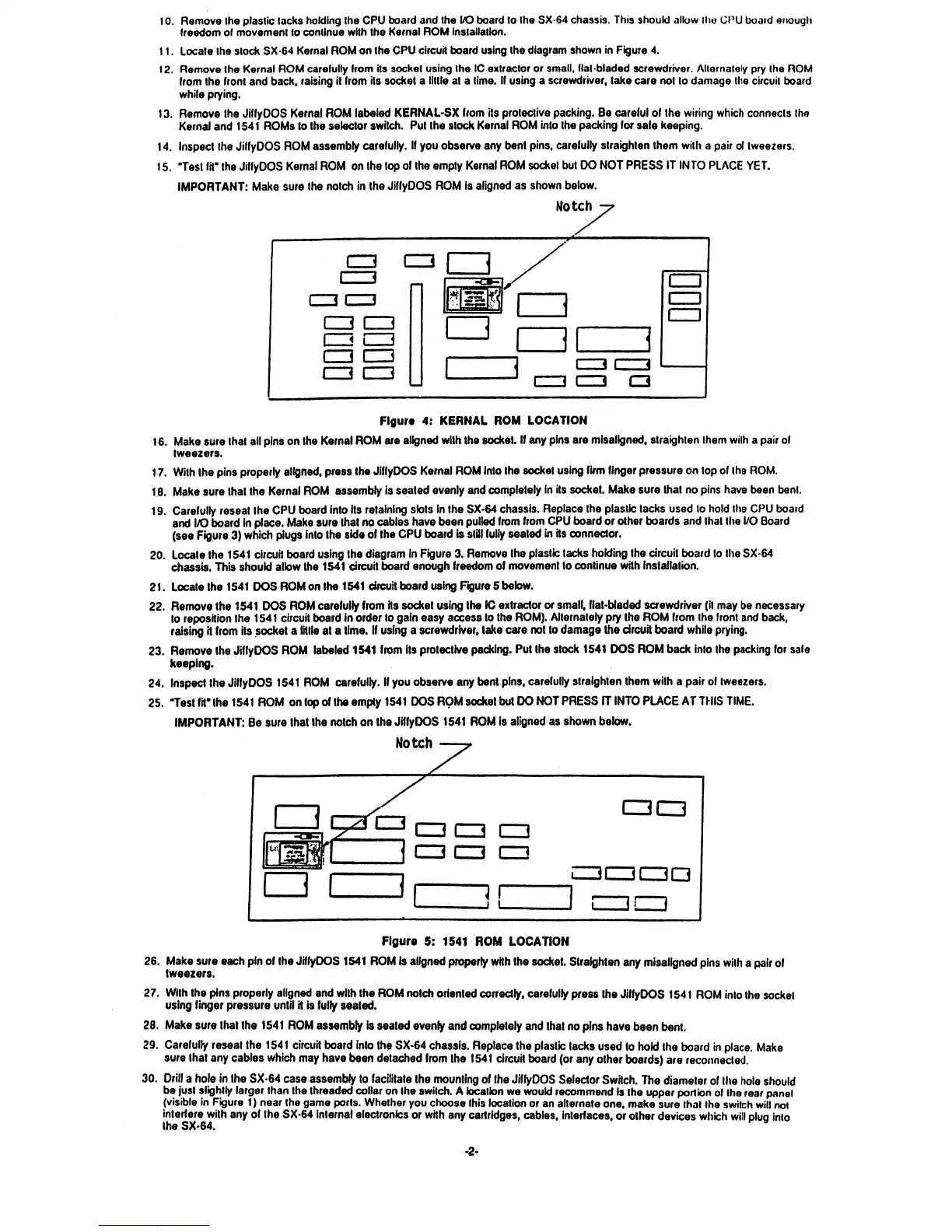
11.
Locate
the
stock
SX-64
Kernal
ROM
on
the
CPU
circuit
board
using
the
diagram
shown
in
Figure
4.
12.
Remove
the
Kernal
ROM
carefully
from
its
socket
using
the
IC
extractor
or
small,
flat
bladed
screwdriver.
Allornalely
pry
the
ROM
from
the
front
and
back,
raising
it
from
its
socket
a
little
at
a
time.
If
using
a
screwdriver,
take
care
not
to
damage
the
circuit
board
while
prying.
13.
Remove
the
JiffyOOS
Kernal
ROM
labeled
KERNAL-SX
from
its
protective
packing.
Be
careful
of
the
wiring
which
connects
the
Kernal
and
1541
ROMs
to
the
selector
switch.
Put
the
slock
Kernal
ROM
into
the
packing
for
safe
keeping.
14.
Inspect
the
JiffyDOS
ROM
assembly
carefully.
If
you
observe
any
bent
pins,
carefully
straighten
them
with
a
pair
of
tweezers.
15.
"Test
fit"
the
JiffyOOS
Kernal
ROM
on
the
top
of
the
empty
Kernal
ROM
socket
but
DO
NOT
PRESS
IT
INTO
PLACE
YET.
IMPORTANT:
Make
sure
the
notch
in
the
JiffyOOS
ROM
is
aligned
as
shown
below.
Notch
Figure
4:
KERNAL
ROM
LOCATION
16.
Make
sure
that
all
pins
on
the
Kernal
ROM
are
aligned
with the
socket
If
any
pins
are
misaligned,
straighten
them
with
a
pair
of
tweezers.
17.
With
the
pins
properly
aligned,
press
the
JiffyDOS
Kernal
ROM
into
the
socket
using
firm
finger
pressure
on
top
of
Ihe
ROM.
18.
Make
sure
that
the
Kernal
ROM
assembly
is
seated
evenly
and
completely
in
its
socket.
Make
sure
that
no
pins
have
been
benl.
19.
Carefully
reseat
the
CPU
board
into
its
retaining
slots
In
the
SX-64
chassis.
Replace
the
plastic
tacks
used
to
hold
the
CPU
board
and
I/O
board
in
place.
Make
sure
that
no
cables
have
been
pulled
from
from
CPU
board
or
other
boards
and
that
the
I/O
Board
(see
Figure
3)
which
plugs
into
the
side
of
the
CPU
board
is
stiJI
fully
seated
in
its
connector.
20.
Locate
the
1541
circuit
board
using the
diagram
in
Figure
3.
Remove
the
plastic
tacks
holding
the
circuit
board
to
the
SX-64
chassis.
This
should
allow
the
1541
circuit
board
enough
freedom
of
movement
to
continue
with
installation.
21.
Locate
the
1541
DOS
ROM
on
the
1541
circuit
board
using
Figure
5
below.
22.
Remove
the
1541
DOS
ROM
carefully
from
Hs
socket
using
the
IC
extractor
or
small,
flat-Waded
screwdriver
(it
may
be
necessary
to
reposition
the
1541
circuit
board
in
order
to
gain
easy
access
to
the
ROM).
Alternately
pry
the
ROM
from
the
front
and
back,
raising
it
from
its
socket
a
tittle
at
a
time.
If
using
a
screwdriver,
take
care
not
to
damage
the
circuit
board
while
prying.
23.
Remove
the
JrllyDOS
ROM
labeled
1541
from
its
protective
packing.
Put
the
stock
1541
DOS
ROM
back
into
the
packing
for
safe
keeping.
t
24.
Inspect
the
JiffyDOS
1541
ROM
carefully.
If
you
observe
any
bent
pins,
carefully
straighten
them
with
a
pair
of
tweezers.
25.
Test
fit"
the
1541
ROM
on
top
of
the
empty
1541
DOS
ROM
socket
but
DO
NOT
PRESS
IT
INTO
PLACE
AT
THIS
TIME.
IMPORTANT:
Be
sure
that
the
notch
on
the
JiffyDOS
1541
ROM
is
aligned
as
shown
below.
Notch
—?
Figure
5:
1541
ROM
LOCATION
26.
Make
sure
each
pin
of
the
JiffyDOS 1541
ROM
is
aligned
properly
with
the
socket.
Straighten
any
misaligned
pins
wilh
a
pair
of
tweezers.
27.
With
the
pins
properly
aligned
and
wilh
the
ROM
notch
oriented
correctly,
carefully
press
the
JiffyDOS
1541
ROM
into
the
socket
using
finger
pressure
until
H
is
fully
sealed.
28.
Make
sure
thai
the
1541
ROM
assembly
is
seated
evenly
and
completely
and
that
no
pins
have
been
bent.
29.
Carefully
reseat
the
1541
circuit
board
into
the
SX-64
chassis.
Replace
the
plastic
lacks
used
to
hold
Ihe
board
in
place.
Make
sure
that
any
cables
which
may
have
been
detached
from
the
1541
circuit
board
(or
any
other
boards)
are
reconnected.
30.
Drill
a
hole
in
the
SX-64
case
assembly
to
facilitate
Ihe
mounting
of
the
JiffyDOS
Selector
Switch.
The
diameter
of
the
hole
should
be
just
slightly
larger
than
the
threaded
collar
on
Ihe
switch.
A
location
we
would
recommend
Is
Ihe
upper
portion
of
the
rear
panel
(visible
in
Figure
1)
near
the
game
ports.
Whether
you
choose
this
location
or
an
alternate
one,
make
sure
that
the
switch
will
not
interfere
with
any
of
the
SX-64
internal
electronics
or with
any
cartridges,
cables,
interfaces,
or
other
devices
which
will
plug
into
the
SX-64.

Other manuals for Commodore SX-64

Related product manuals