EasyManua.ls Logo

Commodore VIC-20 - Page 45

Commodore VIC-20
308 pages
Print Icon
To Next Page IconTo Next Page

To Previous Page IconTo Previous Page
Loading...
If
you
wanted
the
word
HELLO
to
PRINT
diagonally
from
the
upper
reft
corner
of
the
screen,
you
would
type:
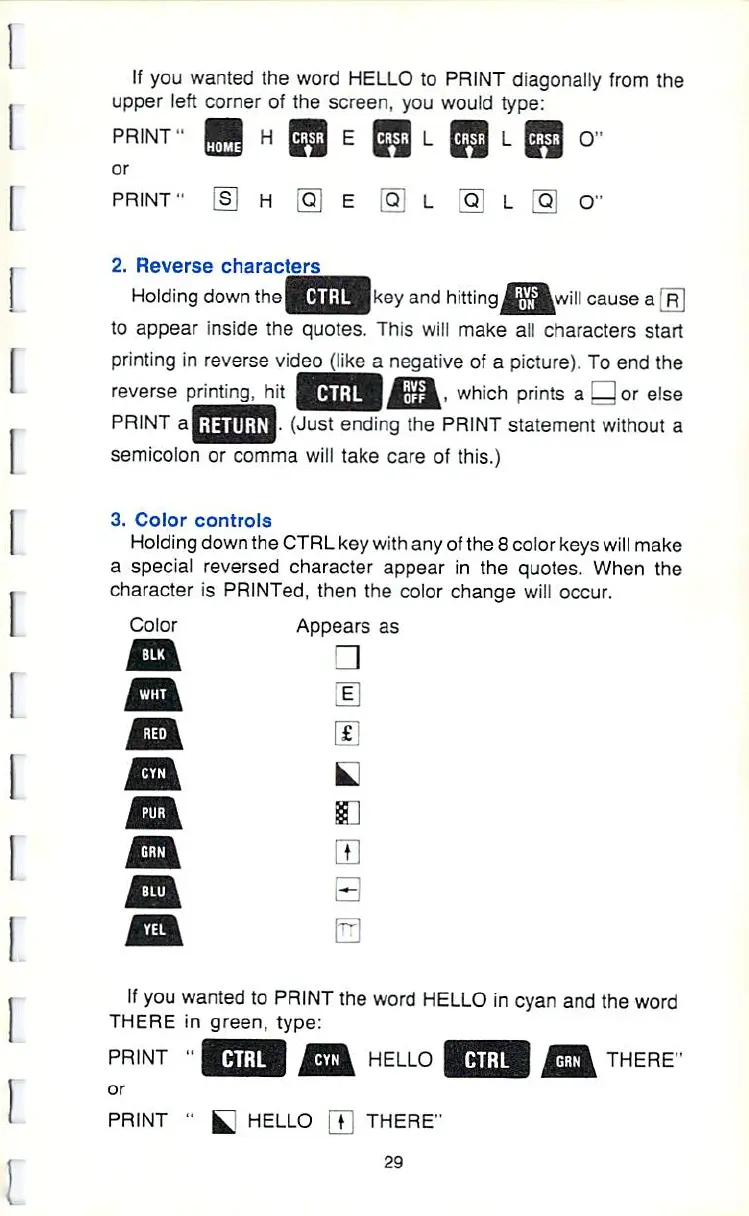
PRINT"
or
PRINT1
H
H
E
[Q]
L
O"
2.
Reverse
characters
Holding
down
thej-i1':
â– â– 
1
<€■■■/
and
hitting
Ifjjf^will
cause
a
R!
to
appear
inside
the
quotes.
This
will
make
alt
characters
start
printing
In
reverse
video
(tike
a
negative
of
a
picture).
To
end
the
reverse
prrnting^iit
|
':â– 
i
|
Atj4-
which
prints
a
or
else
PRINT
a^S
|i
J.
(Just
ending
the
PRINT
statement
without
a
semicolon
or
comma
will
take
care
of
this.)
3.
Color
controls
Holding
down
the
CTRL
key
with
any
of
the
8
color
keys
will
make
a
special
reversed
character
appear
in
the quotes.
When
the
character
is
PRINTed,
then
the
color
change
will
occur.
Color
Appears
as
ff
you
wanted
to
PRINT
the
word
HELLO
in
cyan
and
the
word
THERE
in
green,
type:
PRINT
â– 
or
PRINT
"
HELLO
HELLO
\T
THERE"
29
THERE"

Other manuals for Commodore VIC-20

Related product manuals