134
The
VIC
20
User
Guide
of
the date. The two-digit input needs no RETURN
or
other terminating
character. The program automatically terminates the
data
entry after two
characters are entered.
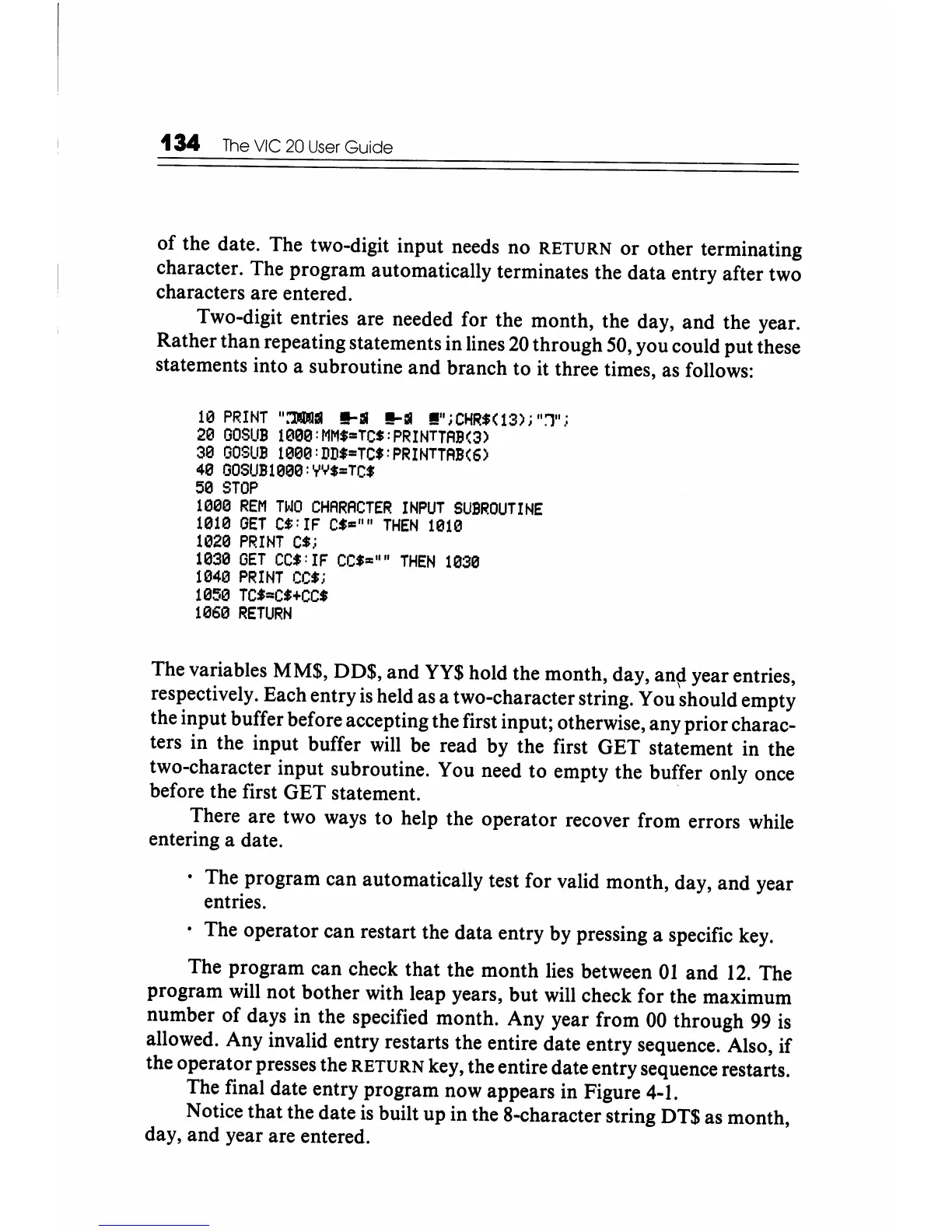
Two-digit entries are needed for the month, the day, and the year.
Rather than repeating statements in lines
20
through 50, you could put these
statements into a subroutine and branch to it three times, as follows:
10
PRINT
":'111
!!-III
!!-III
!!";
CHR$(13);
"1";
20
GOSUB
1000:MM$=TC$:PRINTTAB(3)
30
GOSUB
1000:DD$=TC$:PRINTTAB(6)
40
GOSUB1000:YY$=TC$
50
STOP
1000
REM
TWO
CHARACTER
INPUT
SUBROUTINE
1010
GET
C$:
IF
C$=""
THEN
10113
1020
PRINT
C$;
1030
GET
CC$:IF
CC$"'''''
THEN
1030
1040
PRINT
CC$;
1050
TC$==C$+CC$
1060
RETURN
The variables MM$, DD$, and
YY$
hold the month, day,
an~
year entries,
respectively. Each entry
is
held as a two-character string. You should empty
the input buffer before accepting the first input; otherwise, any prior charac-
ters in the input buffer will be read by the first GET statement in the
two-character input subroutine. You need
to
empty the buffer only once
before the first GET statement. .
There are two ways to help the operator recover from errors while
entering a date .
• The program can automatically test for valid month, day, and year
entries.
. The operator can restart the data entry by pressing a specific key.
The program can check that the month lies between
01
and
12.
The
program will not bother with leap years, but will check for the maximum
number of days in the specified month. Any year from
00
through
99
is
allowed. Any invalid entry restarts the entire date entry sequence. Also,
if
the operator presses the RETURN key, the entire date entry sequence restarts.
The final date entry program now appears in Figure 4-1.
Notice that the date
is
built up in the 8-character string DT$ as month,
day, and year are entered.






 To Next Page