184
The
VIC
20
User
Guide
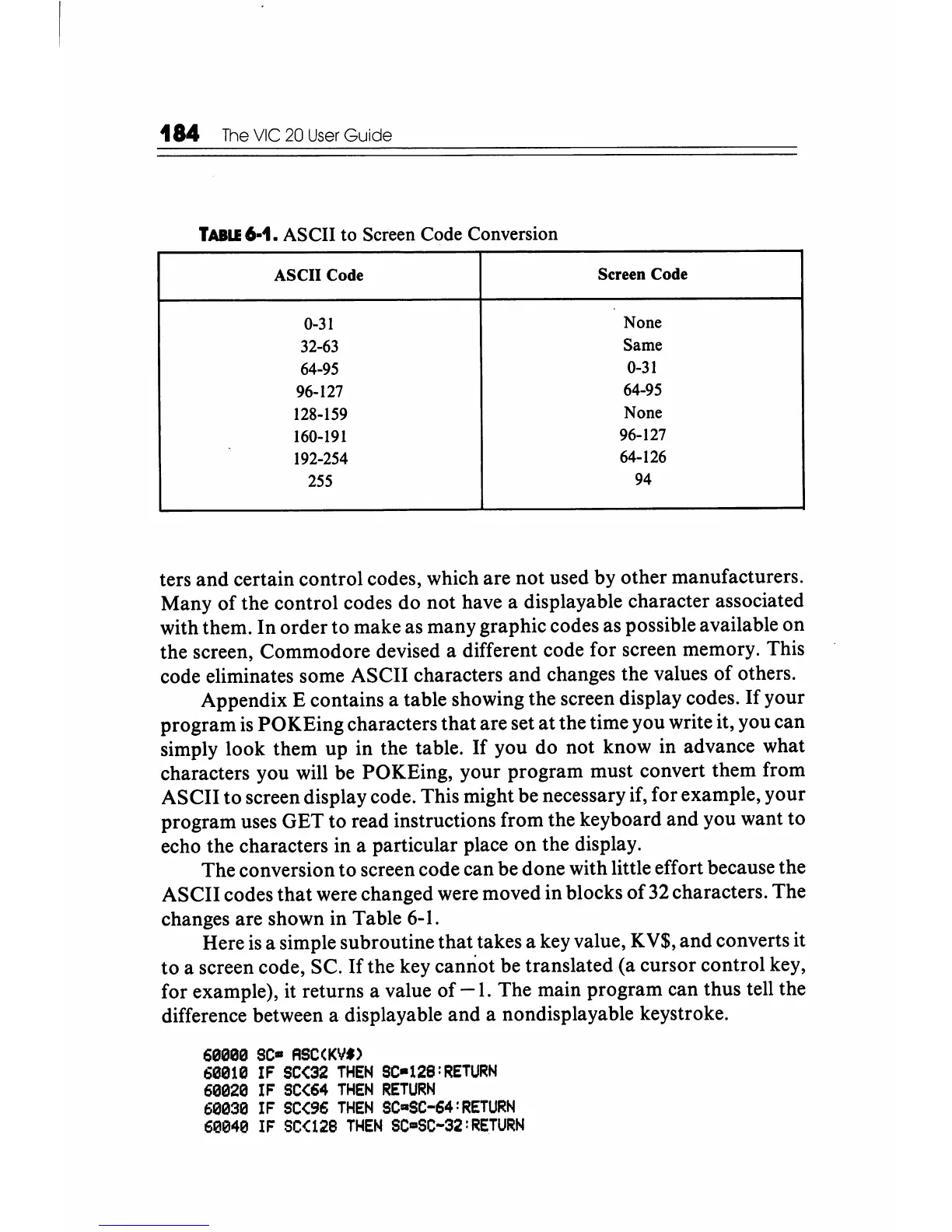
TABU
6-1. ASCII
to
Screen
Code
Conversion
ASCII Code
Screen Code
0-31 None
32-63 Same
64-95
0-31
96-127
64-95
128-159
None
160-191
96-127
192-254
64-126
255
94
ters
and
certain control codes, which are not used by other manufacturers.
Many
of
the control codes do not have a displayable character associated
with them. In order to make as many graphic codes as possible available on
the screen, Commodore devised a different code for screen memory. This
code eliminates some ASCII characters and changes the values
of
others.
Appendix E contains a table showing the screen display codes.
If
your
program
is
POKEing characters
that
are set
at
the time you write it, you can
simply look them up in the table.
If
you do not know in advance what
characters you will be POKEing, your program must convert them from
ASCII to screen display code. This might be necessary if, for example, your
program uses GET to read instructions from the keyboard and you want to
echo the characters in a particular place
on
the display.
The conversion to screen code can be done with little effort because the
ASCII codes
that
were changed were moved in blocks
of
32 characters. The
changes are shown in Table 6-1.
Here
is
a simple subroutine that takes a key value, K
V$,
and
converts it
to
a screen code,
Sc.
If
the key cannot be translated (a cursor control key,
for example), it returns a value of
-1.
The main program can thus tell the
difference between a displayable and a nondisplayable keystroke.
60000
SC-
ASC(KV"
60010
IF
SC(32
THEN
SC-128:RETURN
60020
IF
SC(64
THEN
RETURN
60030
IF
SC{96
THEN
SC·SC-64:RETURN
60040
IF
SC{128
THEN
SC-SC-32:RETURN






 To Next Page