Chapter
1.
Introducing the
VIC
20
Computer 33
TABU
1-4.
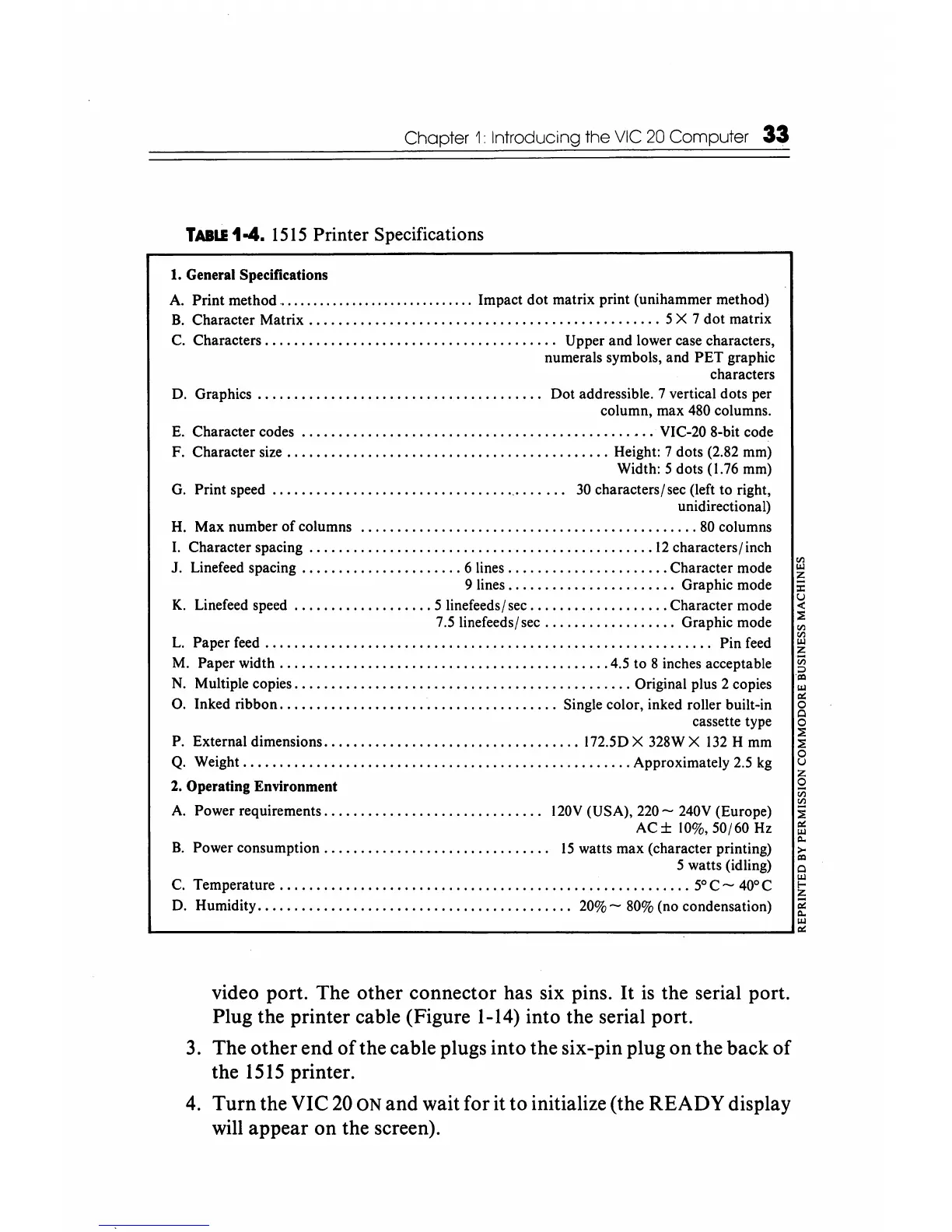
1515
Printer Specifications
1.
General Specifications
A.
Print
method
...............................
Impact
dot
matrix print (unihammer method)
B.
Character Matrix
................................................
5 X 7
dot
matrix
C. Characters
....................................•...
Upper and lower case characters,
numerals symbols, and
PET
graphic
characters
O. Graphics
..
. . . . • . . . . .
..
. •
..
. . . . . . . . . . .
..
. . . . . .
..
Oot
addressible. 7 vertical dots per
column, max 480 columns.
E.
Character codes
•.......•.................................•..•.•
VIC-20 8-bit code
F. Character size
............................................
Height: 7 dots (2.82 mm)
Width: 5 dots (1.76 mm)
G. Print speed
.........................................
30 characters/sec (left
to
right,
unidirectional)
H.
Max
number
of
columns
.............•........................•.......
80 columns
I. Character spacing
...............................................
12
characters/ inch
J. Linefeed spacing
......................
6 lines
.......•..............
Character mode
9 lines
.......................
Graphic mode
K.
Linefeed speed
...................
5 linefeeds/ sec
...................
Character mode
7.5 linefeeds/sec
..................
Graphic mode
L.
Paper
feed.
. . . . . . . . . . . . . . . . . . . . . . . . . . . . . . . . . . . . . . . . . . . . . . . . . . • . . • . . . .
..
Pin feed
M. Paper width
...•.•.•.....................................
4.5 to 8 inches acceptable
N.
Multiple copies
..............................................
Original plus 2 copies
O. Inked ribbon
......................................
Single color, inked roller built-in
cassette type
P. Externaldimensions
...................................
In.50X
328WX
132
H mm
Q.
Weight
•...............•....................................
Approximately 2.5
kg
2.
Operating Environment
A.
Power requirements
..............................
120V
(USA),
220
- 240V (Europe)
AC±
10%,50/60 Hz
B.
Power
consumption...............................
15
watts max (character printing)
5 watts (idling)
C. Temperature
......................•.................................
50
C -
400
C
O.
Humidity...........................................
20% - 80% (no condensation)
~
z
:c
u
..:
:0
'"
~
z
iii
=>
'"
III
..:
§
:0
:0
8
~
iii
'"
i
..:
~
>-
'"
Q
~
iii
C>.
III
L-
____________________________________________________
~--------~..:
video port. The other connector has six pins.
It
is
the serial port.
Plug the printer cable (Figure
1-14)
into the serial port.
3.
The other end
ofthe
cable plugs into the six-pin plug on the back of
the
1515
printer.
4.
Turn
the VIC
20
ON and wait for it to initialize (the READY display
will appear on the screen).






 To Next Page