ComNav 1101 Autopilot6 - 3 BASIC OPERATIONS
Special Turns
A Special Turn is a series of preset turn commands the Autopilot
uses to follow a specific course. To initiate a Special Turn you must
be in AUTOPILOT mode. Press the TURN button. The LCD screen will
come up with the type of Special Turn that was programmed in the
STANDBY menu. You must press either PORT or STARBOARD
DODGE buttons to instruct the Autopilot as to which direction to
turn. Once a turn has been started you can cancel the Special Turn
by changing the mode or turning the ADJUSTMENT KNOB.
Emergency Turn
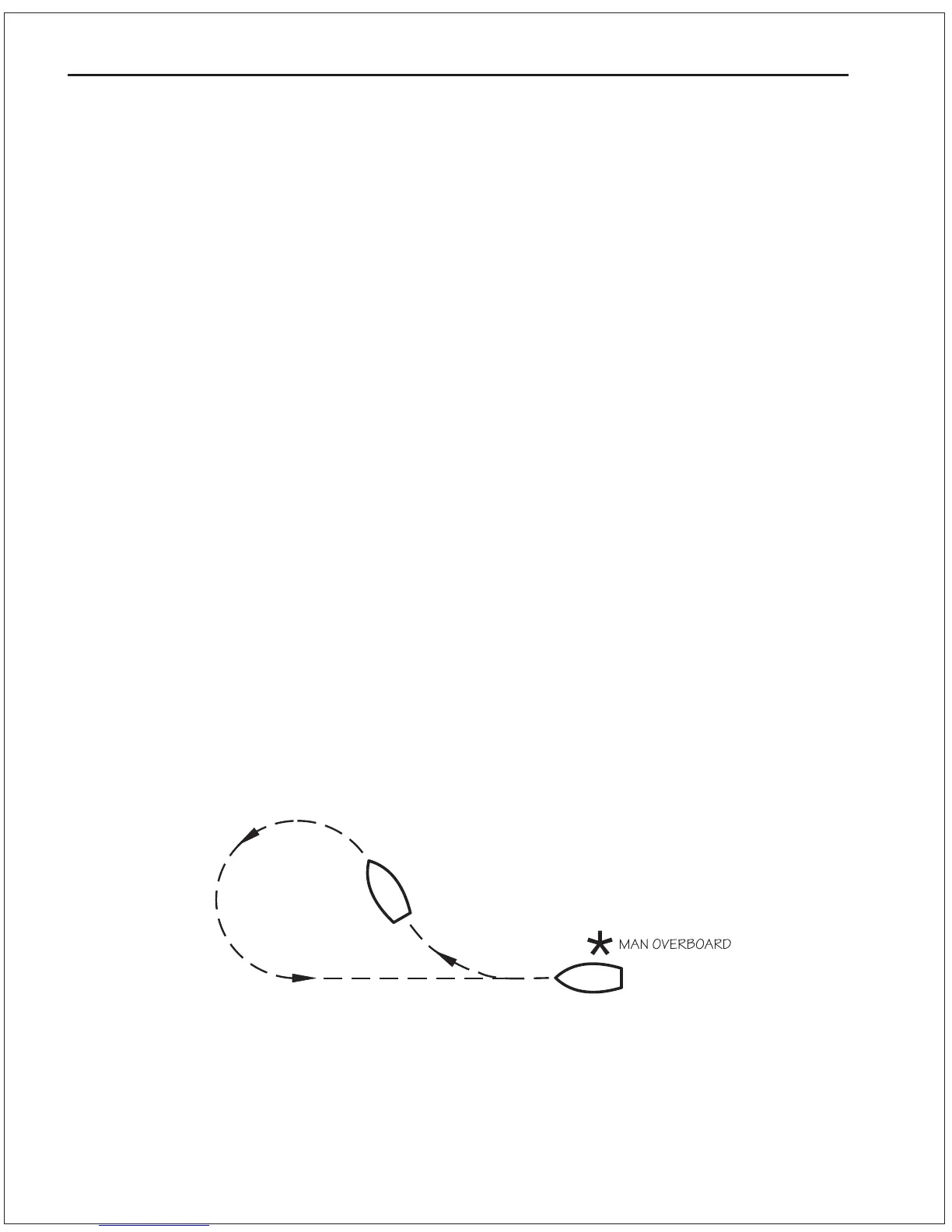
The Emergency Turn, also known as the Man Overboard turn or
Williamson turn, will turn the vessel around and follow the same
path back, as long as the vessels turn rate and speed have not
been changed.
To initiate an Emergency Turn press the TURN button, while in
AUTOPILOT mode, followed by one of the two DODGE buttons.
If the PORT DODGE button is pressed, the Autopilot will make a 90
degree turn to por t, followed by a 270 degree turn to starboard, and
retrace its track in the water. If the STARBOARD DODGE button is
pressed, then the 90 degree turn will be to starboard, and the
following 270 degree turn will be to por t.
A flashing E Turn will be shown in the center of the screen.
Figure 12Emergency Turn



 To Next Page