EasyManua.ls Logo

COMPANION Rover Li 40 - User Manual

COMPANION Rover Li 40
16 pages
Print Icon
To Next Page IconTo Next Page
Loading...
ROVER
LiTHIUM
40AH POWER STATION
OWNERS MANUAL
Part No. 10000071

Questions and Answers

  • J
    Jerry GrahamAug 5, 2025
    Why is solar not charging my COMPANION Power Supply?
    • J
      Julie ReynoldsAug 5, 2025
      If your solar panel is not charging the COMPANION Power Supply, first, check that all connections from the solar panel to the power station are secure. Then, ensure the solar panel is correctly set up by pointing it towards the sun and verifying that there is no inline controller/regulator before the power station.
  • J
    Jaime BellAug 12, 2025
    What to do if fridge connected to COMPANION Rover Li 40 Power Supply is not running?
    • E
      Erin MooreAug 12, 2025
      If the fridge connected to your COMPANION Power Supply isn't running, first, ensure the power station is turned on. Next, check that the power station has sufficient charge; if the charge is low, follow the user manual's instructions to charge it. Finally, verify that the battery monitor on the fridge is set to either the Low or Medium setting.
  • A
    Aaron HunterAug 20, 2025
    How to fix COMPANION Power Supply power outlets not working?
    • S
      Sharon Jimenez DDSAug 20, 2025
      If the power outlets on your COMPANION Power Supply are not working, ensure the power station is turned on and that the relevant outlet power is also activated. After the power station is on, turn on the power outputs by pressing the “Power” button for 3 seconds. For the Anderson output, you'll also need to press and hold the “Anderson On/Off” button for 3 seconds.
  • J
    Jacob WilliamsAug 28, 2025
    What to do if DC charger is not working on COMPANION Power Supply?
    • P
      pamela78Aug 28, 2025
      If the DC charger for your COMPANION Power Supply isn't working, check the inline fuse. If the fuse is broken, replace it with a 10A blade fuse.

Summary

Safety Information

General Safety

Understanding Your Appliance

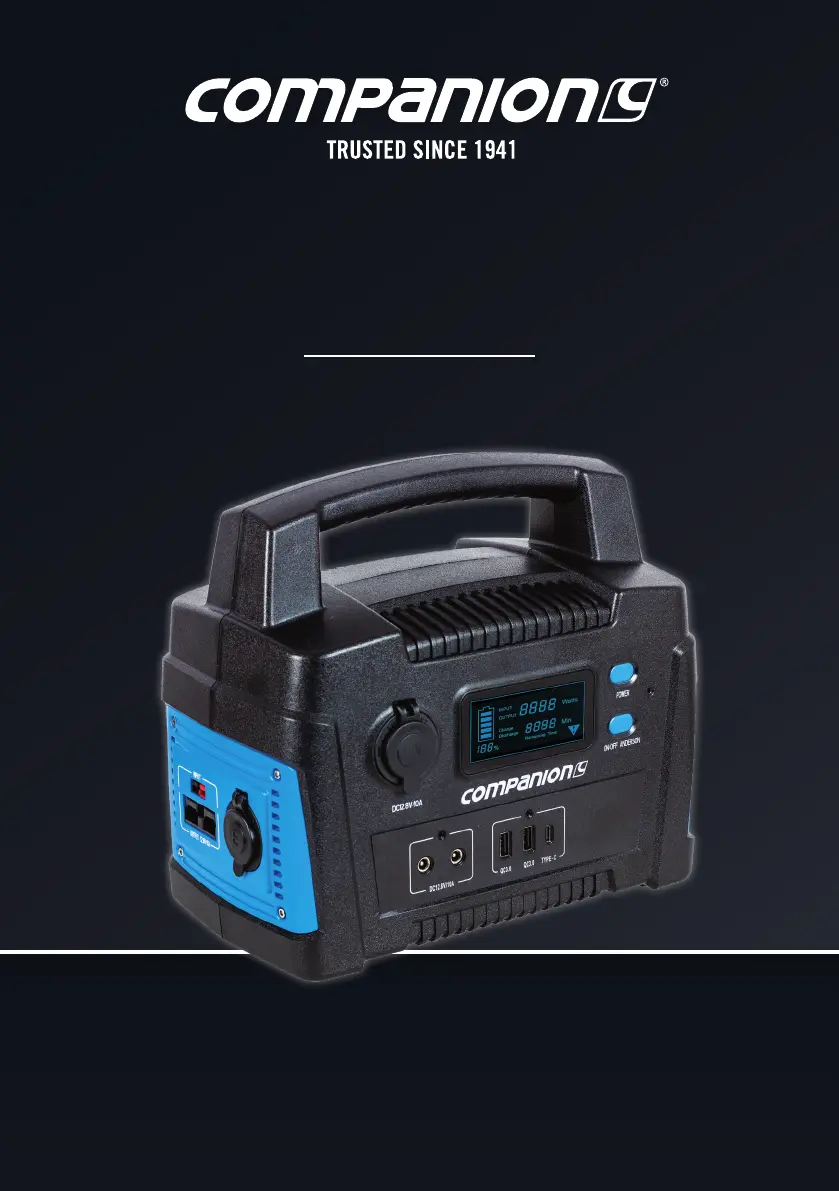
ON;OFF Power Button

Controls the main power for the device.

Anderson Output On;Off

Manages the activation of the Anderson output port.

USB Outputs

Features two USB-A and one USB-C port for device charging.

DC5525 Outputs

Includes two DC5525 output sockets for DC power.

12 V Cigarette Socket Output

Standard 12V socket for car accessories.

LCD Display

Shows input, output, and battery status information.

LED Light Power Button

Button to control the integrated LED light.

LED Light

Built-in LED illumination feature for convenience.

DC, AC or Solar Input

Ports designated for charging the power station.

Anderson Output (50 A Connector)

High-capacity Anderson output port for significant power needs.

12 V 2-Pin Output

An additional 12V DC output option.

Output LED Indicator Lights

Visual indicators for the status of output ports.

Understanding the LCD Display

To Recharge Battery

Charging by 240 V AC Adaptor

Step-by-step guide to recharging using the included 240V AC adapter.

Charging by DC Cable

Charging by Solar Panel

Powering Appliances

USB Outputs

Details on using USB-A and USB-C ports for device charging.

DC Outputs

Information on utilizing cigarette socket, 2-pin, and DC5525 outputs.

Anderson Output

LED Light

Cleaning and Maintenance

Cleaning Instructions

Steps for safely cleaning the power station to prevent damage.

Maintenance

Recommendations for battery care and long-term upkeep.

Disposal

Guidelines for environmentally responsible disposal of the product.

Trouble Shooting

Specifications

Warranty Policy

COMPANION Rover Li 40 Specifications

General IconGeneral
BrandCOMPANION
ModelRover Li 40
CategoryPower Supply
LanguageEnglish

Related product manuals