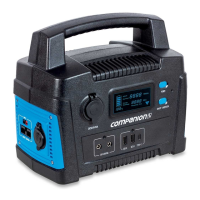
The Companion Rover Lithium 70Ah Power Station is a portable energy storage device designed for various applications, offering multiple charging and output options. It is built with a Lithium Nickel Manganese Cobalt Oxide (NMC) battery, known for its energy density and lifecycle performance.
Function Description:
The Rover Lithium 70Ah Power Station serves as a versatile portable power source, capable of charging and powering a wide range of electronic devices and small appliances. It features multiple output ports, including USB, USB-C, 12V 2-Pin, and 12V cigarette lighter sockets, making it suitable for outdoor activities, camping, emergency backup, and general portable power needs. The device can be recharged through various methods: a 240V AC adaptor, a DC cable (e.g., from a vehicle), or a solar panel, providing flexibility in different environments. An integrated MPPT controller optimizes solar charging efficiency. The power station also includes an LED light for illumination.
Important Technical Specifications:
- Part No.: 10000072
- Cell Chemistry: LiNiMnCoO2 (NMC)
- Capacity: 70Ah
- Wh (Watt hours): 850Wh
- Lifecycles: 800 cycles (80% Capacity Afterwards)
- Shelf Life: 1 year
- Management System: MPPT (Maximum Power Point Tracking)
- Solar Input: 13-30V 12A
- DC Charger: 14V 9A (Max 126W)
- AC Charger: 16.8V 5A (Max 84W)
- USB Output: 4 x 5V 2.4A / 9V 2A (2.4A Max)
- Type C Output: 5V/9V/12V/15V/20V 3A (up to 60W for USB-C laptops)
- DC Output (Cigarette Socket): 1 x 12V 10A (16A Max Combined)
- DC Output (2-Pin): 1 x 12V 10A (16A Max Combined)
- LED Light Output: 2W
- Charge Time: 9-14 Hours (using 240V AC adaptor)
- Battery Protection: Yes (includes over-temperature, under-temperature, overvoltage, undervoltage, overcurrent, short circuit, and incorrect polarity protection)
- Ideal Operating Temp: -10°C ~ 40°C
- Dimensions: 128 x 190 x 310mm
- Weight: 6.8KG
- Pack Contents: Rover Li 70 unit, DC Charge Cable, AC Charge Cable, 50A Anderson to 30A Anderson Powerpole Cable
Usage Features:
- Intuitive Controls: The power station is operated via an ON/OFF power button and individual power buttons for USB, 12V 2-Pin, and 12V cigarette outputs.
- LCD Display: A clear LCD screen shows total input/output in watts and battery percentage, allowing users to monitor power consumption and remaining charge. The screen automatically turns off after 30 seconds to conserve power.
- LED Indicator Lights: Three LED lights (Input, Power, Alarm) provide quick status updates. The Input LED illuminates green when charging, the Power LED indicates the unit is on, and the Alarm LED flashes in case of a fault (e.g., due to protective functions being activated).
- Multiple Charging Options:
- 240V AC Adaptor: Included for convenient home charging, with an estimated charge time of 14 hours.
- DC Cable: Included for charging from a vehicle or other DC power sources, with a maximum charging rate of 9 amps.
- Solar Panel (not included): Direct connection to unregulated solar panels is supported, with the built-in MPPT controller optimizing charging. The charging input is 12 Amp max, and a 200W panel can charge the battery in approximately 9-12 hours depending on weather conditions.
- Simultaneous Output Use: Multiple output ports can be used concurrently to power various devices.
- Safety Features: The device incorporates comprehensive protective functions to prevent damage from over-temperature, under-temperature, overvoltage, undervoltage, overcurrent, short circuits, and incorrect polarity. If activated, the alarm LED will flash.
- Integrated LED Light: A useful LED light is built into the unit, activated by a dedicated power button, providing illumination when needed.
Maintenance Features:
- Regular Charging: It is crucial to fully charge the battery at least every six months to prevent permanent damage from overloading or prolonged storage without charge.
- Proper Storage: Store the device in a dry, cool place within an ambient temperature range of 0 to 40 degrees Celsius. If storing for extended periods without a charger, ensure it is fully charged.
- Cleaning:
- Always disconnect the device from mains power before cleaning.
- Use a damp cloth for occasional cleaning.
- DO NOT use sharp or hard objects, cleaning agents, or alcohol-based cleaning materials, as these may damage the product.
- Troubleshooting: The manual provides a troubleshooting guide for common issues such as power outlets not working, fridge not running, solar not charging, DC charger not working, and alarm LED flashing. Solutions typically involve checking power connections, battery charge, settings, or resetting the unit.
- Disposal: Packaging materials should be recycled. For product disposal, consult local recycling centers or specialist dealers. Batteries should not be disposed of with general household waste but returned to retailers or collection points.
- Repair: Repairs should only be performed by qualified persons. Contact Customer Service for assistance.


 To Next Page
 General