Using the Drivers License Scanner with KeepnTrack
Once both the Drivers License Scanner Browser Plug-In and Drivers have been
installed, you may begin using the scanner with KeepnTrack.
Begin by logging into the Administration component of KeepnTrack at your Kiosk
Station. This is necessary to initially calibrate your Scan Shell 800 scanner. Once
calibrated, it will function correctly for operators signed into either an attended or self
service kiosk on the same machine as well.
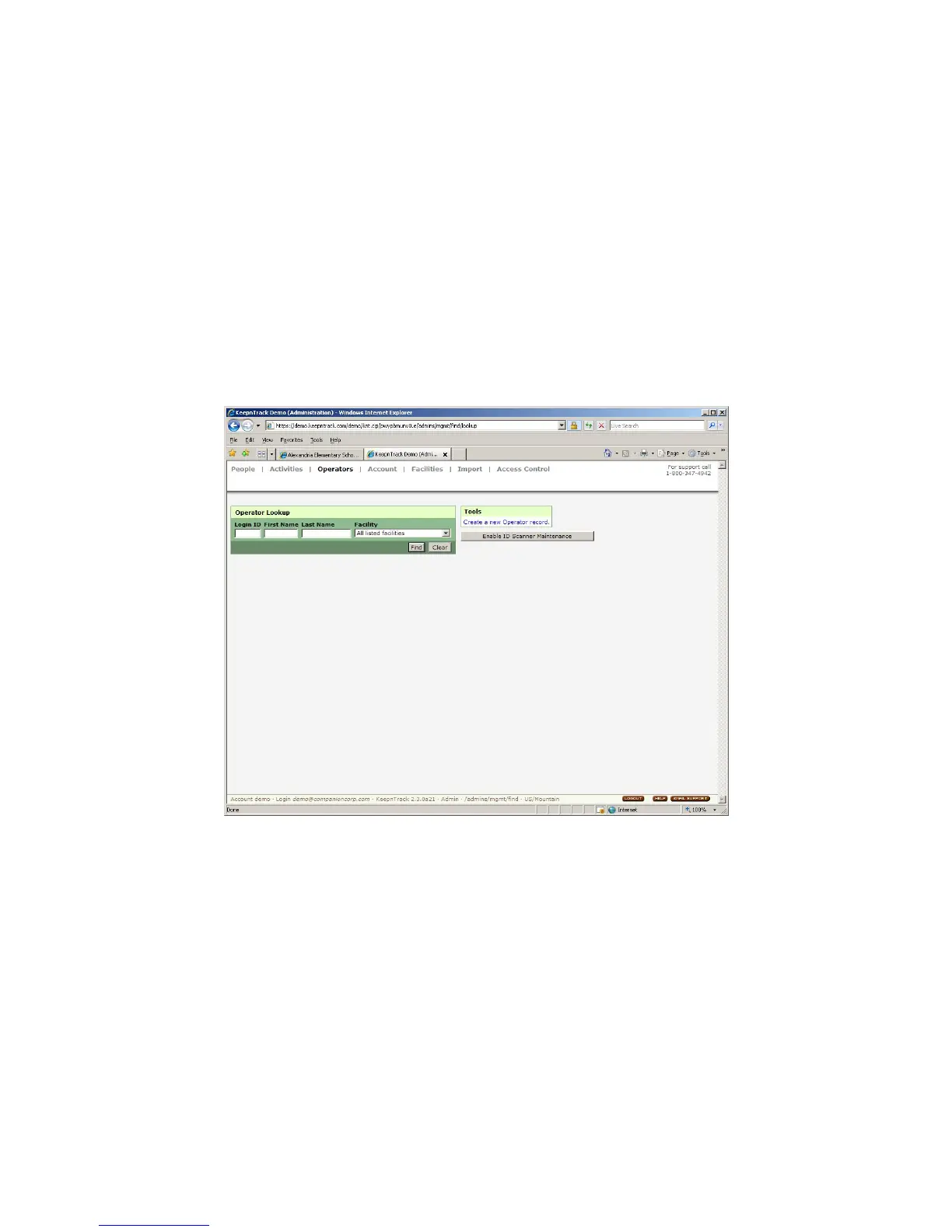
From the Operators control panel, click on the button to Enable Scanner
Maintenance (Image 15).
Image 15
NOTE: FOR SOME VERSIONS OF INTERNET EXPLORER (IE7), THE FIRST TIME AN
ATTEMPT TO USE THE ADD-ON IS MADE, YOU WILL BE PROMPTED TO ENABLE IT. YOU
MUST SELECT TO RUN THE ACTIVE X CONTROL FOR YOUR DRIVERS LICENSE SCANNER
TO FUNCTION WITH YOUR BROWSER (IMAGES 16 AND 17). IF YOU WISH TO ENABLE
OR DISABLE THIS CONTROL LATER, YOU MAY DO SO FROM THE MANAGE ADD-ONS
CONTROL IN INTERNET EXPLORER.
IG0069.2 — V6450 Driver’s License Optical Scanner Page 9 of 16


 To Next Page
 Loading...