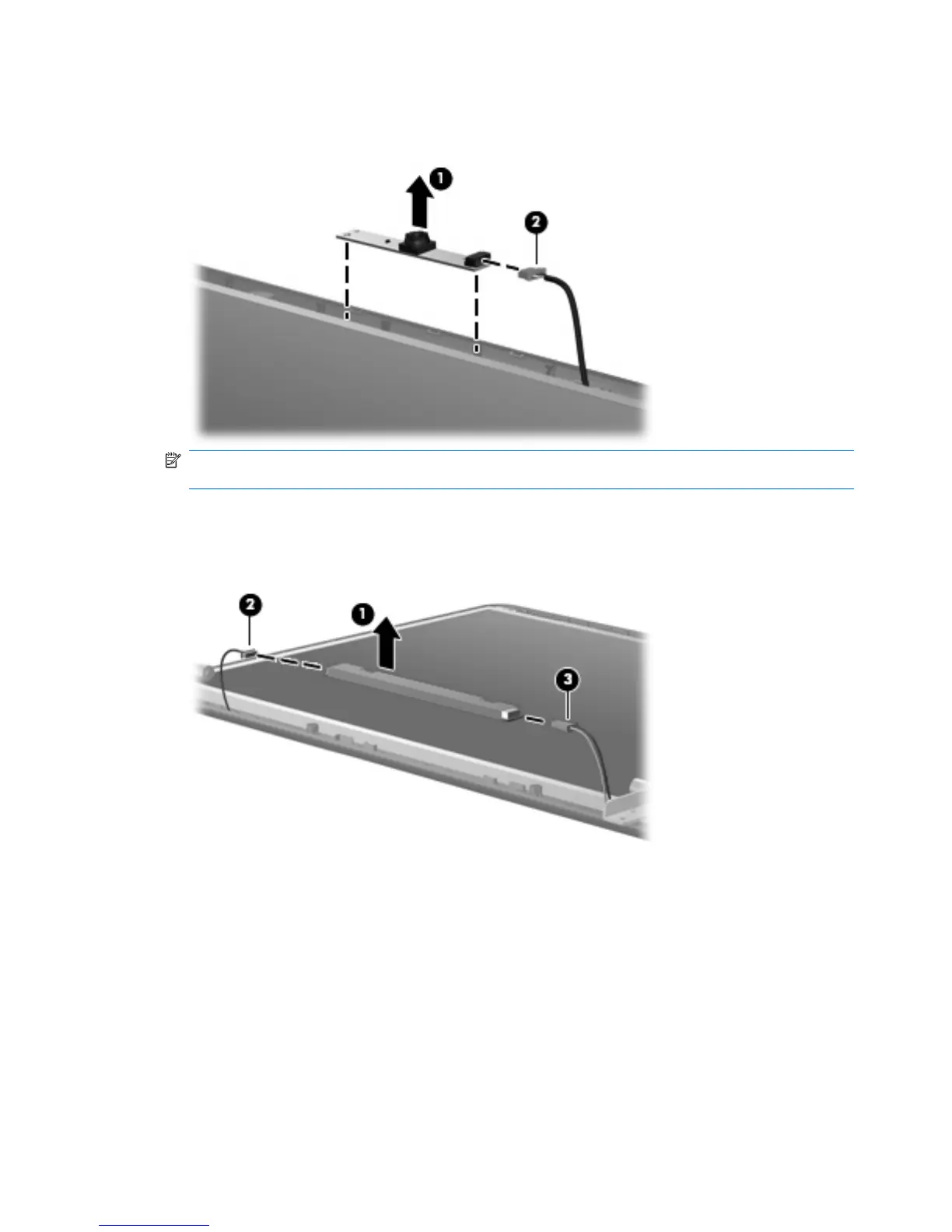
11. If it is necessary to replace the webcam module from the display enclosure, gently pull the webcam
module from the double-sided tape on the display enclosure (1) and disconnect the webcam cable
from the module (2).
NOTE: To replace the webcam module in the display enclosure, align the holes on the webcam
module with the pins on the display enclosure and press onto the double-sided tape.
12. If it is necessary to replace the display inverter, remove the inverter (1) from the display enclosure
as far as the display panel cable and the backlight cable will allow.
13. Disconnect the display panel cable (2) and the backlight cable (3) from the display inverter.
14. Remove the display inverter. The display inverter is available using spare part number
490326-001.
15. If it is necessary to replace the display hinges, remove the two Torx 6.0-mm screws (1) that secure
the display panel to the display enclosure.
58 Chapter 4 Removal and replacement procedures





 To Next Page