PM200/PMH200/PME200/PML200 (07/98) PM200/PMH200/PME200/PML200 (07/98)
Spectral response curve
Relative sensitivity [%]
Connections
The printed circuit board has a 4-pin (PM200, PMH200) or
6-pin (PME200, PML200) jack.
1 9 V DC input
2 Ground for voltage
3 Video signal output
4 Ground for video
5 External synchronisation signal input
6 External synchronisation signal input (–)
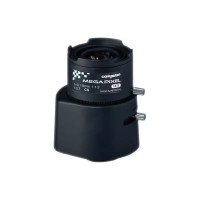
Lens
• If necessary, install lens mount and lens.
• Loosen the locking screw on the lens.
• Adjust the focus by turning the lens and tighten the screw to fix the setting.
Synchronisation
The following models are designed for synchronisation with an external signal:
PML200: Synchronisation with an external vertical signal (VDSYNC)
PME200: Synchronisation with an external composite signal (C-SYNC)
If no digital synchronisation signals are available, you can create a simple circuit for
generating the signals from a video composite signal (see circuit diagram).
VDSYNC
The following data apply when using a VD signal (PML200).
Frequency range: 50 Hz ± 2%
Stabilisation time: 6 s
Input voltage: 4.5 ... 5.0 V
p-p
Installation
z
Attention!
Choose an installation point which ensures that the camera is not
exposed to extremes of either temperature or moisture.
The ambient temperature must lie between –10 and 50° C.
The relative humidity must not exceed 70%.
❚ Do not install the system in the immediate vicinity of radiators or other sources of
heat. Avoid installing the system where it is exposed to direct sunlight.
❚ Ensure that no water can collect at the installation site. If necessary, use desiccant in
housing to avoid condensation.
❚ Lay and place all cables so that they cannot be damaged.
Wavelength [nm]


 To Previous Page
 Loading...