Page
GENERAL INFORMATION
Power Requirements.
The RaceAir Pro uses 6 AA batteries. Note the polarity markings on the battery tray when
installing the batteries. The unit will automatically turn off after 10 minutes of inactivity. The
highest current draw on the batteries is the fan that comes on when the air SAMPLE key is
pressed. Use the display LIGHT only as necessary, to preserve battery life. The computer will
display a caution message when the battery voltage is too low for acceptable operation. If the
display stops responding to keystrokes, including the POWER ON/OFF key, it may be necessary
to remove and reinstall the batteries to restart the computer.
The computer may also be powered with a 12-V dc adapter through the upper connector provided
on the left side of the case. The 110-V ac to 12-V dc adapter is available from Computech
Systems, Inc. The unit may be safely powered by the adapter while the batteries are installed.
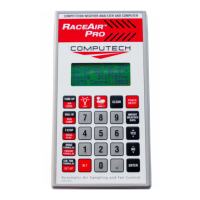
Keyboard Functions.
The keyboard has several multifunction keys. The YES key also functions as an up arrow key and
a + (plus) key. The NO key functions as a down arrow key and a -- (minus) key. To enter a
negative number into a program, press the number, press the minus key, then press ENTER. The
split black and red keys have 2 functions. When a black and red key is pressed the computer will
go to the function labeled in black. When the red ALT key is pressed then a black and red key is
pressed the computer will go to the function labeled in red.
The POWER ON/OFF key must be pressed and momentarily held to turn on the computer.
The ENTER key is discussed in Program Access and Use below.
The CLEAR key may be used anytime to exit a menu or program. CLEAR is also used to
backspace an incorrect entry.
When the computer is powered, pressing the red SAMPLE key will turn on the fan and take a
weather sample. The weather sampling process may be aborted by pressing SAMPLE again.
Several of the included programs use weather information in the calculations. When a program
asks for current weather information, pressing the IMPORT WEATHER DATA key will
automatically transfer that data. The RaceAir Pro powers up in the ==Live== Fan OFF mode. The
actual air data from the last sample may be viewed by pressing ALT then IMPORT WEATHER
DATA.
Program Access and Use
The COMPUTER PROGRAM CAPABILITIES list can be used to select a program. The list is
indented to show the access menu levels. The indicator arrow on the left side of the display may


 To Next Page