-
9
-
4
4
4
4 .1
.1
.1
.1 Setting
Setting
Setting
Setting the
the
the
the Year
Year
Year
Year
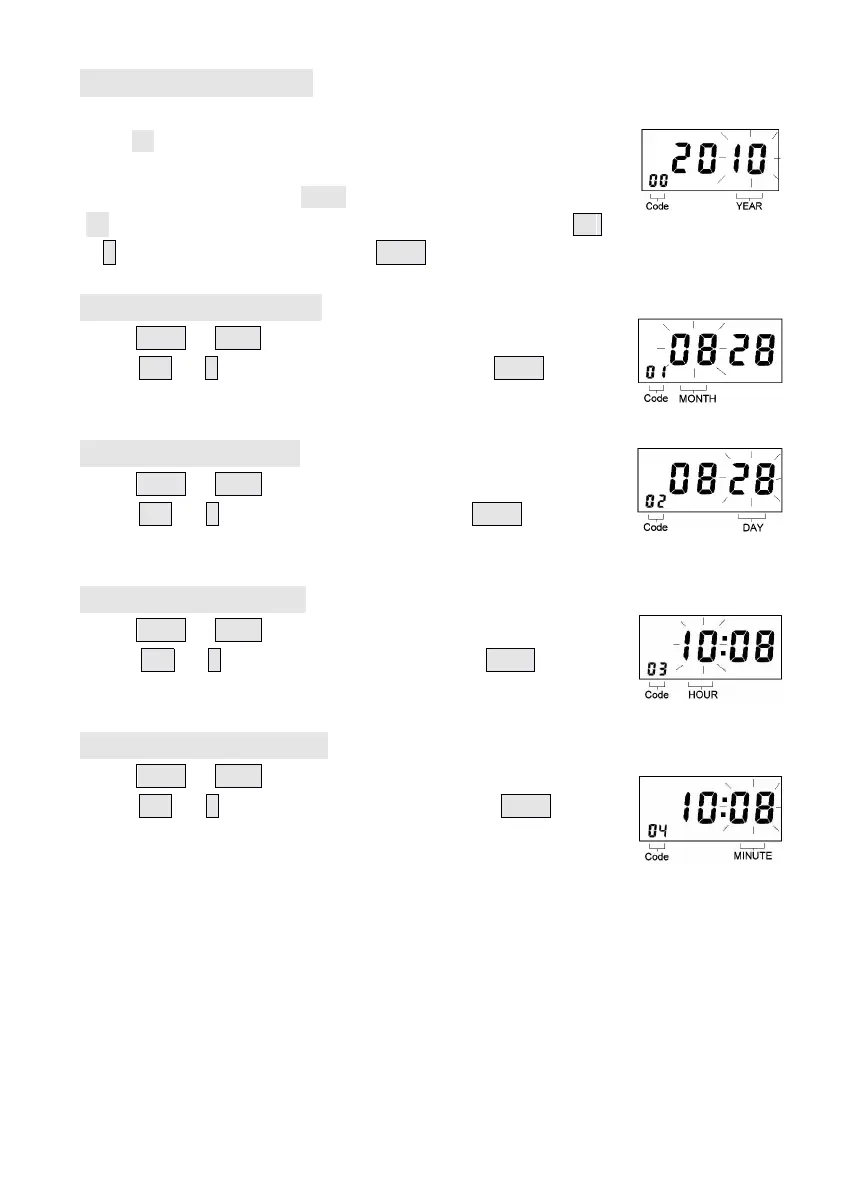
Turn the program switch to right side, the Code s will begin
from “ 0
0
0
0 0
0
0
0 ”
(00 display on the left corner indicates the program Code) ,
The digital display reads 20 10 indicates year 20 10, The year
“ 0 6 ” flashes on the right of the digital display, press the +
+
+
+
or –
–
–
– button to set the year. Press Enter to register the setting .
4
4
4
4 .2
.2
.2
.2 Setting
Setting
Setting
Setting the
the
the
the Month
Month
Month
Month
Press Enter or Back to enter the program Code 01
01
01
01 ,
press +
+
+
+ or –
–
–
– button to set the month. Press Enter again to
register the setting value.
4
4
4
4 .
.
.
. 3
3
3
3 Setting
Setting
Setting
Setting the
the
the
the da
da
da
da te
te
te
te
Press Enter or Back to enter the program Code 0
0
0
0 2
2
2
2 ,
press +
+
+
+ or –
–
–
– button to set the day. Press Enter again to
register the setting value.
4
4
4
4 .
.
.
. 4
4
4
4 Setting
Setting
Setting
Setting the
the
the
the Hour
Hour
Hour
Hour
Press Enter or Back to enter the program Code 0
0
0
0 3
3
3
3 ,
Press +
+
+
+ or –
–
–
– button to set the Hour. Press Enter again to
register the setting value.
4
4
4
4 .
.
.
. 5
5
5
5 Setting
Setting
Setting
Setting the
the
the
the Minute
Minute
Minute
Minute
Press Enter or Back to enter the program Code 0
0
0
0 4
4
4
4 ,
press +
+
+
+ or –
–
–
– button to set the Minute. Press Enter again
to register the setting value.


 To Next Page