EasyManua.ls Logo

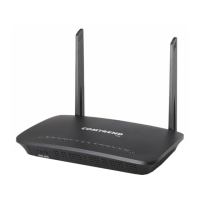
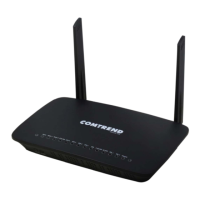
Comtrend Corporation WR-6895 - User Manual

Comtrend Corporation WR-6895
173 pages
Print Icon
To Next Page IconTo Next Page
Loading...
261097-019
WR-6895
Wireless Router
User Manual
Version A1.0, December 9, 2015

Table of Contents

Question and Answer IconNeed help?

Do you have a question about the Comtrend Corporation WR-6895 and is the answer not in the manual?

Summary

Preface and Safety

Important Safety Instructions

Essential safety precautions for using the device.

Chapter 1 Introduction

Chapter 2 Installation

2.1 Hardware Setup

Step-by-step guide to connect and set up the router hardware.

2.2 LED Indicators

Explains the status indicators on the front panel of the device.

Chapter 3 Web User Interface

3.1 Default Settings

Lists the factory default access credentials and network settings.

3.2 IP Configuration

Details how to configure IP settings for DHCP and Static IP modes.

3.3 Login Procedure

Step-by-step guide to log in to the device's web user interface.

Chapter 4 Device Information

4.1 WAN

Displays configured WAN connection parameters and status.

4.2 Statistics

Provides data traffic statistics for LAN and WAN interfaces.

4.3 Route

Displays the routing table and explains its fields.

4.8 IPv6

Covers IPv6 related information and configurations.

4.11 Wireless

Covers wireless settings for the device.

Chapter 5 Basic Setup

5.1 WAN Setup

Allows adding or removing Ethernet WAN interface connections.

5.2 NAT

Network Address Translation settings.

5.3 LAN

Local Area Network configuration settings.

5.4 Wireless

Configuration for wireless network settings.

5.5 Parental Control

Restricts LAN device access to the network based on days and times.

Chapter 6 Advanced Setup

6.1 Auto-detection setup

Configures the device to automatically detect WAN service type.

6.2 Security

Security settings including IP filtering, DoS, and MAC filtering.

6.3 Quality of Service (QoS)

Manages network traffic priority and performance.

6.4 Routing

Configures routing functions like default gateway, static routes, and RIP.

6.5 DNS

Configures DNS server, dynamic DNS, and DNS entries.

6.11 Wireless

Advanced wireless settings for 2.4GHz and 5GHz bands.

Chapter 7 Diagnostics

7.1 Diagnostics - Individual Tests

Provides a dashboard for overall connection status and individual tests.

7.2 Ethernet OAM

Configures Ethernet OAM protocols (802.3ah, 802.1ag/Y1.731).

7.4 Ping

Executes ping diagnostic tests to check network connectivity.

Chapter 8 Management

8.1 Settings

Accesses functions for backup, update, and restore of device settings.

8.2 System Log

Configures, enables, and views system logs for event tracking.

8.6 Access Control

Controls user access, services, and IP address permissions.

8.8 Update Software

Allows firmware upgrades from a locally stored file.

Chapter 9 Logout

Appendix A - Firewall

OUTGOING IP FILTER

Sets rules to drop specific packet types from the LAN interface.

INCOMING IP FILTER

Sets rules to allow or deny specific packet types from the WAN interface.

MAC LAYER FILTER

Filters Layer 2 traffic based on MAC addresses, effective in Bridge mode.

Appendix B - Pin Assignments

Giga ETHERNET Ports (RJ45)

Details the pin assignments for Giga Ethernet ports.

Appendix C - Specifications

Hardware Interface

Lists the physical hardware interfaces and ports on the device.

WLAN Interface

Details WLAN standards, data rates, encryption, and channels.

Security Functions

Lists supported security protocols and filtering methods.

Appendix D - SSH Client

Accessing the Router via SSH

Instructions for connecting to the router using SSH clients.

Appendix E - Printer Server

Enabling the Printer Server

Step-by-step guide to enable and configure the printer server.

Appendix F - Connection Setup

F1 ~ Layer 2 Interfaces

Describes setting up Layer 2 interfaces, specifically Ethernet.

F2 ~ WAN Connections

Instructions for setting up WAN connections for each interface.

F2.1 PPP over ETHERNET (PPPoE)

Step-by-step guide to establish a PPPoE WAN connection.

F2.2 IP over ETHERNET (IPoE)

Step-by-step guide to establish an IP over Ethernet (IPoE) WAN connection.

F2.3 Bridging

Step-by-step guide to establish a Bridging WAN connection.

Summary

Preface and Safety

Important Safety Instructions

Essential safety precautions for using the device.

Chapter 1 Introduction

Chapter 2 Installation

2.1 Hardware Setup

Step-by-step guide to connect and set up the router hardware.

2.2 LED Indicators

Explains the status indicators on the front panel of the device.

Chapter 3 Web User Interface

3.1 Default Settings

Lists the factory default access credentials and network settings.

3.2 IP Configuration

Details how to configure IP settings for DHCP and Static IP modes.

3.3 Login Procedure

Step-by-step guide to log in to the device's web user interface.

Chapter 4 Device Information

4.1 WAN

Displays configured WAN connection parameters and status.

4.2 Statistics

Provides data traffic statistics for LAN and WAN interfaces.

4.3 Route

Displays the routing table and explains its fields.

4.8 IPv6

Covers IPv6 related information and configurations.

4.11 Wireless

Covers wireless settings for the device.

Chapter 5 Basic Setup

5.1 WAN Setup

Allows adding or removing Ethernet WAN interface connections.

5.2 NAT

Network Address Translation settings.

5.3 LAN

Local Area Network configuration settings.

5.4 Wireless

Configuration for wireless network settings.

5.5 Parental Control

Restricts LAN device access to the network based on days and times.

Chapter 6 Advanced Setup

6.1 Auto-detection setup

Configures the device to automatically detect WAN service type.

6.2 Security

Security settings including IP filtering, DoS, and MAC filtering.

6.3 Quality of Service (QoS)

Manages network traffic priority and performance.

6.4 Routing

Configures routing functions like default gateway, static routes, and RIP.

6.5 DNS

Configures DNS server, dynamic DNS, and DNS entries.

6.11 Wireless

Advanced wireless settings for 2.4GHz and 5GHz bands.

Chapter 7 Diagnostics

7.1 Diagnostics - Individual Tests

Provides a dashboard for overall connection status and individual tests.

7.2 Ethernet OAM

Configures Ethernet OAM protocols (802.3ah, 802.1ag/Y1.731).

7.4 Ping

Executes ping diagnostic tests to check network connectivity.

Chapter 8 Management

8.1 Settings

Accesses functions for backup, update, and restore of device settings.

8.2 System Log

Configures, enables, and views system logs for event tracking.

8.6 Access Control

Controls user access, services, and IP address permissions.

8.8 Update Software

Allows firmware upgrades from a locally stored file.

Chapter 9 Logout

Appendix A - Firewall

OUTGOING IP FILTER

Sets rules to drop specific packet types from the LAN interface.

INCOMING IP FILTER

Sets rules to allow or deny specific packet types from the WAN interface.

MAC LAYER FILTER

Filters Layer 2 traffic based on MAC addresses, effective in Bridge mode.

Appendix B - Pin Assignments

Giga ETHERNET Ports (RJ45)

Details the pin assignments for Giga Ethernet ports.

Appendix C - Specifications

Hardware Interface

Lists the physical hardware interfaces and ports on the device.

WLAN Interface

Details WLAN standards, data rates, encryption, and channels.

Security Functions

Lists supported security protocols and filtering methods.

Appendix D - SSH Client

Accessing the Router via SSH

Instructions for connecting to the router using SSH clients.

Appendix E - Printer Server

Enabling the Printer Server

Step-by-step guide to enable and configure the printer server.

Appendix F - Connection Setup

F1 ~ Layer 2 Interfaces

Describes setting up Layer 2 interfaces, specifically Ethernet.

F2 ~ WAN Connections

Instructions for setting up WAN connections for each interface.

F2.1 PPP over ETHERNET (PPPoE)

Step-by-step guide to establish a PPPoE WAN connection.

F2.2 IP over ETHERNET (IPoE)

Step-by-step guide to establish an IP over Ethernet (IPoE) WAN connection.

F2.3 Bridging

Step-by-step guide to establish a Bridging WAN connection.

Comtrend Corporation WR-6895 Specifications

General IconGeneral
BrandComtrend Corporation
ModelWR-6895
CategoryWireless Router
LanguageEnglish

Related product manuals