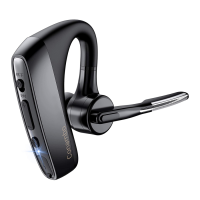
1. Welcome to your new Conambo headset
We appreciate your choice of Conambo headset. Before use, please
read this manual carefully and keep it for future reference. To learn
more and get support, welcome to visit our official website:
www.conambo.com. Or email us at sales@conambo.com, or call us
at 86-755-88608031.
• Do not use the headset at a high volume for any extended period
2. Important Safety Information
to prevent hearing damage.
• Removal of the battery in the headset shall not be conducted on
• The JBT700 can be powered by a built-in rechargeable battery,
please charge the battery for at least 2 hours before first use.
your own.
• Do not expose the headset to moisture, extreme prolonged heat,
cold, humidity, or other adverse conditions.
• Clean the unit with a soft cloth or damp chamois leather. Never
use solvents.
• Keep the headset, accessories, packaging parts out of reach of
children to prevent accidents and choking hazards.
• Do not drop, crush, bend or apply excessive force to the device.
3. Operations
Pairing & Connection
• Pair to mobile device
1) To put your headset in pair mode, press and hold the Multi-
Function Button until you hear "pairing" and the headset LEDs flash
red and blue.
2) Activate Bluetooth on your phone and set it to search for new
devices. NOTE: *Menus may vary by device.
3) Select "JBT700" to pair. If necessary, enter four zeros (0000) for
the passcode or accept the connection. Once successfully paired, you
will hear “connected” and the headset LEDs flash blue.
• Pair to the second device
1) Pair with your first device.
2) Activate Bluetooth on your second device and set it to search for
new devices. NOTE: *Menus may vary by device.
3) Turn off the headset, then press and hold the Multi-Function Button
until you hear "pairing" and the headset LEDs flash red and blue.
4) Select "JBT700" on your two devices to pair. Once successfully
paired, you will hear “connected” twice.
JBT700 Wireless Headset
Committed to be better
Note: Each dongle is matching the only one headset.
1
2 3
4


 To Next Page
 Need help?

 General