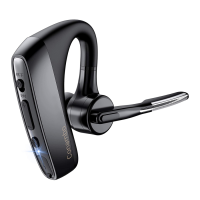
The Conambo K10C Wireless Headset is a Bluetooth-enabled audio device designed for communication and media playback. It features a sleek, over-the-ear design with a rotatable boom microphone, allowing for use on either ear. The headset is powered by a built-in rechargeable battery and offers various functionalities for an enhanced user experience.
Function Description:
The Conambo K10C serves as a wireless headset for making and receiving calls, as well as for streaming audio from connected devices. It supports voice command functions through integration with phone assistants like Siri or Google Assistant. The headset is designed for ease of use with intuitive controls for power, volume, mute, and multi-function operations.
Important Technical Specifications:
- Connectivity: Bluetooth
- Charging: Micro USB (5VDC adapter required for AC charging)
- Battery: Built-in rechargeable battery
- Operating Range: Up to 10 meters (without obstacles)
- Password for Pairing (if needed): 0000
Usage Features:
Power On/Off:
- Power On: Slide the switch down. A blue indicator will flash once, and a "Power on" voice prompt will be heard.
- Power Off: Slide the switch up. A red indicator will flash twice, and a "Power off" voice prompt will be heard.
Charging:
- Connect the headset to a USB port on a computer, power bank, or a 5VDC USB AC adapter using the included micro USB cable.
- Ensure the headset is turned off before charging.
- During charging, a red indicator will stay on.
- Once fully charged, a blue indicator will light up.
- Caution: Do not attach the charger mid-call, as this will reset the headset and transfer the call back to the phone.
Pairing & Connection:
- Entering Pairing Mode:
- Automatically enters pairing mode the first time it's powered on (blue and red indicators flash alternately, "pairing" voice prompt).
- Alternatively, hold the Multi-Function Button for 5 seconds while powered on until the blue and red indicators flash alternately.
- Connecting to a Phone:
- Turn on the headset and ensure it's in pairing mode (red and blue indicators flash alternately, "pairing" voice prompt).
- Put your cell phone in Bluetooth Search/Scan Mode.
- Select "K10C" from the list of available devices. Use "0000" as the password if prompted.
- Upon successful connection, a "connected" voice prompt will be heard, and the blue indicator will flash once.
- Pairing and Connecting with a Second Device:
- Turn off the Bluetooth function on the first connected device.
- While the headset is powered on, hold the Multi-Function Button for 5 seconds until the headset enters pairing mode (red and blue indicators flash alternately).
- Put your second device in Bluetooth Search/Scan Mode and select "K10C".
- Upon successful connection, a "connected" voice prompt will be heard, and the blue indicator will flash once.
- Reconnect:
- The headset will automatically attempt to connect to the previously paired Bluetooth device.
- If it fails to connect, hold the Multi-Function Button for 5 seconds until the blue and red indicators flash alternately to enter pairing mode again.
Call Management:
- Answering/Ending a Call: Press the Multi-Function Button once.
- Rejecting a Call: Press and hold the Multi-Function Button for 1-2 seconds when a call is coming.
- Last Number Redial: Double-tap the Multi-Function Button (headset must be connected to the phone).
- Mute: During a conversation, press the Mute button. You will hear "mute on" or "mute off".
Audio & Voice Control:
- Adjusting Volume: Press the Volume Up (+) or Volume Down (-) buttons during a call or while streaming audio.
- Phone Voice Control (Siri/Google Assistant): Press the Mute Button for 3 seconds while the headset is in standby mode to activate voice command functions on your phone (functionality is phone-dependent).
Wearing the Headset:
- For optimal fit, remove eyeglasses before donning the headset.
- To switch the headset to the other ear, rotate the boom upwards, twist it around so the eartip is on the other side, and then lower the mic boom.
Maintenance Features:
Resetting:
- While charging, hold the Multi-Function Button for 4 seconds until the blue indicator flashes to recover default settings.
- Avoid using the headset at high volumes for extended periods to prevent hearing damage.
- The built-in battery is not user-removable. Do not attempt to remove it yourself.
- Do not expose the headset to moisture, extreme or prolonged heat, cold, humidity, or other adverse conditions.
- Clean the unit with a soft cloth or damp chamois leather. Do not use solvents.
- Keep the headset, accessories, and packaging parts out of reach of children to prevent accidents and choking hazards.
- Do not drop, crush, bend, or apply excessive force to the device.
- When searching for the headset, avoid other operations to prevent program errors.
- Use the headset near the mobile phone to ensure a stable signal.
- Overcharging or storing the headset in environments like a closed car can reduce battery capacity and service life.
Troubleshooting:
Mobile Phone Cannot Find the Headset:
- Possible Reasons: Headset is not on/in standby, headset program error, mobile phone program error.
- Solutions:
- Turn on the headset and hold the Multi-Function Button for 5 seconds to enable pairing status (red and blue indicators flash alternately).
- Recover the wireless headset's default settings if there's a program error.
- Restart the mobile phone and remove all existing pairing data for the wireless headset.
- Cautions: After entering pairing mode, the headset will connect within 2 minutes; otherwise, it will automatically turn off.
No Sound from the Headset:
- Possible Reasons: Mobile phone volume is unsuitable, headset and mobile phone are not connected correctly, headset is out of working range.
- Solutions:
- Adjust the volume on the mobile phone.
- Operate according to the use steps to ensure proper connection.
- Keep the headset within 10 meters of the mobile phone without obstacles.
Charging Red Indicator Doesn't Light On:
- Possible Reason: The headset has not been used for a long period.
- Solution: Charge the headset for 30 minutes; the red indicator should then light on.
- Cautions: Overcharging or storing the headset in environments like a closed car can reduce battery capacity and service life.

 Need help?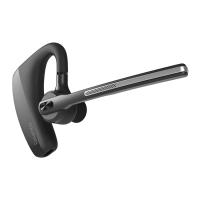

 To Next Page
 General