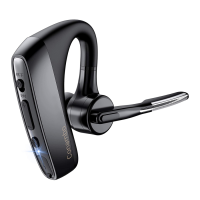
Answering/Reject a Call
1) When a call is coming, press the Multi-Function Button
once to answer the call and press it again to end the
call.
2) When a call is coming, press and hold the
Multi-Function Button 1-2s to reject the call.
Last Number Redial
1) Make sure the headset is connected to your phone.
2) Double-tap the Multi-Function Button to redial the last
number.
Phone Voice Control (e.g. Siri/ Google
Assistant )
Press the Mute Button for 3s while the headset is in
standby status to activate voice command functions on
your phone. Support for this is phone dependent.
Adjust the volume
Press the volume up or down during a call or while
streaming audio.
Mute
During a conversation, press the Mute button. You hear
"mute on" or "mute off".
Reconnect
1) Your headset will direct connect with previous
Bluetooth device.
2) If the headset doesn’t connect, please hold
Multi-Function Button for 5s until the blue and red
indicator flashes alternately to enter pairing mode.
Resetting
When charging, hold the Multi-Function Button for 4s till
the blue indicator flashes to recover default settings.


 To Next Page