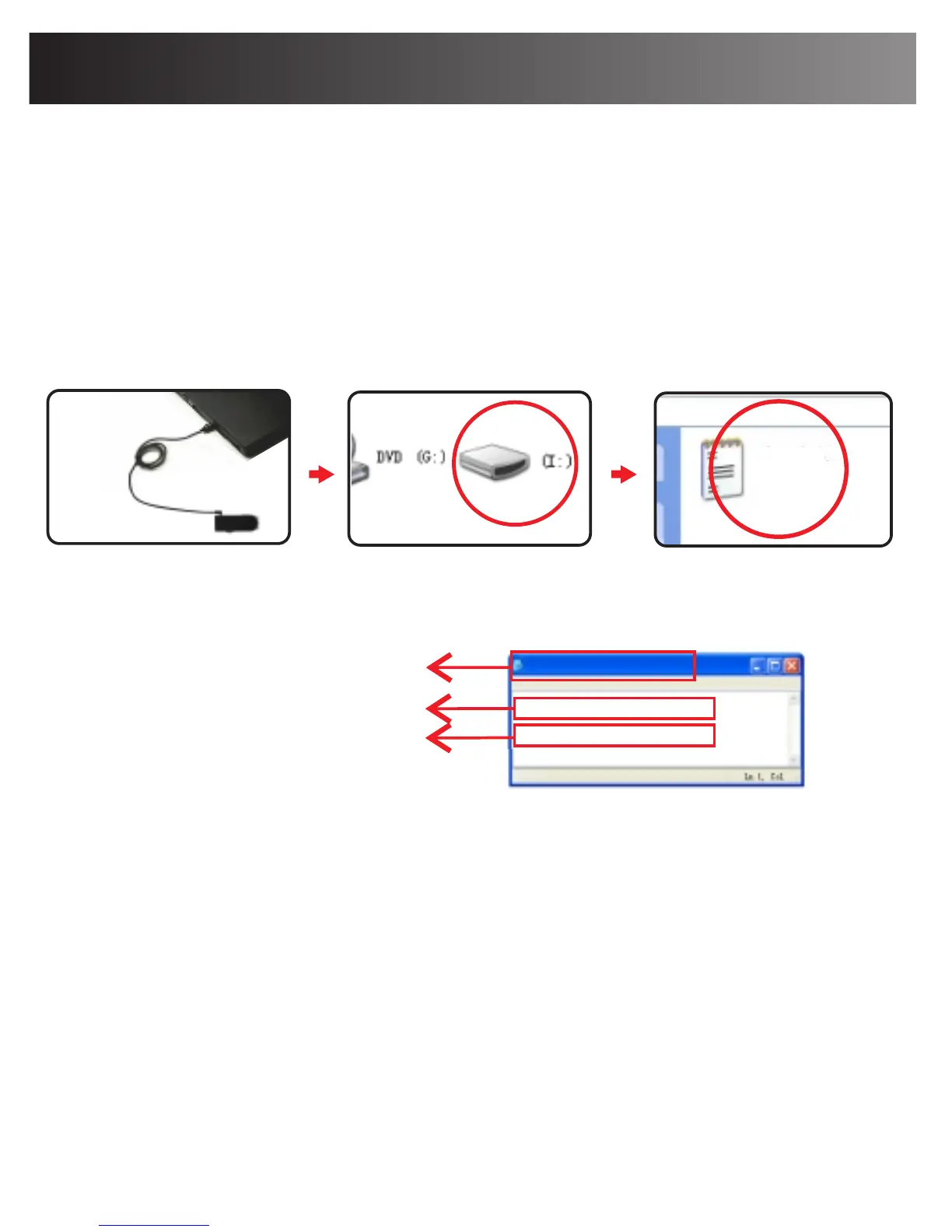
It may be necessary to change the Camera's preset
time and date setting to reflect your local time. To
change the time and date:
Step 1: Power on the Camera, and connect it with a
PC using the USB cable in the package. after about
12 seconds, the disc icon will open on your computer.
Then please open SETTIME.TXT.
Time and Date Setting
12
SETTIME.TXT
file Edit Format View Help
File name
yyyy-mm-dd,hh:mm:ss
2016-07-15,
yes
23:15:12
SETTIME.TXT
Step 2: Please change the time and date. Select yes
for auto recycling or no to prevent recycling.
Step 3: Disconnect the Camera from the PC and power
on the Camera. The time/date setting is complete and
you will find the time & date watermark in the video
recordings.
yes:auto-recycle the SD
no:no auto-recycling
SPECIAL NOTES:
- Please remember to SAVE the file you recorded before
exiting or the change will not be saved.
- Please do not add any blank space or characters to
change the existing file format.


 To Next Page