21DEEP LEARNING PLUS QUICK START GUIDE
Create Event Actions
A wide variety of Event Actions can be configured to trigger when the deep learning Action Rule is
detected, including:
• Network: E-mail Notification (including custom e-mail formats), HTTP command and/or TCP
command (for third party software integration), FTP snapshot upload, and ONVIF event
metadata.
• System: Disarm (disarm the system from triggering additional event actions until re-armed),
Alarm Output, Video Pop-up, RS-485 (for third party hardware integration such as access
control).
• VMS: For third party software integration and DL PLUS Event Server Mode.
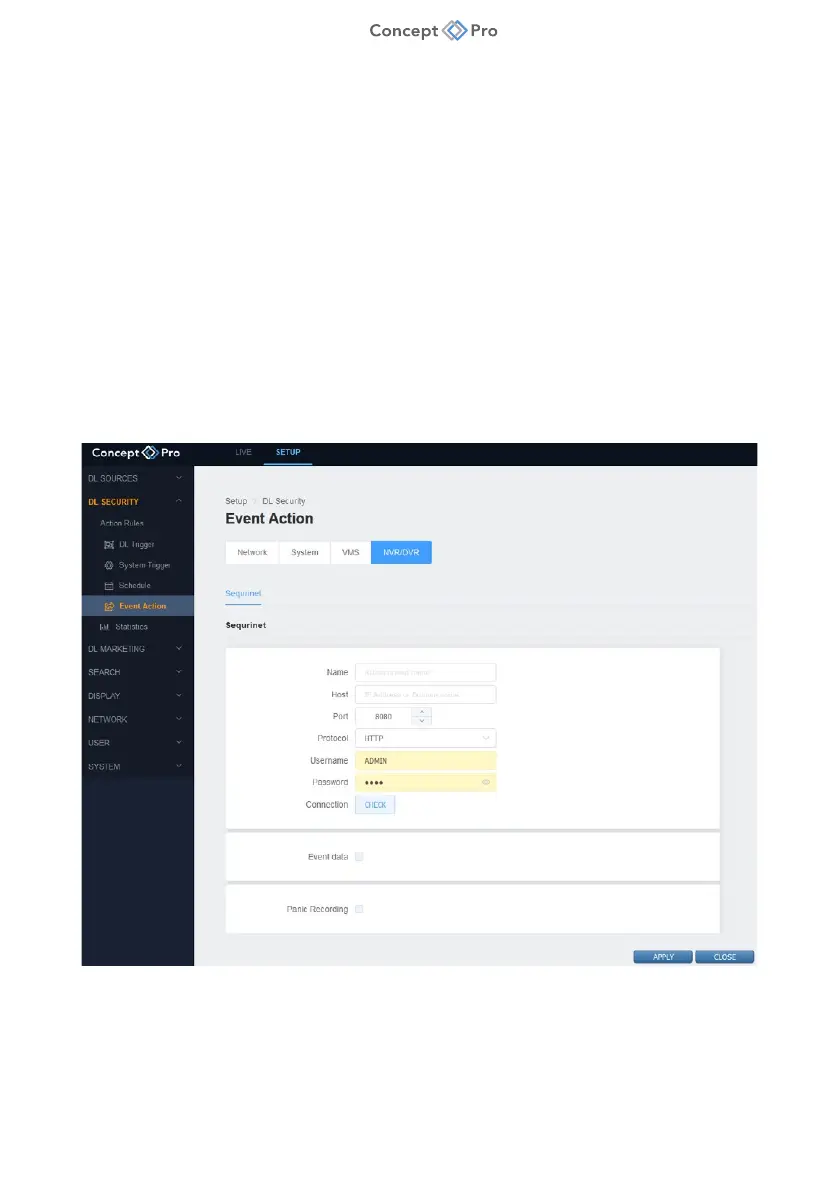
• NVR/DVR: Sequrinet integration for sending event metadata to Concept Pro recorder in DL
PLUS Universal Mode.
For the purposes of sending event metadata and snapshot from DL PLUS to supported Concept Pro
recorder in Universal Mode, configure as follows :
1. From DL PLUS web interface, select <SETUP> tab, then <DL SECURITY> - <EVENT
ACTION> - <NVR/DVR> menu.
2. Under SEQURINET, click <ADD> and configure the following fields to create an NVR/DVR
event action preset for Universal Mode operation:
a. Name: Enter a custom name for the Sequrinet preset.



 To Next Page